- Joined
- Jun 30, 2022
- Messages
- 14
- Reaction score
- 1
Good day members,
I have an odd issue with importing bulk extensions on V20.
I export the current list of extensions to know which collum's to fill in.
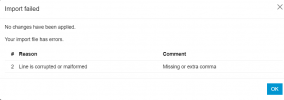
I then just change the ext number the first name, last name, email address and Vm Pin, I dont remove any other commas or numbers, but when importing i get the error (file import error)
please see attached images.
When i export and remove the users that i exported and re-import import is successfull, but if i export and change only ext number and re-import I also get the same error
Looking forward to get to the bottom of this issue.
I have an odd issue with importing bulk extensions on V20.
I export the current list of extensions to know which collum's to fill in.
I then just change the ext number the first name, last name, email address and Vm Pin, I dont remove any other commas or numbers, but when importing i get the error (file import error)
please see attached images.
When i export and remove the users that i exported and re-import import is successfull, but if i export and change only ext number and re-import I also get the same error
Looking forward to get to the bottom of this issue.