
- Joined
- Aug 24, 2017
- Messages
- 88
- Reaction score
- 29
Has there been any word on if the Inbound Rules page will be returning? I have a large number of DID's in my system and have become dependant on that page for managing them.


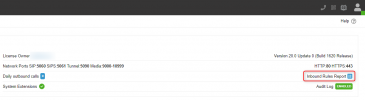
I took a second look and found that.I don't have a v20 handy but on the webinar today Nicolas said there was an assigned DIDs report accessible from the dashboard, I think he said in the upper right? To show where the DIDs were assigned.
+1
We have many user extensions with assigned DIDs and different In-Office/Out-of-office routes.
When In office - ring user phone, out of office - route to IVR.
In v18 this is easily configured with Inbound rules
In v20 I can't find how to configure this. As a workaround - create a bunch of 'dummy' ring groups or departments 1 per user extension. But that doesn't looks right to me.
Am I missing something? Or maybe In-office/out-of-office routing at extension level will be added later?

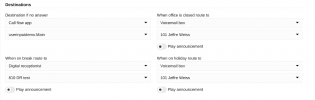
This is configured on extension level. You need to configure Avaiable and DND status and set "use global office hours" or specific one for the extension.Still no response to this?

Indeed I did!I don't have a v20 handy but on the webinar today Nicolas said there was an assigned DIDs report accessible from the dashboard, I think he said in the upper right? To show where the DIDs were assigned.
This is configured on extension level. You need to configure Avaiable and DND status and set "use global office hours" or specific one for the extension.

No, you can tie the DIDs to the Ring Groups or IVRs in V20 still.So in an example on our 3CX instance we have a bunch of DIDs setup that are not tied to a specific user, such as toll free DIDs and other shared DIDs that are bring routed to Ring Groups or Call Queues. Would we in V20 have to set these up as users and then lose the granulated control we currently have over these Inbound Rules?
In our case in/out-of-office routing should not be available for users to change. But we can't deny users to edit their forwarding rules either, because those are used and changed during working hours, according to users' needs.This is configured on extension level. You need to configure Avaiable and DND status and set "use global office hours" or specific one for the extension.
This is not acceptable. Many of our users have O365 sync and they're set as DND when they have an event on their calendar. I can't use DND for out-of-office routing.This is configured on extension level. You need to configure Avaiable and DND status and set "use global office hours" or specific one for the extension.
This is not acceptable. Many of our users have O365 sync and they're set as DND when they have an event on their calendar. I can't use DND for out-of-office routing.
It's like @dzastin said - currently the only solution is to create a dummy RG, Queue or IVR for each inbound rule and then configure out-of-office routing there... Which is simply just not a good solution at all.
3CX should really think about adding this to Users as well:
View attachment 41801
Hello, thanks for responding, sorry I've only just seen it. Exporting a previous gateway and importing was what we did in the end. Neither are an ideal solution though, feels like we're being forced onto something which isn't finished.You can "export" the trunk, edit and reimport the XML file.
View attachment 39705
I'm stuck I have a website trying to send me an OTP to my main voice line which is going to a Digital receptionist. Normally in 18 I redirect this to my ext, get the OTP code than revert it back to the digital receptionist. I'm stuck here and I can't seem to do this now.I took a second look and found that.
It does show the DIDs that are assigned to a digital receptionist.
We don't have much on this system yet but that appears to be the overview I was looking for.
Thank you

Use the web client to pick the call up without making any config changes - under "Panel", right click the call and choose "transfer".I'm stuck I have a website trying to send me an OTP to my main voice line which is going to a Digital receptionist. Normally in 18 I redirect this to my ext, get the OTP code than revert it back to the digital receptionist. I'm stuck here and I can't seem to do this now.
Use the web client to pick the call up without making any config changes - under "Panel", right click the call and choose "transfer".
Assuming you have the correct access rights...

For the life of me I do not see this any where. I am sure it is a ME problem. I am looking on our NFR license Version 20.0 Update 2 (Build 715 Release)
Founded in 2005, when VoIP was an emerging technology, 3CX has gone on to establish itself as a global leader in business communications.


