V20 - Inbound Rules?

Status
Not open for further replies.

ProudCanadian

Free User
Joined
Aug 24, 2017
Messages
88
Reaction score
29
Has there been any word on if the Inbound Rules page will be returning? I have a large number of DID's in my system and have become dependant on that page for managing them.
 
Inbound rules are created automatically in v20 and are done when you add a DID to an endpoint.
 
  • Like
  • Sad
Reactions: MayurPatel and N_G
How about CID rules? Or custom hours on certain specific DIDs?
 
Hi Charles, thanks for the reply!

I see in V20 how I can go to a user or Call Handling objects and assign a DID but this in present form has two massive problems for me.

1. It no longer shows the name assigned to the DID's from what I can see. This means I will have to start mapping DID's to purposes via a spreadsheet or something.

2. I cannot easily pull up a list of all the DID's and for example search FAX for a quick overview of all our fax lines and their routing. (Something that has been requested twice this month of me for some reason...)


While this isn't the end of the world, it does feel like at least for my use case a regression of a fairly important feature for manageability of medium sized systems.
 
Due to missing CID rules I restored back the instance to v18. I didn't expected to be removed features with upgrades, I hope that will be back ...
 
Missing CID Inbound rulles to route dedicated CIDs to different ring groups ?
What i'm missing is the v18 possibility to route dedicated nubmers from a Trunk to a dedicated Ring group. In v18 i had a lot of rules like this.In v20 i'm perhapse blind and do not see this rule set :(

Any idea, where i can find the CID inbound rules that redirect CIDs to Ring groups in v20 ? if it's removed, that's from my point of view more than one step backward.

Thx forward
Chris
 
Last edited:
I configured a V20 from scratch for a new customer.
The problem I have: I would like to be able to attach different wav files to different holidays.
This doesn't seem possible anymore like in V18, and I have no idea how to solve this.

Is there a solution?
If not, I'm going to throw away the V20 setup and start again with V18...
 
Last edited:
Inbound rules are created automatically in v20 and are done when you add a DID to an endpoint.

I don't really understand how this is even close to what inbound rules allowed to do (office/out-of-office hours routing, holidays routing, BEFORE the endpoint).

David
 
I'm just chiming in to make sure I'm counted in this thread. I have a recent customer who was deployed on v20, and they have requested a CID rule for a reasonable business use case, and I have had to explain that I currently cannot implement this.

+1 for this feature
 
Same issue here, v20 update is missing inbound rules and different wav files...(among other things maybe ?) and they're both important...

How do we create those same rules now if we don't have the inbound rules menu in the admin panel ? Do we only have the CFD option ?

Even if it's not strictly the same subject, before the update I noticed that the rules didn't work anymore. My customer wants to receive no phone calls on tuesday and thursday afternoons, apart from some specific numbers. I was one of them, and couldn't reach anyone. I had the message telling me they were only reachable via email...
 
  • Like
Reactions: Samuel-
I believe in another thread it was suggested to export and import the trunk to change DIDs.

Re matching, ensure the format is the same as what’s arriving on the trunk…+1 prefix or not, etc.

Re holidays, we have clients who pay for custom per-holiday messages.

We haven’t updated any…going to wait a few months/updates at this point let alone use prerelease software now.
 
I must add that Inbound Rules would be the perfect place to add a new feature which IMHO is missing, although other vendors have it: routing switches
Mitel calls that CDE, call distribution element, for example.
Vodia also has a such feature.

It would require:
-the office hours routing should allow at least 3, but preferably an unlimited numbers of routing destinations, each with an index number
-the OOF hours routing could be disabled in the config of the rule with a checkbox

One could change the current routing destination of a such inbound rule using a feature code/function key (similar to the existing presence feature code).
Ideally, the key led should indicate that such routing is ON.

This provide some kind of night/day switch, but far more powerful (75% of our customers use at least one switch like that, which makes them impossible to migrate to 3CX).

Each time I talk to 3CX sales here in France, they don't seem to get it.

David
 
Since V20 is still in beta testing, I am not sure why everyone is upgrading, then complaining as to why things are not working yet. Beta means TESTING, do not upgrade a production system and expect everything to work!!!!
 
+1
Many of my customers use inbound rules name shown on phone display to answer accordingly as they take calls on behalf of several client businesses who expect them to reply with the correct company name.
It is therefore essential that inbound rule settings and options remain as it is in v18
 
+1
Many of my customers use inbound rules name shown on phone display to answer accordingly as they take calls on behalf of several client businesses who expect them to reply with the correct company name.
It is therefore essential that inbound rule settings and options remain as it is in v18
The ability to add names to DIDs will come in a later update in early part of 2024.
 
Does it say it is BETA? No.
It definitely does not in the GUI (and IMO should) but it is widely discussed here and on 3CX's blog as beta, release candidate, etc. Anyone who just logs in and sees the notification does not know that.
 
Does it say it is BETA? No.
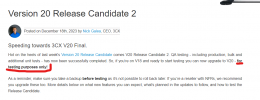
I guess you missed the blog post, and you are right it does not say BETA, but it is for testing only.

Screenshot 2023-12-19 131216.png
 
  • Like
Reactions: PaulC_3CX
You are right @elnino - it doesn't say BETA. It should have said that it is a RELEASE_CANDIDATE though, because as far as I'm aware, it hasn't been released as final yet.

https://www.3cx.com/blog/releases/v20-release-candidate-2/

That recent blog post says this about the matter:

The following features - for which we don't have a formal release date yet - will be available in Update 2:

  • Assign a name to a DID to tag a call.
  • Editing of the Teams Configuration.

So I guess hold off on v20 if that is crucial to you, and also read every single blog post carefully as there's little gems of info peppered all throughout the "Product Releases" blog posts, that often don't get repeated in later posts. One example I can think of is this:

https://www.3cx.com/blog/releases/v20-beta1/

...where it says "Web Client password requirements are more complex - requiring 1 special character". Not even my Partner knew about that one, but after running a test installation of v20 I found this comparing password reset dialogs.

3CX v18 update 9
"Password should be at least 10 characters long with no spaces and contain a lowercase letter, an uppercase letter and a digit"

3CX v20 (20.0.0.1494)
"Password should be at least 10 characters long with no spaces. Must contain minimum 1 lowercase and 1 uppercase letter, a digit and a special character. Supported special characters are: !#$%&()*+,-./:;<=>?@{}"

Anyway that's a little tangent but you get the point.
 
The ability to add names to DIDs will come in a later update in early part of 2024.
Thats good to hear. Is that likely to include the re-introduction of the Inbound Rules page in the process?
 
Status
Not open for further replies.

Forum statistics

Threads
111,972
Messages
590,068
Members
164,888
Latest member
Tim Cook