Solved v20 incoming SMS routing

Status
Not open for further replies.

biggreyphone

Customer
Joined
Oct 3, 2021
Messages
186
Reaction score
23
working with v20 for the last week or so.

I have been using Flowroute for several years and one user receiving and responding to all SMS messages for a few years. Just realized this has not been working for awhile now [not used with high volume]. I am trying to get it up and working again in v20. Webhook, access code, secret all seem to be setup properly on the trunk both on 3cx and on flowroute, but dont see where to route incoming SMS in the new GUI.
 
  • Like
Reactions: Aditya Raj
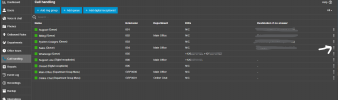
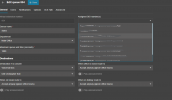
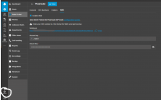
I hope this helps,Screenshot 2023-12-03 140523.png

Screenshot 2023-12-03 140733.png

Screenshot 2023-12-03 135447.png
 
Thanks for the reply.

That looks about identical to my set up, but I have a few questions:

1] If Flowroute webhook, access and secret are all set up correctly, then is the SMS going to go whichever DID/ring group is set up to receive it? I am assuming this because it is not clearly explained in the GUI if so.

2] I used to be able to direct incoming SMS on my main phone number to a single particular user despite voice calls going to a ring group. Is this no longer the case? What if I want SMS to only go to one user, not the entire ring group?

3] I believe that Flowroute previously could only be setup with SMS for one number [the main number of the trunk]. I cant recall how to change which number is considered the main one of the trunk if so.

Thanks!
 
Is there any documentation yet for v20 SMS setup/routing? The current layout is not particularly clear. I am assuming that an incoming SMS is directed to the user that that particular trunk line or DID line is assigned to but it does not seem to work with me for Flowroute at least. I have the web hook, access and secret setup correctly also.
 
Same question as above. Is there any documentation for v20 on how to route SMS? I was hoping for some flexibility in the sms routing but doesn't seem like I have many options.
 
Can you route SMS messages to a different group of users (or a specific user) that is different than where voice calls go? Currently we have a workaround in using "+" in front of the DID for routing SMS with an inbound rule, and removing the "+" with the same DID for routing to a ring group. That has allowed us the ability to send messages to a different group than the voice calls, even for the same DID. Is v20 capable of that?
 
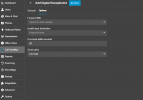
Creating an IVR gives you also the option where to route the SMS and different the voice from SMS:
1713151722594.png
 
  • Like
Reactions: Evolute IT
The previous screenshot is from V20 but this is also an option in V18 if you access using the System Owner in your web client:
1713240174890.png
 
Hi. Trying to clarify for the following scenario:
Using hosted 3CX V20. My main line comes into a Ring Group in my office. I am not sure how to forward a SMS to a separate user not in that ring group. Currently if the ring group does not answer, it gets forwarded to a Digital Receptionist. I have tried to set that digital receptionist to forward the SMS to the user I want that is shown in Theodoros' image above but it doesn't work. What do you do in this situation?
 
@biggreyphone Set the destination of the DID directly to an IVR and then route accordingly.
 
Can you have an IVR forward directly to a ring group without having to have a keypress or hearing a prompt? Our customers love to have a live person without hearing a prompt first.

I tried to create an IVR and set the destination of the DID directly to that, selected forward SMS and also set to forward to the ring group if there was no response within 1 second. The phone calls are routed correctly, but the SMS is still going to the users of the ring group
 
Last edited:
Remove any previous configuration of the DID and check.
 
Do you have to delete and re-add the trunk with the DID or just delete the DID from the ring group? I did the latter, then created the IVR and added it that way and it still does not work.
 
It only works after I deleted the entire ring group that previously held that DID. It wasnt enough to just delete the DID from within that ring group.
 
Is this working as expected now?
 
Sometimes. It was very particular about the order I had to add things back in. I ended up having to delete my main ring group. I could then create the IVR and forward to the main ring group which I had to recreate.

So is the only way to forward from the IVR to a ring group without hearing a prompt to select the option to send call to a ring group if there is no response within 1 second?
 
I've tried this many times and is not working as expected.

I was able to delete and recreate the IVR/DR and set the SMS to be forwarded to my extension and get that working. If I go to the options window and attempt to change it to another extension, it does not honor it and it keeps sending it to my extension. I tried deleting and recreating the IVR/DR from scratch and add the person I want it to go to and the SMS still come to my extension.
 
I deleted the incoming main trunk DR/IVR, restarted 3CX [hosted] and recreated the DR/IVR. No matter who I set the SMS to forward to in the IVR, is always going to my extension. I have to believe this is a bug.
 
Status
Not open for further replies.

Forum statistics

Threads
111,972
Messages
590,068
Members
164,888
Latest member
Tim Cook