V20, Update 1 BETA: Faster Backup & Restore, Pipedrive CRM

Official Pipedrive support very welcome. This will help us to sell more 3CX instances.
 
  • Like
Reactions: N_G
@MichaelB_3CX the new Hourly backup/restore option is most welcome! These will be much appreciated by our Active/Passive failover clients.

I do have one request. The check is currently a time interval, but a time delay would be more appropriate. For example, lets say you want a delay of five minutes before the passive instance takes over. If we set the interval to 300 seconds it could fire at any time before the 300 seconds have elapsed. If this is correct, the active could be offline for only 30 seconds and the passive would become active. Something like a check interval of 30 or 60 seconds, with a configurable delay after the first failure is detected so that if the active comes back online before the configured delay then the passive doesn't take over.

Edit - second request - a Maintenance Window that can be configured where the passive will not attempt becoming active. This will be useful for critical systems that are not 24x7 operations. A maintenance windows of say midnight to 4am will stop failover occurring when an ISP does maintenance.
 
  • Like
Reactions: NCIA
Is there an ETA on when the official update 1 will get released? Thank you
 
Is there an ETA on when the official update 1 will get released? Thank you
3CX never shares dates, just "when it's ready"
But update 1 beta was a few days ago, usually means stable within 3 or so weeks.
 
Will the option to target busy agents with a call arriving from the same queue in update 2?
Because nothing is mentioned in the patch notes for beta1
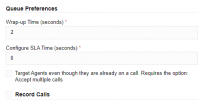
 
Will the option to target busy agents with a call arriving from the same queue in update 2?
Because nothing is mentioned in the patch notes for beta1
Take a look at the queue settings.
1712236547117.png
 
  • Like
Reactions: tronic
  • Like
Reactions: Evolute IT
Yes this option is coming in update 3 or 4 we are not sure yet. It needed more work.
 
going on the chart from here https://www.3cx.com/docs/manual/access-roles/ extensions set as "owners" should be able to delete call recordings but they can't.

I have been testing and trying out all the different roles and the only one that gets the recording tab in admin is the "system owner" I don't really want to have to set users to the "system owner" to allow them to get this function. Is this a glitch or is it they way it was intended to be?

Any chance the ability to customize extensions rights will be coming back?

Thanks.
 
Last edited:
  • Like
Reactions: CPMM
Wow great...

The TLS trunk is it possible apply to the ip peering trunk as well?
 
  • Like
Reactions: N_G
Good day 3CX Team.

Could you please tell me when V20 will be available for Windows Servers? on portal only V18 available for download.

Thank you.
 
@Knight! any moment now..... Its ready just have to get update 1 out of qa first.
 
Email Field:" Value already in use"
We have several users who use different desk phones at different sites, however, if there is a missed call I want the email notification to go to the same email. We also have some shared phones that if there is a missed call that a notification/copy of the voicemail goes to a group email. After upgrading from v18 to 20Beta1 it now requires the email field to be a unique id.

In addition, if I don't want to break any existing duplicate values I can not make any changes to the extension because it refuses to save other tabs for that extension without updating the email.

Can we please make the email field not a unique value? My users have distribution list emails tied to some extensions.

Update** Another issue I found is that Directly connected Router phones T58W are not getting the background display image. Its just loads the default 3cx display - Enterprise lic.,
 
Last edited:
Can we please make the email field not a unique value? My users have distribution list emails tied to some extensions.
Hello,
unfortunately i think it's a "no " to your question, the way could be to use aliases or create new unique email address
 
@MCCDCHS If you have M365 or Google email look at Plus Addressing.

Also note accounts without a unique email can’t send password reset emails.
 
@MCCDCHS as @aws2p said, you will need to use unique email addresses. Email is used for user authentication and password resets now and must be unique on each user.

In situations like yours we are using email "plus addressing", which is supported by both Google and Microsoft. The first part of the email address will be the mailbox or d-list address, then use a + symbol and then add your unique ID before the @ symbol and domain. For example dlist+x103@company... could be used on extension 103 and will deliver emails to dlist@company...
 
  • Like
Reactions: tronic
@MCCDCHS as @aws2p said, you will need to use unique email addresses. Email is used for user authentication and password resets now and must be unique on each user.

In situations like yours we are using email "plus addressing", which is supported by both Google and Microsoft. The first part of the email address will be the mailbox or d-list address, then use a + symbol and then add your unique ID before the @ symbol and domain. For example dlist+x103@company... could be used on extension 103 and will deliver emails to dlist@company...
Since there are several phones like 5 phones in a larger office space, but if someone were to call any of them in the past and the call was missed, it would route the voicemail to the site office and email a copy of it.

I see now this isnt an option even the dlist only allows you to use dlist on one additional phone and not past that. So a work around would be go into each phone and set the voicemail to go to the site office's extension vs having their own voicemail that was cc'd to the extension.
 
Since there are several phones like 5 phones in a larger office space, but if someone were to call any of them in the past and the call was missed, it would route the voicemail to the site office and email a copy of it.

I see now this isnt an option even the dlist only allows you to use dlist on one additional phone and not past that. So a work around would be go into each phone and set the voicemail to go to the site office's extension vs having their own voicemail that was cc'd to the extension.
Yes, you can do it that way. Set the destination if no answer in 3CX to be the voicemail that routes to the d-list. (Don't do it on the phone itself.)

Using plus addressing (if supported by your email provider) will allow all five phones to use the same d-list. [email protected] and then [email protected], etc. "largeoffice" would be the d-list name.
 
  • Like
Reactions: Wesley | Ruijs IT
Found an issue with 20Beta1

When you have a Yealink T58W set as a router phone, Then Factory reset the router phone, then delete the router phone from the user's profile, it does not delete the SBC part under Voice & Chat. This prevents you from re-adding this router phone back to the network. You get an error: Phones: Value already in use

If you go to delete the SBC - the delete button from the 3 dots is grayed out. - No Other devices are using this as their SBC.
You can re-add the phone by choosing to add the phone and choosing the existing same router phone as before but the phone doesn't provision and gives an error "of extension 113 is behind SBC Yealink T58W (113) which has no known local IP yet!" ID 30041. The phone does have a valid IP and I can remote into the phone via browser from a PC on the same network.

I can re-add the phone to the extension if I choose the site SBC, but essentially this phone can never use direct connect and be a router phone again as the SBC for this phone is stuck and can not be removed.

I did try editing the SBC and changing the name and it had no affect - the phone says the value already in use. Even though its not.

After lookign further - I can not delete any of the Router Phone SBC's. But I can delete everything else's SBC, trunks, dect ect
Logged in as System Owner. | Hosted by 3CX | 8SC ENT License.

Also side note: Router phones that are online and working under Voice & Chat have a Red Box. This should be green?
 
Last edited:
  • Wow
Reactions: Colorado VoIP

Forum statistics

Threads
111,992
Messages
590,171
Members
164,929
Latest member
Cloudstar