V20, Update 1 BETA: Faster Backup & Restore, Pipedrive CRM

Found another issue: When Adding a New T58W Router phone the provisioning URL it provides on the following prompt after selecting direct connection is not the actual url. It doesn't work. You then need to go into the user and copy the real provisioning url.

This happened when adding a router phone to a user who already had a desk phone and wanted to add a 2nd desk phone for this user in the same location. (It may have grabbed the provisioning url from the first desk phone rather than the one for the new desk phone needing provisioning.)

Another Issue: After provisioning a router phone, the "reprovision" button is grayed out. Even power cycling does not make it available when the firmware version is out of date.

Enabling a "NEW" Router phone but having "Block remote non-tunnel connections" enabled prevents the phone from having service but it pulls the directory and phone configuration including the background image. However, a NEW router phone that was added via a local SBC first does not have this behavior. After the phone Links up and is green it seems to function normally.

Side note - This turns the SBC indicator to Green while the other - SBC added first then converted to remote connection - phones all show RED offline but work fine. Image to explain.
 

Attachments

  • Screenshot 2024-04-18 130113.png
    Screenshot 2024-04-18 130113.png
    9.4 KB · Views: 19
Last edited:
@MCCDCHS AFAIK 3CX only supports/allows one router phone per extension and it has to be the first phone configured for the extension.

I did run into a scenario yesterday where someone had a "too new" firmware version (T43U, I think .90?) and it didn't work until downgrading to the 3CX-approved .77 version for that phone.
 
@MCCDCHS AFAIK 3CX only supports/allows one router phone per extension and it has to be the first phone configured for the extension.

I did run into a scenario yesterday where someone had a "too new" firmware version (T43U, I think .90?) and it didn't work until downgrading to the 3CX-approved .77 version for that phone.
DO you know if I can add am addition non-router phone to the extension as long as the router phone is primary even if the non-router phone is not connected via the internal SBC from the router phone buyt to the site SBC?

Yes I know why have a router phone and a site SBC?! Well users sometimes take home their desk phones.
 
Yes an extension can have a router phone and multiple normal phones. The additional phone can use an SBC in the office, or any other SBC/router phone.

Technically it could use this extension's router phone, but it would stop working when the router phone left the office...it could then be changed to use a different SBC.

Yes it would be handy to have multiple router phones, for instance if someone had a branch office location and a phone at home.
 
  • Love
Reactions: MCCDCHS
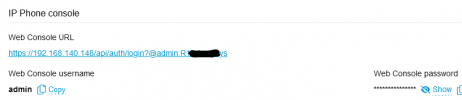
The web console URL is revealing the Web console password.

The password is obscured but right above is the url with the password at the end.
 
Hi, lots have changed with 3cx over the 10_+ years we've been using. We're unsure how to ask questions but will try here.

We followed directions to upgrade one of our cloud instances to V20. after the upgrade we can't login with same admin account/pass used for years

Thats obviously crazy on face vlaue!

Please help us login to our paid instance and hosting guys.

Byron
 
The web console URL is revealing the Web console password.

The password is obscured but right above is the url with the password at the end.
Huh? Can you post a redacted screenshot?
 
post a redacted screenshot
I think that's this, on the phone tab. It is in v18 also and I recall at least one other post about it. It's not like the user can't click the link to show the password, but it's hidden in one place and shown right next to it. Making the URL a text link ("click here to open") would "hide" it, at least from passersby.
1713537340193.png
 
  • Like
Reactions: SweetAction
I think that's this, on the phone tab. It is in v18 also and I recall at least one other post about it. It's not like the user can't click the link to show the password, but it's hidden in one place and shown right next to it. Making the URL a text link ("click here to open") would "hide" it, at least from passersby.
View attachment 40979
Ah, so IP Phone password. Yeah, the URL should be redacted / display text should be changed.
 
I think that's this, on the phone tab. It is in v18 also and I recall at least one other post about it. It's not like the user can't click the link to show the password, but it's hidden in one place and shown right next to it. Making the URL a text link ("click here to open") would "hide" it, at least from passersby.
View attachment 40979
this may not be a bug. it gives you one click access to manage the IP phone if you ever needed to log into the GUI of the phone.
 
one click access to manage the IP phone
Yes but it could say "click here to open phone web GUI" instead of displaying the password. It'd be "better practice" to hide it, in case someone else was looking at the screen with the admin.

It stretches my memory but in v16 or 18 was there a similar link, and it was removed? v18 only shows the hidden password field.
 
This is a question/thought to the 3CX team.

Has there been any discussions on adding more things to the department or security groups. As this seems like a natural progression to me.

Let me explain what I mean. For example, you could have users settings that are in the General/BLF/Options tabs of the user, programmed at department or security user level. Like a group policy in windows.

So say you have two departments, one called Melbourne and one called Sydney. You program the BLF buttons in the Melbourne department, and all phones added to this group get the BLF programming of this department/security user.

This works great on old legacy systems I've used over the years and make life on a large system more logical and easy to manage.
 
  • Like
Reactions: MH_INDUS
T
@MCCDCHS as @aws2p said, you will need to use unique email addresses. Email is used for user authentication and password resets now and must be unique on each user.

In situations like yours we are using email "plus addressing", which is supported by both Google and Microsoft. The first part of the email address will be the mailbox or d-list address, then use a + symbol and then add your unique ID before the @ symbol and domain. For example dlist+x103@company... could be used on extension 103 and will deliver emails to dlist@company...
thanks for your suggestion here as it's a great work around as we like to use a dummy user so you can have different company voicemail greetings.
 
  • Like
Reactions: accentlogic
Is it safe to update to V20, Update 1 BETA or wait until the final release? Getting this warning:

Warning: this is an Alpha/Beta update. Some functionality might not be fully tested and may contain bugs. Alpha/Beta updates are not to be used in production environments and can not be reverted. Alpha/Beta updates enable you to update to the next beta or to the final Release.

 
Is it safe to update to V20, Update 1 BETA or wait until the final release? Getting this warning:

Warning: this is an Alpha/Beta update. Some functionality might not be fully tested and may contain bugs. Alpha/Beta updates are not to be used in production environments and can not be reverted. Alpha/Beta updates enable you to update to the next beta or to the final Release.

we are running update 1 beta on our in-house system because any issues would only affect us. haven't had any issues. but it's still not good practice to run a beta on a live customer production system. update 1 is coming soon from what I see, so i'd hold off.
 
  • Like
Reactions: CamNYC
We are preparing to upgrade a client to version 20, but we are unable to find the "System Owner" option under "Rights" to designate a user as a System Owner. We are currently operating on version 18 SU6. It seems we first need to upgrade to version 18 SU9 to see this option. The online documentation indicates that the "System Owner" option should be under "Group Membership," but it's not available in our current setup.
 
18u6 is too old to activate...if possible upgrade through to update 9 ASAP.
https://www.3cx.com/docs/assign-system-owner/
Once we upgrade to 18u9 and set up a system owner along with other preparatory tasks, will version 20 appear immediately under updates, or could it take a day or two for version 20 to become available for upgrade on the system?
 
IIRC you need to open the update page to get it to check right away, otherwise it will show once it does its automated check.
 
  • Like
Reactions: CamNYC

Forum statistics

Threads
111,992
Messages
590,171
Members
164,929
Latest member
Cloudstar