
- Joined
- Apr 1, 2019
- Messages
- 58
- Reaction score
- 10
Thats the primary ..no option for google storage etc..on the failover side, 3cx just looks at the local disk


Thats the primary ..no option for google storage etc..on the failover side, 3cx just looks at the local disk
Now it is .802, but only in the SMB. The on-premise version currently remains at .796 after apt update && apt dist-upgrade.This is the first I've heard of .799.

It is now under 1 central repository only.Can we no longer have a different storage location for call recordings archive and system backups? Before on version 18 we had call recordings going to SFTP server and the backups going to google buckets. Is this possible?

Ok thanks for confirming, shame we've lost that feature.It is now under 1 central repository only.
Any chance that changing/improving this might be considered, as the way version 18 and V20 release 1 & 2 has it where you can have the backups separately is the ideal option.It is now under 1 central repository only.
I just noticed that you could use different locations (such as local for recordings and SFTP for Backups) in Update 2 Build 715, but that now everything is in one location in Update 3 Build 796.It is now under 1 central repository only.
You can still have the recordings locally if you want. It is just the remote storage which is in one location now.I just noticed that you could use different locations (such as local for recordings and SFTP for Backups) in Update 2 Build 715, but that now everything is in one location in Update 3 Build 796.
I agree that having these split, as it was before, is needed. Do you have any idea as to why this was changed?
John Rayfield, Jr.
Rayfield Communications
You can select Google Storage as your storage locationHi 3CX Team,
How to config failover on V20 Update 3 with storage location type = FTP , follow by failover manual we recommend Google Storage only.
Thanks.
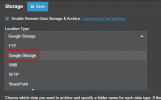

I've been quite confused about this. New installs have been a Build that is shown as "Alpha" in the Upgrade area of v18 systems, which 3CX has said not to use for 'production' systems. I have not upgraded any customer systems (or my own office system), but two new systems that I put online a couple of weeks ago seem to be running ok on the "don't use for production" builds.At this point in time, upgrades from v18 to v20 install a version later than this RC, which was (as normal) not recommended for production. However per https://www.3cx.com/blog/news/v18-support/, support for v18 ends in one week from today. The later versions of 20u3 have no change log entries.
Are you all proceeding with upgrades or holding off until the release of u3?

 Keep up the great work.
For failover, If me not use Google Storage but Choose FTP, I can running failover?You can select Google Storage as your storage location
View attachment 44350
The active PBX will backup to this location and the failover machine will restore from this location as well.For
Of course! All the failover machine needs is access to that storage.For failover, If me not use Google Storage but Choose FTP, I can running failover?


Founded in 2005, when VoIP was an emerging technology, 3CX has gone on to establish itself as a global leader in business communications.


