V20 Update 8 Alpha - The AI Chapter

Having an issue with the transcription, and not sure where to dig and troubleshoot.

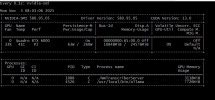
AI Agent is working, however I have set to recording, and added the local transcription, added a dedicated GPU server, connection shows as up and available, however no transcriptions coming through. If I change to 3CX cloud, it will transcribe.

Server is a Single Socket; Xeon Gold 6242R (20 core)
192GB RAM
Quadro RTX6000 GPU

View attachment 49963

View attachment 49962

Hi Dear
You’re using:
GPU Model: Quadro RTX 6000
Driver Version: 580.95.05
CUDA Version: 13.0

Looking twice at your image, I see only 3GB of GPU memory loaded.
It looks like only one of the 2 models is loaded in memory.
So you have a model which is either never called or not loaded at all.

you should be looking at something around 3 + 9 Gb = 12Gb of GPU memory.

even though we have never tested on a quadro, your GPU is fully compatible with CUDA workloads (e.g., PyTorch, TensorFlow, etc.) and running on a modern driver.
Which means that 3CX Staff will contact you privately for the logs..

Thanks for reporting
 
Last edited:
  • Like
Reactions: KyriacosS_3CX
Perhaps a stupid question:
But I have used the AI-agent to leave behind a message. The agent understood (at least, I think it understood) for whom the message was, asked me who I was and my company, asked for the message text and confirmed everything. So that works great!

But: where does the message go??
I expected to get either a chat-message, an email or perhaps a voicemail of some kind. But I didn't get the message anywhere.
Where is it supposed to go, or isn't this part complete yet in the Alpha?
Hi Dear @noord
Can you reproduce this all the time?
It looks like the tool that should be called when a message needs to be sent was not called by the LLM.
I would need to see the logs.
Can you reproduce this at will and contact me privately? I would need the AI bridge log.
try to stop the service, Delete the log and start it and reproduce immediately. Like this the file is clean for us to troubleshoot.
Thanks so much and at your disposal for anything you need.
 
The thing is, we use our own transcription solution, on our own servers and neural networks. For us, the most important thing is simply to be able to record stereo files in the PBX file system and then transmit them to the server with our neural networks in their pure form.
So, the question is, will we be able to do this after upgrading from the Pro version to the Enterprise version?

I don't know about the Pro and Enterprise and what they can and cannot do. This is a licensing thing.
But the UI can tell you.

If you see that you can toggle the Stereo option on and off, And that you are allowed to save,
Then the recording artefact will be in Stereo format. As you want it.
Then you can get it and do what you want with it.

[UPDATE] I checked for you and this is an enterprise only feature.
 
Last edited:
Nice update.

Have been testing the AI Agent with OpenAI but has anyone been able to change the voice to a British accent? I've tried different voice styles and adding an instruction in the Agent Instructions but it seems to always be an american accent.
 
  • Like
Reactions: nikolascx
Nice update.

Have been testing the AI Agent with OpenAI but has anyone been able to change the voice to a British accent? I've tried different voice styles and adding an instruction in the Agent Instructions but it seems to always be an american accent.

What do you think of "Ballad". Open AI suggests Ballad.
You can also try and tell it in the prompt "Speak with a British accent." (It will but I agree with you - the model needs to be trained to speak with a British accent voice)
Let me know if this works..
 
Yes, Ballad's a british accent, thanks.

I tried telling it to "Speak with a British accent" under the language section using another voice type but it's still American. I guess we are restricted by the voice type offered.
 
Nice update.

Have been testing the AI Agent with OpenAI but has anyone been able to change the voice to a British accent? I've tried different voice styles and adding an instruction in the Agent Instructions but it seems to always be an american accent.

For me the below worked reasonably (switch around with the voices though as not all take it the same):

Change the intro phrase to a more British one:
Welcome, you’ve reached the {{ company_name }} reception — this is {{ agent_name }} speaking. How may I help you today?

Add a line to the language section:
# Language
Use **{{first_language}}** by default when you are the first to speak.
If talking English, use a clear Neutral UK corporate accent, intonation and phrasing.

 
The thing is, we use our own transcription solution, on our own servers and neural networks. For us, the most important thing is simply to be able to record stereo files in the PBX file system and then transmit them to the server with our neural networks in their pure form.
So, the question is, will we be able to do this after upgrading from the Pro version to the Enterprise version?
To get transcription and stereo you need enterprise. Then it will record in stereo. If you want to analyze the file yourself which is not so easy, requires quite some coding, then you can. But 3CX will do it for you if you use 3CX transcription and its much better to use our transcription server instead.
 
Last edited:
Yes there is, we will be launching a transcription package which will still be much cheaper than OpenAI. We are thinking $250 for 20K minutes.
@N_G that's great news, thanks for the reassurance!
 
  • Like
Reactions: N_G
Is anybody else having an issue where after adding the Open AI integration for the AI Receptionist and creating the extension for the agent the routing destinations don't save?
I'm experiencing the same issue.
I add agents to the routing destinations and click "Save," and it appears to save correctly. However, when I leave the Receptionist tab and log back in, the agents are no longer there.
Has anyone found a solution to this?
 
 
Having an issue with the transcription, and not sure where to dig and troubleshoot.

AI Agent is working, however I have set to recording, and added the local transcription, added a dedicated GPU server, connection shows as up and available, however no transcriptions coming through. If I change to 3CX cloud, it will transcribe.

Server is a Single Socket; Xeon Gold 6242R (20 core)
192GB RAM
Quadro RTX6000 GPU

View attachment 49963

View attachment 49962
I've found a config issue, that may be considered a config(interface) bug?

This was a fairly blank installation. Not really ever been used. Default department.
Added an AI Agent, set to record and transcribe via 3CX Cloud - In call reports it was transcribed.
Added 3CX Local Transcribe via GPU - no transcriptions.

At this point Support pointed out that I did not have Group/Department recording configured. However this was not changed between the switch from 3CX Cloud to 3CX GPU transcription.

At this time transcription is working from what I can tell, I see load on the GPU server after a couple of test calls to the AI Agent.

Thank You Support!

SNGOUT2085.jpg

SNGOUT2120.jpg
 
  • Like
Reactions: KyriacosS_3CX
I've found a config issue, that may be considered a config(interface) bug?

This was a fairly blank installation. Not really ever been used. Default department.
Added an AI Agent, set to record and transcribe via 3CX Cloud - In call reports it was transcribed.
Added 3CX Local Transcribe via GPU - no transcriptions.

At this point Support pointed out that I did not have Group/Department recording configured. However this was not changed between the switch from 3CX Cloud to 3CX GPU transcription.

At this time transcription is working from what I can tell, I see load on the GPU server after a couple of test calls to the AI Agent.

Thank You Support

Indeed now you have both models loaded ~ 10GB (3+7)
What was the problem again? I didn't understand. Just show me what you had to configure to understand.

Can you repeat the same thing but go straight to the Local transcription? Don't toggle between 3CX Transcrber because it might add some config there for the transcriber. Just go to Local Transcription directly. And tell me if the problem occurs.

Thanks so much - But in the meantime We will check your scenario. Looks like something is configured for 3CX transcriber, but then needs to be refreshed on each change.
 
  • Like
Reactions: KyriacosS_3CX
I'm liking the AI agent. I've been thinkering around with it for some time now. And was wondering if there wil be a possibility
to link a small knowledge base to the AI agent, without having to put the knowledge all in the prompt.

This way it could not only be used as a receptionist but as some kind of self aid agent in some cases freeing up resources of the service, sales, ... teams.
 
  • Like
Reactions: N_G and Clément_72
@ArneDery Thanks for the heads-up! yes this is what we are working on and will be in the next update! We will have an onboard vector storage essentially that will be configured with openAI. It will learn from your calls and anything you upload.
 
Last edited:
@ArneDery Thanks for the heads-up! yes this is what we are working on and will be in the next update!
Amazing to see the swift reponses here. Looking forward.
 
A really exciting update and a sneak preview of what the future holds.

I'd already been playing around with integrating eleven labs with 3cx with some success but this is much easier 'out of the box'.

I do have one question through. What happens to the data the AI collects whilst first chatting with the caller.

i.e. someone rings up, the AI answers, it finds out their name and where they are from and that they are interested in purchasing a holiday to New York, based on that the AI then puts them through the the correct agent that covers North America, but how does the info it collects from the caller also get passed to the agent so the caller isn't repeating themselves all over again to the human?

I'm also interested in how in the future the AI can ben given access to external systems, i.e. an external database for the accounts department, so someone can ring up, verify themselves and then request and copy of an invoice to be emailed out.

It feels like there maybe some place in all these for the CFD to obtain the info and then do something with it?

Keep up the good work :-)

Dave.
 
A really exciting update and a sneak preview of what the future holds.

I'd already been playing around with integrating eleven labs with 3cx with some success but this is much easier 'out of the box'.

I do have one question through. What happens to the data the AI collects whilst first chatting with the caller.

i.e. someone rings up, the AI answers, it finds out their name and where they are from and that they are interested in purchasing a holiday to New York, based on that the AI then puts them through the the correct agent that covers North America, but how does the info it collects from the caller also get passed to the agent so the caller isn't repeating themselves all over again to the human?

I'm also interested in how in the future the AI can ben given access to external systems, i.e. an external database for the accounts department, so someone can ring up, verify themselves and then request and copy of an invoice to be emailed out.

It feels like there maybe some place in all these for the CFD to obtain the info and then do something with it?

Keep up the good work :-)

Dave.

I do have the answer to that :-)
When the call is transferred, that information is displayed in the 'ringing' dialog on the 3CX Desktop / Web Client.
So you get to see it before you answer the phone - but only when you are (also) using the computer. When just using a desk phone, that information is (obviously) lost.
 
  • Like
Reactions: David Forster
I do have the answer to that :-)
When the call is transferred, that information is displayed in the 'ringing' dialog on the 3CX Desktop / Web Client.
So you get to see it before you answer the phone - but only when you are (also) using the computer. When just using a desk phone, that information is (obviously) lost.
currently not yet to the windows softphone (BETA) which resides in the store.
 
  • Like
Reactions: David Forster
Has there been consideration to allowing users to utilize elevenlabs or something similar for the actual voice creation, but leaving openai as the "brains"?
 

Forum statistics

Threads
111,990
Messages
590,165
Members
164,928
Latest member
blackacoustic