V20 Update 8 Final: Leaping Forward with Agentic AI

What a fantastic update!
just tested the auto firmware update on provisioning with a brand new yealink 44u as a router phone straight out of the box and it's grabbing firmware 1st boot. that's a game changer for drop shipping phones to customers and not having to pay a vendor to slip in the right firmware first!!

kudos to 3cx for slipping this into update 8!!
Thanks for the heads up! I've had a new Yealink T85W waiting in box to test this. Really great news. Not only do we save a bit on provisioning costs, it also simplifies the process with fewer touches and we have as much time as we need to configure the extensions and assign phones.
 
Hi Charles,

The 3CX page here https://www.3cx.com/docs/ai-transcription/ states the below, which suggests/states VM transcription is available on 8SC Pro and up?? as well as the Ai variants, is this an error or have I misread it??

License Requirements​

For Voicemail Transcription:


  • If your 3CX license is 8SC or higher, voicemail transcription using 3CX AI is free.
  • If you have a 4SC license, you must configure transcription using OpenAI or Google.
For Call Transcription:

  • Requires an Enterprise/AI 3CX license.
Hi Tony,

We have only just released update 8 Final which comes with additional editions and AI feature movements over to ENT/AI and ENT +. Relevant pages and docs are being reviewed. The feature page reflects the changes https://www.3cx.com/ordering/pricing/features/

Lastly, kindly refer to the recent blog which covers it all. https://www.3cx.com/blog/news/enterprise-plus-cloud-transcription/
 
Updated to v20 u8 and everything works like before. :-)

We have only one problem: We can't activate Boss-Secretary Call Handling for users with normal user role, only for manager role and above. Could this be changed, so that admins can activate new Boss-Secretary Call Handling for every 3cx user that needs that function?
(We can't user 3cx manager role as this role has more functions than are allowed in our organisation.)
 
Updated to v20 u8 and everything works like before. :-)

We have only one problem: We can't activate Boss-Secretary Call Handling for users with normal user role, only for manager role and above. Could this be changed, so that admins can activate new Boss-Secretary Call Handling for every 3cx user that needs that function?
(We can't user 3cx manager role as this role has more functions than are allowed in our organisation.)
I think this is something for the Ideas forums, if one of the partners agrees and adds it there.
 
Last edited:
I don't think it's an "idea". I just can't see any reason why the new Boss-Secretary Call Handling should be linked to specific 3CX user roles, since this function has to be activated/deactivated individually for each user by the administrators anyway.
 
I don't think it's an "idea". I just can't see any reason why the new Boss-Secretary Call Handling should be linked to specific 3CX user roles, since this function has to be activated/deactivated individually for each user by the administrators anyway.
Hi,

Apologies for not reading this right.

Boss-Secretary is available for all users roles. Have you tried adding to a normal User on a PBX where you had it for Manager, and it was not showing?
 
  • Like
Reactions: Evolute IT
We didn't see the new option in admin interface this morning. According to https://www.3cx.com/blog/releases/u8-beta2-ai-pa/, the role of manager or higher is required.
But yes, you are right: I checked again and now this option is shown in admin interface. Maybe I forgot to reload admin interface after update to v20 u8.
Sorry, everything is fine! :-)
 
  • Like
Reactions: PBX128
Thank you!For me it would be ideal if

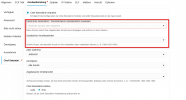
a) our users could configure this function not only in 3cx webclient, but also in 3cx windows app. At the moment there is only an option for activating/deactivating.

b) our users could also configure the fields "secretary" and "additional users" (I don't know how it is called in english version) on their own like the other fields
1770982263559.png

c) The german translation in 3CX Windows app should be optimised, from ""Chef-Sekretärin" to "Chef/Sekretariat" (Sekretärin is a woman. Sekretär would be a man. Sekretariat is the neutral version)
 
Its is not our intention to have everything configurable from the app. It remains a softphone with most configuration done from the webclient.
 
@KyriacosS_3CX @Charles_3CX

The AI features are all working wonderfully. However, I have been experiencing issues with queue login and logout. In some cases, logging in and out via the app is not possible. In other cases, configured skill-based rules are not being applied correctly. Even though users are assigned to Group 1 and Group 2, when using skill-based routing with “signaling all,” all phones ring immediately, regardless of their skill level. Is this a known issue?
 
Last edited:
@N_G I heard that U9 will bring additional improvements to the user experience, so I’d like to ask one more question:

Is it planned that in the near future - maybe in U9/U10 - queue calls will be trackable on smartphones? That would be a huge milestone. Many customers have been asking for this for years and it would be great if this could be implemented.

It would significantly improve the user experience, as it would allow the advantages of call queues to be fully used on mobile devices as well. Yes, I know there is an option to integrate the “call history into the device list,” but for example, when a user is set to DND, queue calls are not visible or cannot be reviewed later at mobile devices directly. In addition, you then have to copy the caller’s number from the device list into the 3CX app to make a call back. Uses ringgroups instead is no option for most of the customers.

I get asked almost after every installation within the first few days why queue calls cannot be viewed there. It would be really great if this could be made possible.
 
Last edited:
@KyriacosS_3CX @Charles_3CX

The AI features are all working wonderfully. However, since updating to version 8, I have been experiencing major issues with queue login and logout for many customers. In some cases, logging in and out via the app is not possible. In other cases, configured skill-based rules are not being applied correctly. Even though users are assigned to Group 1 and Group 2, when using skill-based routing with “signaling all,” all phones ring immediately, regardless of their skill level. Is this a known issue?
Not sure a completely understood what you meant here, can you clarify what group 1 and group 2 are, and for the login check that they are not explicitly logged out of the queue from the panel view.
 
Not sure a completely understood what you meant here, can you clarify what group 1 and group 2 are, and for the login check that they are not explicitly logged out of the queue from the panel view.
Skill-Based Routing (Level 1–5). For example, I have a queue with 10 agents split into two skill levels: Level 1 and Level 2.
When I select skill-based routing – signaling all, an incoming call rings on both skill levels at the same time, meaning all 10 agents’ phones ring simultaneously. Normally, Skill Level 1 agents should be prioritized, and Skill Level 2 agents should only be called if no Level 1 agents are available. However, since upgrading to U8, all agents ring at the same time regardless of their assigned skill level.

Regarding the second part of your question: I thought that might be the solution. I explicitly logged the agents out as a queue manager. :rolleyes: o_O

So I’d like to add one more point to my question to N_G above:
@N_G I heard that U9 will bring additional improvements to the user experience, so I’d like to ask one more question:

Is it planned that in the near future - maybe in U9/U10 - queue calls will be trackable on smartphones? That would be a huge milestone. Many customers have been asking for this for years and it would be great if this could be implemented...
It would be great if users could manage their explicitly logged-in and logged-out queue status directly within the mobile app, and not only in the desktop version. :)
 
  • Like
Reactions: N_G
Skill-Based Routing (Level 1–5). For example, I have a queue with 10 agents split into two skill levels: Level 1 and Level 2.
When I select skill-based routing – signaling all, an incoming call rings on both skill levels at the same time, meaning all 10 agents’ phones ring simultaneously. Normally, Skill Level 1 agents should be prioritized, and Skill Level 2 agents should only be called if no Level 1 agents are available. However, since upgrading to U8, all agents ring at the same time regardless of their assigned skill level.

Regarding the second part of your question: I thought that might be the solution. I explicitly logged the agents out as a queue manager. :rolleyes: o_O

So I’d like to add one more point to my question to N_G above:

It would be great if users could manage their explicitly logged-in and logged-out queue status directly within the mobile app, and not only in the desktop version. :)
If you have explicitly logged them out, they will not be able to log in from the main queue logging button on their apps. They will first need to be relogged in expicity then they will be able to log out of all queues normally.

For the issue with the queue skill group, it may be best to open a support ticket via your partner portal so we can check, as I can't replicate it, and it's not ringing all skill-based routing users.
 
@patrickb_de Thank you for the suggestion - an agent panel for the apps. Well there is not so much screenspace and its not a quick development.

However you can install the webclient in PWA mode on an Android device for example and it works really quite nice and from there you can then also see the queue calls etc

In update 9 we have some nice queue features coming to control skill call routing more granularly
 
Last edited:
@patrickb_de Thank you for the suggestion - an agent panel for the apps. Well there is not so much screenspace but I can see the application yeah..... we will discuss internally.

In update 9 we have some nice queue features coming to control skill call routing more granularly
I think it doesn’t necessarily need a full queue panel like in the webclient - nobody is realistically monitoring live queue activity on a smartphone anyway. Most customers would already be happy if the app simply showed “missed queue calls” or "all queue calls" and maybe allow setting flags like “in progress” or “called back”.

A full live queue panel would probably be too much for a mobile app and likely wouldn’t be used much there.

I’m really exited to see what U9 will bring. It sounds great that you’re expanding functionality within the skill levels and queues.

One additional idea for that: an option like “Accept calls while no agent is online,” allowing queue calls to remain on hold even when no agent is available for a moment, would be highly appreciated by many larger customers and call/contact centers. As a workaround, I actually built a solution for this myself - although it requires/blocks two SC to work. I jokingly call it “Klaus Koslowski” (@fxbastler and others knows it)xD. Klaus is basically an automated agent that stays on an active call all day (CFD talks to Klaus and Klaus to a CFD) allowing queue calls to remain on hold even when no real agent is online.
Overall, I’m really looking forward to what U9 will bring, especially considering how great U8 already is.
 
Last edited:
  • Like
Reactions: PBX128
However you can install the webclient in PWA mode on an Android device for example and it works really quite nice and from there you can then also see the queue calls etc
For now, it could be a workaround, but most customers prefer a smooth user experience without having to switch between apps so often. I’m also not sure whether this works reliably on iOS devices, even if Chrome is installed.

I’ve just tested it on my Android device: the PWA works, but when you switch to the queue panel and try to view the “missed queue calls,” the buttons for callback, adding to the phonebook, and similar actions block the call log view. You’re also unable to zoom out there, unlike in the regular browser to fix this. When starting a callback from there, the PWA dialer always defaults to loudspeaker mode (or selected media device) and does not allow switching back to the normal earpiece.
 
@patrickb_de Thank you for the suggestion - an agent panel for the apps. Well there is not so much screenspace and its not a quick development.

However you can install the webclient in PWA mode on an Android device for example and it works really quite nice and from there you can then also see the queue calls etc

In update 9 we have some nice queue features coming to control skill call routing more granularly
I have it on my Android in PWA and it works well!!
 
  • Like
Reactions: NatalyS_3CX and N_G

Members Online Now

No members online now.

Forum statistics

Threads
111,831
Messages
589,277
Members
164,660
Latest member
RJenkinsROCK