V20 Upgrade Checklist & FAQ

N_G

Founder
Joined
Jun 6, 2006
Messages
4,857
Reaction score
9,290
Everything you need to know to prep for V20. V20 is a big upgrade with important architectural changes, so moving up from v18 to v20 requires some preparation and work. We have put together this checklist to ensure your upgrade is as smooth as reasonably possible. We also added in FAQs....
Continue reading the Original Blog Post.
 
Last edited by a moderator:
Can we safely / is it supported to :
- backup our current v18.0 Update 8 ;
- install v20 from scratch ;
- restore our v18.0 Update 8 backup.

If so we will go this way, to start with a clean ISO installation for servers deployed years ago from packages (old installation method).

Many thanks !
 
  • Like
Reactions: accentlogic and N_G
Can we safely / is it supported to :
- backup our current v18.0 Update 8 ;
- install v20 from scratch ;
- restore our v18.0 Update 8 backup.

If so we will go this way, to start with a clean ISO installation for servers deployed years ago from packages (old installation method).

Many thanks !
Yes, this is supported.
 
Thank you for the clarity on various timelines. Notably for v18, Google PUSH.
 
  • 3CX v20 is tested on supported cloud providers ONLY

    Is there a list of supported Cloud providers somewhere. When will the AWS marketplace be available in V20?
 
  • Like
Reactions: N_G
Good idea @benrg and thank you for the heads up @SteveITS. Its possible Google might give it a bit of extra time - sometimes they do. @Michiel2000 As per @SweetAction it will the usual - which also includes Vultr btw. We will try to make RC3 available on marketplace as a separate image from the V18 image
 
Last edited:

Step 7 - Check out our new Windows Softphone​

  • New Windows Softphone replaces Desktop App (aka Electron App)
  • Can already be deployed with v18
  • Download it from Windows Store here
  • Alternatively use PWA (Native Web App for Chrome / Edge)
I wasn't aware that it could be used with v18, how do you provision it? The web client only suggests using the PWA.
 
I wasn't aware that it could be used with v18, how do you provision it? The web client only suggests using the PWA.
In the web client> Apps, choose Windows App. Ignore the Install button and click Download. Use that config file in the Store app (drag and drop works). Note it's more of a dialer; it opens the web client for chat/settings/etc.
 
  • Like
Reactions: jed and samuellay
In the web client> Apps, choose Windows App. Ignore the Install button and click Download. Use that config file in the Store app (drag and drop works). Note it's more of a dialer; it opens the web client for chat/settings/etc.
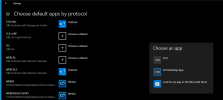
You can also use the Desktop App provision option - you just need to make sure the protocol "tcx+app" is associated with the correct app

1704919957760.png
 
Really good write-up, this is definitely something to stick to, will make sure to play around with v20 more before release! :cool:

I do have one question though, something which I haven't exactly figured out myself yet, it's concerning this.

1704957449288.png

How can I prevent users, seeing each-others calls from within the department, if there is only one department? Be it the default one, an "All" or "Company" one, this is something I don't quite get yet. Can someone explain this to me? How can I have multiple people in one department, without them being to see eachothers internal/external callers?

Maybe I am missing out on something or? I can just smell all the privacy iffy people breathing down my neck already lol xD
 
@Gasha

The user roles in Version 20 will inherit the default values of the role. The Group and system Owner roles do not publish their calls to members of the group, so the big guys calls will not be visible.
 
Hi @Gasha, Thank you for your feedback :)

So a normal user level can just see the status of another user. Receptionist level and up will see actual number being dialled.
Exception are System owners and Group owners whose numbers will not be displayed. We are also working on a future that you can mask the number as private number and make this selectable at user level.
 
Hello! The preparation and groundwork that 3CX is doing for V20 is encouraging and impressive. At the risk of sounding like I'm gushing, I don't think I've seen this level of pre-upgrade instruction in any software, anytime. I especially appreciate the notice about what features will not be available at first, since we use hotdesking.

My question today is: Can the items in Step 3 be executed in advance on V18? When I look in the new Admin section of our self-hosted instance of 18.0 Update 9 (Build 20), I see that I can assign Group Membership to new Queues (Advanced) and new IVRs (Options), but it seems I can't do it to existing ones. Thank you for the help!
 
Hello @Nick Galea

First, thank for you update.

At my company, 1500 users are using the "3CX Desktop App for Windows" (aka Electron App).

==> Have you considered migrating the '3CX Desktop App' client to the '3CX Windows Store App' without requiring any action from the end user ?
==> We can not ask our 1500 users to log again through the webclient and then ask them to click on provision.
I sincerely hope that you will address this.

Regards,
 
  • Like
Reactions: blerim and bit101
Hi @Gasha, Thank you for your feedback :)

So a normal user level can just see the status of another user. Receptionist level and up will see actual number being dialled.
Exception are System owners and Group owners whose numbers will not be displayed. We are also working on a future that you can mask the number as private number and make this selectable at user level.
From another Nick, a thank you to you Nick and Nicholas ;)

I've been reading the documentation thrice over, both in English and German and haven't really grasped it yet. Maybe it's the post holidays-blues, who knows. I'll make sure to check it out and play around with it, before we commit to our internal v20 clarification meeting.

Heres to hoping my sanity is saved!
 
  • Like
Reactions: NatalyS_3CX
Best to take part in the upcoming "v20 - Preparation" Webinars (provided in various languages ;-) ), which will assist taking the step towards the upcoming release :
https://www.3cx.com/blog/event-trainings/
 
@David Liddle Thank you so much for the heads up - thats really good to hear! My team and myself appreciate this. We are trying to cover all the bases but there is a lot of ground to cover and there are indeed things that we miss out on, not just in terms of development but in terms of explaining old versus new. So this interaction is very good.

Re your question - I checked about this myself actually as it would be great if you could do it before hand but unfortunately not. You have to go to v20 first. However, what i recommend is to fire up a trial, take a backup of your v18 without license key info, do a restore, and then get all the settings right on the trial, ask any questions, test it etc so that when you actually move you just have to duplicate the environment you have checked and tested before doing the upgrade.

Might i also add that the hot desking will not just come back but will come back much better and easier to manage and maintain :)
 
Last edited:
@Gasha - Thank you for your feedback, just let us know if you have questions
@gcf - No need you need to go to the new app I am afraid. We will definitely look into mass deploy mechanisms for Windows store apps but not right now. You can also import MAC address. Those are the options, i believe we had discussed in an earlier thread.
 
Last edited:
Best to take part in the upcoming "v20 - Preparation" Webinars (provided in various languages ;-) ), which will assist taking the step towards the upcoming release :
https://www.3cx.com/blog/event-trainings/
Good stuff, was just checking this morning and yesterday too, for the German one.
Will make sure to sign up if it's possible for me that day, I'll forward it to my colleagues as well.

Thanks!
 

Forum statistics

Threads
111,974
Messages
590,081
Members
164,899
Latest member
mazet