V20 Upgrade Checklist & FAQ

In the V20 roadmap, it mentions “New Queue strategy: Target busy agents (multi line queue strategy)”

I’ve checked more recent guides and blog posts but can’t confirm exact details.

Does this allow extensions to be alerted if a call is waiting in the queue and all agents busy? I know this has been requested by a few customers and partners here - ie you have 2-3 receptionists all on the phone, but they could quickly wrap up the call they’re on IF they are alerted to a call in the queue.

@bnichols_ Yes that is exactly what it does, it allows busy agents to be targeted so they can take the call if they wish. They must have multiple line support enabled on their phones.

Currently in French V20 webinar with @JorisR_3CX .
Joris just told that the agent with multiple line support enabled will ring a second time if his current call does not come from a queue (but an internal call, a voicemail call, a call he initiated himself...).
In other words, an agent won't be able to take several calls from a queue at the same time !

So, what's true ?
@Nick Galea @JorisR_3CX Please clarify :)

Of course, what we need here, is an agent to be able to take several calls from (various) queues at the same time.
Many thanks !
 
what we need here, is an agent to be able to take several calls from (various) queues at the same time.
Many thanks !

I also add ;
  • Please, we would also need for Ring Group ( Equivalent of ALLOWUSEBUSYOPTFORGROUP but officially supported way )
If you need examples of scenarios where multiple calls in Queues and Ring Groups is requested, let us know, and we can provide several examples to justify its usefulness.

Please considering this.
 
Seems like all of the webinars are full. Are there any more being offered? Posted recordings?

The Windows Store deployed phone appears to be missing Chat. It just pushes to a webpage which is cumbersome at best. I was not able to find a resolution to this on the official posts. I probably missed it somewhere with all of the chatter.
 
  • Like
Reactions: blerim
The Windows Store deployed phone appears to be missing Chat. It just pushes to a webpage which is cumbersome at best. I was not able to find a resolution to this on the official posts
That's as designed; the Store app is intended as only a phone/dialer. So yeah, in an office using chat one needs another client open. Which makes me wonder at the applicability of the Store app.
 
That's as designed; the Store app is intended as only a phone/dialer. So yeah, in an office using chat one needs another client open. Which makes me wonder at the applicability of the Store app.
Uggg.... That makes the Store app next to useless for many users.

We already dislike recommending the webclient because individuals accidently close the web browser as they shift between the work responsibilities through out the day which then prevents incoming calls. It looks like the Store app is fully closed using the "X" as opposed to staying resident in the system tray. We need an always present app that allows users to chat and access voicemail (not under "More"). I see voicemail has been pulled out of "More" which is a good change.

Any idea why "Profile" is so prominent on the left menu?
 
We already dislike recommending the webclient because individuals accidently close the web browser as they shift between the work responsibilities through out the day which then prevents incoming calls.
Have the users tried "installing" the web client, leveraging the PWA functionality?

The result is the 3CX web client will sit separate to the web browser and act quite like the v18 desktop app. This way, a user can close their regular browser without affecting the web client.
 
Have the users tried "installing" the web client, leveraging the PWA functionality?

The result is the 3CX web client will sit separate to the web browser and act quite like the v18 desktop app. This way, a user can close their regular browser without affecting the web client.
PWA app appears to close just like the windows store app. It doesn't stay in the system tray continuing to run and accept calls. I am sure I am missing something. https://www.3cx.com/blog/releases/web-client-pwa/ doesn't seem to indicate that the PWA stays open in the system tray.
 
I've been testing v20 and was wondering where to post and warn people of the limitation coming from v18.

Just a couple things I've noticed, if you have any considerable size install with many users, there is NO mass editing of users. Such as, BLF's, options and things. You have to do all edits one extension at a time. Also, missing dial code editing, like in/out of office.

There are others, but wanted to see the best place to post for missing features, so the 3CX team can be aware.

Thanks, Milo
 
We are working on adding a 3CX login to the app so you can login using 3CX (including 2FA) after which the app will provision itself.

Great to hear Nick!

We are considering switching to 3cx with our 400 employees. From our point of view, the mentioned simple login is an important point for a successful introduction.

We also see two other particularly important requirements for the final v20:

1. simple distribution of the new Windows app without MS Store, e.g. via .msi (in many German organisations, MS Store is blocked due to data protection guidelines)

2. new configuration option so that no user can see who their colleagues are currently calling. At the moment, this cannot be deactivated for receptionists or department admins, but is permanently implemented in the rights groups.
I fully understand that there are advantages to defining fixed rights groups. However, these rights groups should only enable FUNCTIONS and not deal with DATA PROTECTION RIGHTS at the same time.
This is a very sensitive issue in Germany. Many works councils only authorise the introduction of telephone systems if a certain minimum level of privacy exists for the user: No recording of telephone calls, no insight by colleagues/superiors into who you are on the phone with.
Many professional PBX systems even have functions implemented that require two passwords (e.g. IT manager + works council) to analyse who has been on the phone with whom and for how long. 3CX does not necessarily have to implement this, but it should at least be possible to create receptionists and department admins without them automatically being able to see who their colleagues/employees are calling.

We are excited to see what new features/changes RC3 will bring. :)
 
  • Like
Reactions: blerim and Gasha
1. simple distribution of the new Windows app without MS Store, e.g. via .msi (in many German organisations, MS Store is blocked due to data protection guidelines)
I was looking at something similar. In an ideal environment, you would have some form of MDM running over business devices and therefore could deploy 3CX from the Windows Store with a platform such as Microsoft's Intune.

For a manual alternative, you can download the MSIX file and sideload directly or remotely by script/GPO

Downloading 3CX app installers from the Microsoft Store
  1. Navigate to https://store.rg-adguard.net/
  2. Ensure the dropdowns are set to URL (link) and Retail (default is RP for Release Preview)
  3. Past the link to the 3CX store app: https://apps.microsoft.com/detail/9NW77489NGJ0
  4. Download the app and any dependencies it has listed for your platform (x64 for most but you may be x86 or ARM)
    At time of writing, I download the following files:
    • 3CXDMCC.3CX_20.0.346.0_x64__bhm4yemhnd70e.msix
    • Microsoft.WindowsAppRuntime.1.4_4000.1082.2259.0_x64__8wekyb3d8bbwe.msix
Installing downloaded MSIX files
There are several ways you may choose to install the apps, I've just listed the two methods I use below
  • Directly - just double click them and select Install, starting with the dependencies first and the app itself last.
  • Group Policy / Script
    • Place the installers in an accessible location (such as a network share with read-access for users)
    • Using Group Policy or any other remote/unmanned script capability that can run in the user context:
      Code:
      Add-AppxPackage -Path 3CX_MSIX_FILE -DependencyPath DEPENDENCY_MSIX_FILE

2. new configuration option so that no user can see who their colleagues are currently calling.
There has been a lot of people asking about roles/permissions since they are fixed and non-editable in V20.
Perhaps they may add a couple more options to the list to cover other common use cases / regulatory compliance.
It's good to voice opinions and let 3CX know what kind of role you would like to see, as who knows how many more hundreds or thousands want the same and this can help their team identify a requirement to implement.
 
if I have a client on v18 hosted by 3cx, do I have any option of moving them to Lightsail on v18?
 
I've been testing v20 and was wondering where to post and warn people of the limitation coming from v18.

Just a couple things I've noticed, if you have any considerable size install with many users, there is NO mass editing of users. Such as, BLF's, options and things. You have to do all edits one extension at a time. Also, missing dial code editing, like in/out of office.

There are others, but wanted to see the best place to post for missing features, so the 3CX team can be aware.

Thanks, Milo
As the team have indicated, until Release 1, there is likely to be several features that are not yet fully enabled or accessible.
IIRC, during one of the webinars I attended there will be a form of bulk edit coming back for extensions but may not be immediately available. Guess we will see when it's live :)

⚠️ P.S. Remember, v20 is essentially in an early access (Release Candidate) stage at the moment so you are not seeing the final features yet.

If you know you need immediate access to BLF and other bulk edits, I suggest doing your changes in a V18 instance and then use the backup from the v18 to update a running v20 RC instance. As of the latest builds of v18, the backups are interchangeable.
Then, even if we need to wait to Update 2 or 3 for bulk edits, you will have got most of them out of the way already!
 
  • Like
Reactions: WhitneyG_3CX
Lightsail is considered "self-hosted" (as in 3CX themself is not hosting it) so you would set this up anew and then bring over the data via a fresh backup.

See the official documentation here: Installing 3CX on Lightrail - Re-deploying a 3CX System
Right but sorry I should have said that I don't want to put them on Lightsail and v20, I want to put them on v18 on Lightsail then eventually upgrade them to v20
 
Any word on additional trunk providers in update 1. I use Broadvoice and they are not listed in the release candidate.
 
  • Like
Reactions: nathan0707
Currently in French V20 webinar with @JorisR_3CX .
Joris just told that the agent with multiple line support enabled will ring a second time if his current call does not come from a queue (but an internal call, a voicemail call, a call he initiated himself...).
In other words, an agent won't be able to take several calls from a queue at the same time !

So, what's true ?
@Nick Galea @JorisR_3CX Please clarify :)

Of course, what we need here, is an agent to be able to take several calls from (various) queues at the same time.
Many thanks !
Hi @benrg in V20 busy agents can receive a call from the queue.

What you need to check is the following:

1) In the queue go to the Advanced Menu and enable the parameter Target Agents even though they are already on a call and apply the settings.

1705883308133.png

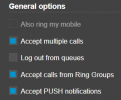
2) Edit the agent extension ---- click on Call Forwarding ---- Available status --- enable the parameter Accept multiple Calls and apply the settings.

1705883386980.png

Once done, if the agent is already busy, let's say he/she is talking with another user/ voicemail/ or external number (direct call) and a call enters in the queue, then this agent can be polled by the system and answer that call. But, if the agent is busy with a call queue and then another call enters in the same queue, then this busy agent will not be polled by the system. So the target agent option, allows the system to poll busy agents with other calls that are not part of this queue, it doesn't mean that these busy agents will be polled for another call in the queue when they are already on a queue call.

One last thing, please note that if you are using an IP phone, you have to configure multiple LINE KEYS in order to accept multiple calls in that device.

I hope the information is clear :cool:

Have a great week ahead!
 
Last edited:
Hi @Alejandro_3CX, and thank you for your clarification.
But, if the agent is busy with a call queue and then another call enters in the same queue, then this busy agent will not be polled by the system.
So, you confirm, and unfortunately, the option is not what we were expecting here :confused:
Of course, what we need here, is an agent to be able to take several calls from (various) queues at the same time.
Many thanks !
What a disappointment ! :(
 
Hi @Alejandro_3CX, and thank you for your clarification.

So, you confirm, and unfortunately, the option is not what we were expecting here :confused:

What a disappointment ! :(
If the agent has taken a call from the queue and then another call enters in the same queue, then you will need to park the current call and you will be able to take the other call. Please check this guide about parking call.
 
  • Like
Reactions: GregG_3CX
IMO your proposal is rather hard to apply, as agent who has taken a call from the queue will not be notified about another call entering the queue...
And rather hard to constantly keep an eye on queue details in 3CX webclient, especially if agent is working from another device (IP phone for instance).

Anyway, goal for the agent here is to put its current queue call on hold, while taking another queue call.
Much more convenient than parking, when agent is supposed to manage several calls at the same time.
 
Great to hear Nick!

We are considering switching to 3cx with our 400 employees. From our point of view, the mentioned simple login is an important point for a successful introduction.

We also see two other particularly important requirements for the final v20:

1. simple distribution of the new Windows app without MS Store, e.g. via .msi (in many German organisations, MS Store is blocked due to data protection guidelines)

2. new configuration option so that no user can see who their colleagues are currently calling. At the moment, this cannot be deactivated for receptionists or department admins, but is permanently implemented in the rights groups.
I fully understand that there are advantages to defining fixed rights groups. However, these rights groups should only enable FUNCTIONS and not deal with DATA PROTECTION RIGHTS at the same time.
This is a very sensitive issue in Germany. Many works councils only authorise the introduction of telephone systems if a certain minimum level of privacy exists for the user: No recording of telephone calls, no insight by colleagues/superiors into who you are on the phone with.
Many professional PBX systems even have functions implemented that require two passwords (e.g. IT manager + works council) to analyse who has been on the phone with whom and for how long. 3CX does not necessarily have to implement this, but it should at least be possible to create receptionists and department admins without them automatically being able to see who their colleagues/employees are calling.

We are excited to see what new features/changes RC3 will bring. :)
Hi there - Thanks for the feedback, we will keep it in mind....
 

Forum statistics

Threads
111,974
Messages
590,081
Members
164,899
Latest member
mazet