V20 - Yealink IP phones' firmware not upgrading

Status
Not open for further replies.

Dominique_CH

SMB User
Advanced Certified
Joined
Mar 20, 2020
Messages
84
Reaction score
15
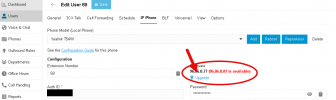
I'm having this issue with a 3CX recently upgraded from V18 to V20 update 2 (installed on-premises):
- Dashboard shows 'unsupported phones'
- On the Users' page, those phones are indicating '(Upgrade)'
- Clicking on that Upgrade issues a (regular) warning about the phone disconnecting
- Pressing 'OK' has no effect at all and phone won't upgrade

Tried rebooting and re-provisioning the phone, but no effect either.

The phone themselves are not accessible from outside the local network per https, only the 3CX but I'd expect the phones getting their updates locally from the 3CX PBX.

Is anybody having the same issue? What's the solution?
 

Attachments
  • IpPhoneIpgrade.png
    IpPhoneIpgrade.png
    22.6 KB · Views: 25
Last edited:
  • Like
Reactions: JohnWoodCC
things I'd try.
Does the url work if you try to login to the phone? Manually update?
Factory reset the phone and try again.
 
Ok:
- I tried the phone-URL (locally) which works
- I performed a local update by downloading the new firmware separately: it worked fine
No factory reset required.

So, the question is why doesn't it work from the 3CX management-GUI? And does anybody else experience this issue?
 
try factory resetting a phone then try again.
i've seen (had) this before where they phones just won't do it or have old network settings in them.
Factory resetting normally fixes it.
 
  • Like
Reactions: JohnS_3CX
If the phone cannot reprovision (ie. when you add a BLF and press save) then the firmware upgrade won't work either.

Please start from there first. Then if it doesn't work, reset and reprovision from scratch and try again.
 
I'm having this issue with a 3CX recently upgraded from V18 to V20 update 2 (installed on-premises):
- Dashboard shows 'unsupported phones'
- On the Users' page, those phones are indicating '(Upgrade)'
- Clicking on that Upgrade issues a (regular) warning about the phone disconnecting
- Pressing 'OK' has no effect at all and phone won't upgrade

Tried rebooting and re-provisioning the phone, but no effect either.

The phone themselves are not accessible from outside the local network per https, only the 3CX but I'd expect the phones getting their updates locally from the 3CX PBX.

Is anybody having the same issue? What's the solution?

I'm going to guess you did a clean install of Deb12/V20 and restored a backup? During the install did you select the default port of 443 for https? Because if you did and your V18 used 5001, that's the cause. Or put simply if you used to have to append the url with :5001 when logging into the web client or admin panel on your v18 and you no longer need to on v20.

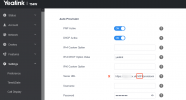
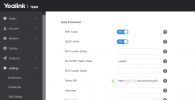
Anyone running into this can try logging into a phone and checking the settings, if you delete the :5001 from the Auto Provision server url and press Confirm you'll then find the phone will behave normally.

Before.png

After.png

If you don't have remote access to the phones and you don't have someone on site to run around factory resetting them all then the quick and easy solution is a reinstall but be sure to choose 5001 as the https port during install and before uploading the backup.
 
try factory resetting a phone then try again.
i've seen (had) this before where they phones just won't do it or have old network settings in them.
Factory resetting normally fixes it.
I confirm that this procedure worked, although it's very strange for a phone reset being required. In particular, when not using BLFs nor a specific config-file.

Anyway, after resetting and reprovisionning all IP-phones, the fw-upgrade succeeded w/o any further issues.

As I initially manually upgraded the fw on one of the IP-phones, I suspect that this problem will still be around for that device at the next fw-distribution.
 
  • Like
Reactions: Gingerr6
I'm going to guess you did a clean install of Deb12/V20 and restored a backup? During the install did you select the default port of 443 for https? Because if you did and your V18 used 5001, that's the cause. Or put simply if you used to have to append the url with :5001 when logging into the web client or admin panel on your v18 and you no longer need to on v20.

Anyone running into this can try logging into a phone and checking the settings, if you delete the :5001 from the Auto Provision server url and press Confirm you'll then find the phone will behave normally.

View attachment 43426

View attachment 43427

If you don't have remote access to the phones and you don't have someone on site to run around factory resetting them all then the quick and easy solution is a reinstall but be sure to choose 5001 as the https port during install and before uploading the backup.
Hey, that's an interesting explanation. I'm going to verify that during the next upgrade.

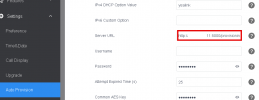
I just checked the phone upgraded manually (by loading the new fw), and the provisioning link is indeed incorrect but points to http port 5000 - strange !
 

Attachments

  • AutoProvisionLink.png
    AutoProvisionLink.png
    9.6 KB · Views: 22
... be sure to choose 5001 as the https port during install and before uploading the backup.
Should have typed "just after uploading the backup", that's when you get given the port options.
 
Last edited:
For me it's alright to switch to port 443 for https. But is there any way to force IP phone provisioning to switch from http to https?
I can see that both links are present among the parameters, but IP phones currently are all set to use http
 
Last edited:
Hey, that's an interesting explanation. I'm going to verify that during the next upgrade.

I just checked the phone upgraded manually (by loading the new fw), and the provisioning link is indeed incorrect but points to http port 5000 - strange !
That is strange as I assumed provisioning
always used https.

Another thing we did on an NFR was put a port redirect
rule in iptables.

Code:
iptables -t nat -I PREROUTING --src 0/0 --dst ***.***.***.*** -p tcp --dport 5001 -j REDIRECT --to-ports 443

With *** being the IP of the instance. External firewall needs both ports forwarded too.

This works and you can then remotely change BLFs, reboot, reprovision. The phones will then take on the correct url. But I would think it would render a production instance unsupported.
 
That thread doesn't really help as it refers to the reverse problem of provisioning phone using https instead of http.

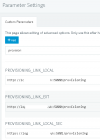
I just checked the config on another V18-PBX and it's also using http://ipaddr:5000 on the local LAN and not FQDNs even though the provisioning links in Parameters (PROVISIONING_LINK_LOCAL_xxx) use FQDNs!! I suppose these links were updated at some point in time, because more recent IP phones use FQDNs, but still http.

I'd make the following assumptions:
- the current provisioning links were generated when setting up new users and connecting the phones for the 1st time (and that was some time ago using v18 before above parameters were changed by some update and before split-DNS),
- I'll have to manually change the provisioning link from http to https on the users' IP phone pane and on the IP phones themselves using the GUI-URL

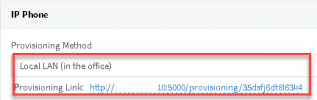
Correction: the provisioning link on the User's IP Phone pane can only be copied, not edited !! This issue will drive me nuts :mad:
 

Attachments

  • AutoProvisionLink2.png
    AutoProvisionLink2.png
    4.2 KB · Views: 18
  • AutoProvisionLink2Params.png
    AutoProvisionLink2Params.png
    7 KB · Views: 20
Last edited:
I finally found how to update the provisioning link on the User's IP phone pane:
- Correct the network interface used from IPaddress to FQDN and save
- Re-open and the link is updated to https://fqdn/xxx
DONE :)
 
Status
Not open for further replies.

Members Online Now

Forum statistics

Threads
111,832
Messages
589,278
Members
164,662
Latest member
DejanMDS