Validate record VAD (press 1 to record or press 2 to repeat)

Status
Not open for further replies.

hector-ip

Joined
Mar 21, 2012
Messages
3
Reaction score
0
Hello, sorry for my bad english;)

I have an IVR where the customer record several conversations, but wanted to hear before saving the file on your hard disk.

Something like:

Recording> recording played> press 1 to record or press 2 to repeat

and not written to disk until the conversation validate.

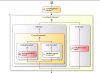
Current flow capture

regards
 

Attachments

  • 6oitts.png
    6oitts.png
    63.7 KB · Views: 3
Re: Validate record VAD (press 1 to record or press 2 to rep

Hello Hector,

In order to do this, you need to configure your Record component to save the file. Once you have recorded the audio, you can play it back to the user and ask him/her to confirm to save or discard the recording. If the user decides to save it, then the file is already on disk. If the user decides to discard it, then you need to delete the audio file. To delete a file you will have to use an External Code Execution component and create a DLL that does the job, as currently there is no component to manipulate files that way, only read and write operations on files are allowed with the File Magement component.

To play the recording back to the user, you need to use a Prompt of type RecordedAudioPrompt, and set the AudioId property to the value of your recordComponent1.AudioId.

Hope the information helps, and let me know if you have any other question.
 
Re: Validate record VAD (press 1 to record or press 2 to rep

Thank you!
Today when I have a moment, I will make tests and confirm you;)

Regards
 
Status
Not open for further replies.

Forum statistics

Threads
112,322
Messages
591,882
Members
165,468
Latest member
kanderson