Various user complaints after 16v5 update

Status
Not open for further replies.

weimerd

Bronze Partner
Advanced Certified
Joined
Feb 27, 2020
Messages
147
Reaction score
67
Hi 3cx-Team,

First I need to say THANK YOU for your hard work even during this complex time, I really enjoy seeing the progress 3cx has made already.

After updating to 16 V5 (coming from 16 V4) I experience a high load of user complaints.
V4 worked pretty stable.

User complaints are mostly pointing to too low volume all in a sudden in midst of a call (we are using Fanvil X3S phones, but some users also experience that using Webclient / Windows client and USB headset).
In midst of call users cannot hear the other part anymore. Volume is SUPERLOW. Can only be solved by rebooting users phone. Issue cannot be seen in log.

There are some other issues as well, but as mainly all users are working from home, their problems may be found on client side as well.So I would address the LOW-volume issue here only as this happens to various users and just came up with V5.

Using 16V5 on Azure cloud. 3CX image, so no self install.

Thanks for your help in advance :)
 
Hi, looks like I have the same issue. Have you been able to find a solution to this?
 
It appears to me codec issue, i just went through this. Are you able to to try G711 codec, that solved my issue.
 
We also have the same issue with 16.0.5.611, clients reporting very quiet calls using Yealink T48S
 
Hello,

We need some more information on the issue so we can better understand the conditions that cause it

- Is there a common trunk provider involved in these calls?
- Does it only affect trunk calls, or are internal calls also affected?
- If internal calls are also affected, have you heard any recordings of such calls to verify this?

If you understand where I'm going with this, the goal is to isolate whether the effect only exists on the handset itself, or if the volume is lowered on another leg of the call (ie. on the provider-to-pbx leg or the pbx-to-device leg). Once this is isolated, we can look further at the specific leg where the volume is affected and go from there
 
Hello,
We have the same issue with those using Webclient / Windows client and USB headset.
Our headsets are Microsoft Lifechat 3000. We must increase the volume to 80% - 100% to hear what the other person is saying.
The problem is both from internal and external calls.

Using Yealink T46S to Yealink T46S the sound is ok.

Thanks
 
@stavros.mavrommatis there's quite a few variables here. We need to eliminate them one by one, on both sides, not just the one user. For others reading this post: This is more in-depth troubleshooting that you would normally need, but if you are using 3rd party headsets and face issues, it is worth looking into.

1 - The headset mic's physical sensitivity - this cannot be changed, but varies from model to model. If you have an alternate model lying around, it can be used as a comparison to the one having the problem.

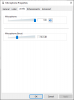
2 - The mic Input Volume level in Windows. You can change this to make sure it is set to 100%. Some mics also have volume boost and this can also increase the volume further. You should only use boost as a last resort. Before making any adjustments, I usually go to the advanced tab and hit Defaults so I have a solid starting point.
1589363865087.png

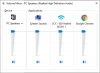
3 - Output Volume levels. For good practices, the volume level of the app or browser (Applications) from the Windows Volume Mixer must be set to 100%. In the below example I set everything to 100%, now they are all matched together with the master volume (Device), and I can lower the master Windows volume to a comfortable level as needed and control things from there.
1589363738403.png

4 - USB Mic Software/driver suites (applies to headsets that do have such software only). Most mics won't need it, they are plug and play, but some brands may work differently when their software is installed vs just plugging them in. I have noticed differences in some models where the software can affect the end result. The software often affects all the above settings previously mentioned which you can adjust manually from windows anyway, but sometimes there's a "secret sauce" that only appears after installing their software. Some may employ their own auto-gain which might need to be disabled. Then again, sometimes their software may misbehave, so I would try both with and without the software it comes with.

5 - Mic positioning on some mics that are directional to reduce noise, moving the mic up or down an inch from your mouth can greatly affect volume. This varies across models of course so you can experiment a bit to find the optimal position.

A note about the Webclient in Chrome:
Chrome has a hardcoded auto-gain feature that affects the mic volume during calls. Now for most people this won't be a problem, but for some mics it may over/under compensate and cause issues. Firefox does not do that from what I can tell, so if you recheck the mic level to find out it has changed after being on a call for a few minutes, close Chrome, increase the mic gain to 100%, and log in from Firefox to make the same call again. If Firefox sounds better, then it is very likely related to Chrome's auto-gain not playing nice with some microphones. There is no workaround for this other than switching to another input device that Chrome likes better or perhaps positioning the mic higher or lower to avoid catching hard "P" or "S" sounds, or windage from your breath. It may compensate against the "worst" noises, but end up cutting down the useful portions of speech too. Good mics usually attenuate hard sounds by design, and the PC always hears a more or less uniform volume without spikes, meaning that any auto-gain software running on your pc will be less likely to overcompensate.

A note about the 3CX Phone for Windows:

The desktop app has a mic gain feature that can also be adjusted to a higher or lower number.
This may also be useful as a last step after all the above have been addressed.
1589364231814.png
 
Hello

Installed a new 3CX v16.0.5 version on a hosted Linux + SBC at customer site.
Connected a Trunk to the server + Yealink T46S to the SBC.

Now when I call the trunk from my mobile (that's an external mobile not linked in any way to that 3CX), Yealink T46S picks the call, but I almost can't hear the person on the Yealink.
The sound level is very low, and lots of noise, like shuffle.

It's not a microphone level problem on the yealink side which is already at maximum level. And anyway the sound is low but also awfull with lots of parasite noises
 
Hi,

I would recommend to first check internal calls and see if they sound ok.

Once this is confirmed, I would then run a capture on the PBX for an external call, and hear the audio level that the PBX sends to the provider. If the audio does come out low from the PBX, we can investigate that separately.

However, if the capture shows the audio is sent OK, then the next step is to contact the trunk provider, because after the audio leaves the PBX we no longer have control over it.
 
I'm not on site so I need to do some tests before moving to customer site.

What I did :

- connect the Yealink direct to STUN (without SBC) : same result
- call from another extension on the same server : 3CX (I was calling remote using the 3CX win app)

Then I've asked a colleague to call from his mobile to my 3CX win app, and I did not have the problem.

So for me the problem is only when I call that Yealink phone, which for now is the only one they have configured.
It's either because they have a problematic router configuration or it could be the Yealink itself that has a problem... I'll ask the customer to try with another Yealink
 
OK, asked the user to change the handset of the Yealink, and problem gone.
A new phone, handset not working properly...
 
  • Like
Reactions: JohnS_3CX
Ah the old handset issue :)

It's always a better test to answer the call in speaker-mode to make sure.

The spiral cable often wears out, causing no audio, or lots of static noise, or even attenuation.
 
Lol I forgot to try in speaker mode...

What's strange is that this is a totally new phone/handset/cable... But anyway, I will replace the handset + cable from our own stock, since it's going to be a nightmare to replace it with warranty
 
Yeah now and again you might get a faulty one, but try it on another phone too (using a known good spiral cable) just to ensure that the handset is indeed faulty.
 
Status
Not open for further replies.

Latest Posts

Forum statistics

Threads
111,952
Messages
589,890
Members
164,843
Latest member
sambannoura