Version 18 Update 8 Final - The Recap

Status
Not open for further replies.
hello
im installing again the new version the install is different than the one i previously install
i want the windows version desktop app but it ask to go to portal etc..
To use 3CX Desktop App on your computer
  1. Open the Web Client and login with your credentials.
  2. Click on
  3. Press Provision to automatically connect the App.
cannot get the provision
what im doing wrong ?
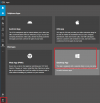
Apps -> desktop app
1700056053240.png
 
hello
im installing again the new version the install is different than the one i previously install
i want the windows version desktop app but it ask to go to portal etc..
To use 3CX Desktop App on your computer
  1. Open the Web Client and login with your credentials.
  2. Click on
  3. Press Provision to automatically connect the App.
cannot get the provision
what im doing wrong ?
Hello @PeteOJ when the users receive the welcome email, they have to set the password for the webclient.

Once done, they need to click on Apps as @SweetAction shared in the pic above --- and click on Desktop App --- download the installer --- execute it --- click on provisioning.
 
  • Like
Reactions: GregG_3CX
Ok and if the welcome email was sent longtime ago just need to send it back from my portal ?
and if they dont remember there password ?
 
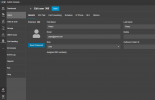
You can click on RESET PASSWORD and they will receive again the welcome email to reset the password

1700058241755.png
 
  • Like
Reactions: GregG_3CX
@PCMH_Jeremy the best option is to create a full backup and re-install with the latest 3CX ISO
 
Status
Not open for further replies.

Forum statistics

Threads
111,974
Messages
590,081
Members
164,899
Latest member
mazet