Version 18 Update 8 Final - The Recap

Status
Not open for further replies.
hello is this version is free from malware ?
 
hello is this version is free from malware ?
The desktop app was free from malware 24 hours after it was detected.
 
Hi, I hope I am correct in posting here. I have a hosted 3CX Version 18 update 5 (418). When I go to Settings-> Update, I get the message "Your system is up to date. Last checked: Today, 11:52", which reading all the above, us probably wrong.
Also, as described above and in the post, when click on on Settings -> License, I get the relevant error.

Why cant I upgrade?

BR,
Jim
 
As i can see this is not a 3CX Hosted machine but an on premise installation.
Since you are in V18 SP5 it is expected that you cannot see any new updates as you are not able to contact the activation server.
In this case you need to create a full backup and re-install with the latest 3CX ISO.
 
As i can see this is not a 3CX Hosted machine but an on premise installation.
Since you are in V18 SP5 it is expected that you cannot see any new updates as you are not able to contact the activation server.
In this case you need to create a full backup and re-install with the latest 3CX ISO.
Yes, sorry on-premise. So I have to take a full backup, re-install and restore?
 
Yes that is correct.
 
How do you give a user access to listen to call recordings without giving access to delete users etc.. Previous version you could allow Receptionist access to listen without having admin access..
 
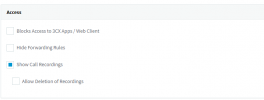
You can do this from the user settings > Phone provisioning tab > choose 3CX app from the 'Your phones' drop-down menu and under the Access section set the options to 'Show call Recordings'.

1698868871227.png


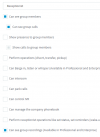
Then, if you want the user to see other users' voice recordings that are members of the same group, you can change to user's role under the user's rights tab, setting their role as 'manager' as a minimum and check the option 'Can see group recordings and reports'
 
Last edited:
  • Like
Reactions: IrinaP_3CX
Group Owner still gives the user access to edit / delete users etc... We want to give a user read only access ..Which is what you could do in previous version.
1698869936602.png
 
In the current, and in the next version, v20, this is possible when you set them to the role 'manager.'
 
Last edited:
A manager can still edit the users extension, disble call recording and delete extn..
How do we give read only access ?
 
This is all that is available. There are no other settings to accomplish this other than what we have already provided you.
 
This is all that is available. There are no other settings to accomplish this other than what we have already provided you.
The security options for the new groups functionality are not granular enough. This is a major frustration point for us. We want to give users access to manage their own team's call queues only, they shouldn't have access to manage global queues or delete SIP trunks for example. We also need a way to associate an existing call queue with a user group or at least to specify the desired extension number to use for it when creating it via the web client.
 
  • Like
Reactions: Itel628
Thats absolutely possible in v20. You just have to ensure that the user is not part of multiple groups and that sip trunks etc are in the correct groups.
 
Thats absolutely possible in v20. You just have to ensure that the user is not part of multiple groups and that sip trunks etc are in the correct groups.
Yes, but you can't place an existing resource in a group after creation and last time I checked you can't specify the virtual extension number to use for resources created via the web client. It automatically increments, which isn't useful to us as we decided a numbering convention to use for things like call queues.
 
OK thats in v18, in v20 final you will be able to do all this. Its not that far off.
 
Can you confirm in v20 that we can give a user read only access to listen to call group recordings etc..but have no options to delete or edit users.
 
hello
im installing again the new version the install is different than the one i previously install
i want the windows version desktop app but it ask to go to portal etc..
To use 3CX Desktop App on your computer
  1. Open the Web Client and login with your credentials.
  2. Click on
  3. Press Provision to automatically connect the App.
cannot get the provision
what im doing wrong ?
 
Status
Not open for further replies.

Forum statistics

Threads
111,974
Messages
590,081
Members
164,899
Latest member
mazet