Solved Version 20 (Includes OS upgrade from Debian 10 to 12)

Status
Not open for further replies.

Deepak | Aastitva.com

Free User
Joined
Jun 3, 2021
Messages
72
Reaction score
5
Hi,

We are using 1 CPU server. The error log while upgrade says, that the upgrade has failed as it can only installed in 2 CPU system.

Is this right? Have anyone of you faced the same issue?

The error is listed below:

All packages are up to date.
[33m====== [19:53:53] Preparation: Not enough CPU cores. At least 2 CPU cores are required for a smooth upgrade.[39m
[33m====== [19:53:53] Upgrade Result: *******************************************[39m
{
"result": "aborted",
"time": "17-01-2024 19:53:53",
"title": "Insufficient CPU cores",
"message": "There are not enough CPU cores. Please make sure there are at least 2 CPU cores before upgrading."
}
::FAIL::


Regards,
Deepak
 
Did you read the requirements for this upgrade? Anyway its still not for productive use and not official released.
 
  • Like
Reactions: Evolute IT
Hi @bitn2,

Thanks for your quick response.

We are getting this alert of update in our sever. Screenshot attached.

Here, it seemed a tried confirmed version.

Regards,
 

Attachments

  • scrnli_1_17_2024_8-19-55 PM.png
    scrnli_1_17_2024_8-19-55 PM.png
    33.2 KB · Views: 25
Hi @bitn2,

Thanks for your quick response.

We are getting this alert of update in our sever. Screenshot attached.

Here, it seemed a tried confirmed version.

Regards,
Please always check release notes before and check the hardware requirements. Its not released yet for productive use and you need to check the requirements before update.
 
@bitn2 - You had mentioned in some other post to upgrade the Debian version to 12. We are still running on 10. The upgrade is not happening by normal command prompt. So I thought version upgrade may help move to 12.
 
@bitn2 - You had mentioned in some other post to upgrade the Debian version to 12. We are still running on 10. The upgrade is not happening by normal command prompt. So I thought version upgrade may help move to 12.
I have never mentioned to upgrade to 12. V18 is on debian 10 and v20 on debian 12. But your need to check the stuff i said before. I would wait with the upgrade until the first updates for the v20.
 
  • Like
Reactions: N_G
@bitn2 - I will wait and then decide as we have the full v20. Thank you.
 
  • Like
Reactions: bitn2
Hi,
We have upgraded the to v20, but we are not able to login to the server with the same admin password. Getting a server error. Request an immediate help.

Please note the screenshot.

Regards,
 

Attachments

  • Screenshot 2024-06-21 161809.png
    Screenshot 2024-06-21 161809.png
    6.2 KB · Views: 11
  • Screenshot 2024-06-21 160525.png
    Screenshot 2024-06-21 160525.png
    75.7 KB · Views: 13
Hi,
We have upgraded the to v20, but we are not able to login to the server with the same admin password. Getting a server error. Request an immediate help.

Please note the screenshot.

Regards,
Wait for the upgrade to complete. You'll get an email. It can take up to 30min.
 
Thank you for the update. It is more than 60 mins. We powered down the server in between as we were not able to judge the problem. After power up, we have taken the screenshot to show to the forum.
 
Thank you for the update. It is more than 60 mins. We powered down the server in between as we were not able to judge the problem. After power up, we have taken the screenshot to show to the forum.
Dont power down the server... The upgrade could be broken now.
 
  • Like
Reactions: Evolute IT
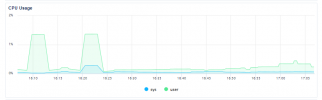
Hi @bitn2 - I am sharing the CPU usage. Kindly check and let me know if the installation is on, or we restore the server, and then go ahead with the upgrade.
 

Attachments

  • scrnli_6_21_2024_5-07-44 PM.png
    scrnli_6_21_2024_5-07-44 PM.png
    23.4 KB · Views: 9
This is not 3CX hosted system so you can login to the actual of and check the file for the update (monitor it live).
Its path will be in /var/lib/3cxpbx directory
 
Hi,
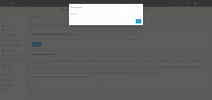
We have restored the droplet, and activate the 3CX server. First time we went to upgrade again, it just logged us out. After we logged in and trying to upgrade, it is giving this error. Please note the screenshot.
 

Attachments

  • scrnli_6_21_2024_7-08-50 PM.png
    scrnli_6_21_2024_7-08-50 PM.png
    74 KB · Views: 15
Hi,
After version upgrade it is not allowing me to login with the system owner account. How to solve it?
 
We have successfully upgraded. Thank you so much.
 
Thank you for the feedback provided. This thread will now be closed.
 
Status
Not open for further replies.

Latest Posts

Forum statistics

Threads
112,276
Messages
591,637
Members
165,393
Latest member
Carlos - EC Mates