- Joined
- Nov 23, 2020
- Messages
- 104
- Reaction score
- 22
Hello y'all,
An interesting situation occurred Thursday morning: our 3CX v20 (Update 7) stopped accepting incoming calls. Instead of connecting, callers received busy tones, and there were no entries in the PBX logs. The Vitelity-configured SIP trunk showed as "Registered," and outbound calls were working without issue.
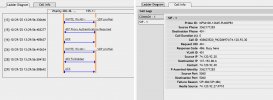
Ultimately, the problem was traced to the PBX blacklisting the Vitelity server IP address 64.2.142.90 due to "too many failed authentications." We’ve never encountered anything like this before:

The question is: does anyone have any ideas about what could have triggered such a stream of failed authentication attempts? Vitelity support stated: "We wouldn't be the ones to initiate such a communication. 64.2.142.90 will never send you any messages that would require authentication. Not for any reason."
An interesting situation occurred Thursday morning: our 3CX v20 (Update 7) stopped accepting incoming calls. Instead of connecting, callers received busy tones, and there were no entries in the PBX logs. The Vitelity-configured SIP trunk showed as "Registered," and outbound calls were working without issue.
Ultimately, the problem was traced to the PBX blacklisting the Vitelity server IP address 64.2.142.90 due to "too many failed authentications." We’ve never encountered anything like this before:
The question is: does anyone have any ideas about what could have triggered such a stream of failed authentication attempts? Vitelity support stated: "We wouldn't be the ones to initiate such a communication. 64.2.142.90 will never send you any messages that would require authentication. Not for any reason."