Voice Quality issues

vivasupport

Silver Partner
Advanced Certified
Joined
Mar 5, 2020
Messages
27
Reaction score
2
One of the customers recently hosted in version 20.0 Update 7, we are receiving multiple voice quality complaints from them, specifically regarding background noise and low volume at the beginning of the call. We have shared MTR logs from the customer’s end for your reference. Could you please review the issue and keep us updated on the findings?
 

Attachments

Hosted by 3CX?

Have you tried utilising the monitor call quality feature?

does this replicate in a call recording?
 
Hello,

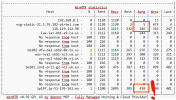
Viewing the MTR logs, this does not look any good.
The Ping has dramatic result, especialy between: nsg-static-21.5.76.182-airtel.com and 116.119.112.98.

1757676785056.png
( From New Delhi, India on "airtel.com", to Paris France, To London United Kingdom and back )

Paulo
 
Last edited:
@paulo and @Alphabetic . We have informed to customer but the ISP is no accepcting the fault. Customer blaming the system, that they earlier using v18 without any issues but V20 not like that and the new deskop app are not comfortable.

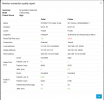
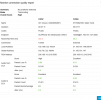
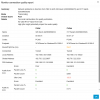
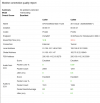
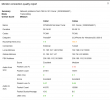
I have shared call monitoring for your reference. In the call recordings seems fine but some background noise for few sec.
 

Attachments

  • mon1.PNG
    mon1.PNG
    36.7 KB · Views: 16
  • mon2.PNG
    mon2.PNG
    35 KB · Views: 14
  • mon3.PNG
    mon3.PNG
    41 KB · Views: 15
  • mon4.PNG
    mon4.PNG
    33.1 KB · Views: 16
Dear 3CX Team,

Any update on the above tread?

"We have informed to customer but the ISP is no accepcting the fault. Customer blaming the system, that they earlier using v18 without any issues but V20 not like that and the new deskop app are not comfortable.

I have shared call monitoring for your reference. In the call recordings seems fine but some background noise for few sec."
 
Hello,

Was the v18 also hosted (was it a system upgrade or it's a new install)? And if yes, was it hosted in the same region (country choice at deployment time)?

Thanks,
KS
 
Dear KS,

No, the V18 is on Promise and was installed in the UK region a few years ago. Could you please confirm how V18 is still functioning and whether it is still in use?


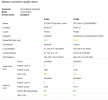
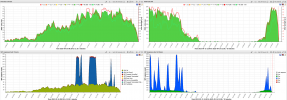
We have also shared a few monitoring reports for your reference. Could you kindly check and confirm if there are any issues with the hosted version?
 

Attachments

  • oscar.PNG
    oscar.PNG
    35.3 KB · Views: 6
  • oscar2.PNG
    oscar2.PNG
    32.3 KB · Views: 6
@vivasupport do a trial account of voipmonitor.org to help, I had similar issues and issues where I was not getting audio from the trunk provider. Just do the 30 day trial and you can get the pcap per call basis it can help with not needing to filter out so much.

1758017856392.png
 
Dear Bruce,

Thank you for your help. We will check and keep posted.
 
Hi,

The calls are being routed from the UK to a network in a completely different continent. The transit time will vary a lot based on interconnections between two such remote networks. Choosing a region for 3CX hosting closer to where your agents are would yield better audio performance between the PBX and them, otherwise you will need to accept that call quality will fluctuate.

It is a point of note that you also seemed to have deployed this instance just as this happened:
https://www.reuters.com/world/middl...-internet-across-asia-middle-east-2025-09-07/
which can easily be what's making the difference.
 
  • Like
Reactions: jed
Dear KS,

Still, We are receiving same reported from the customer. Could you please help us choose a region for hosting and help us to process the request the request?
 
You can if you wish perform the move yourself, or open a support ticket and ask for assistance with the move.

If you choose to do this on your own, migrating a 3CX hosted instance to a different region involves a few critical steps:

1. Backup Your Current Configuration:
– Before moving your 3CX instance, ensure that you have a full backup of your current system.
– Include all critical data: License Key Information, FQDN, etc.

2. Change the License Key Region:
– You will need to entirely shut down your current instance.
– Then, you can proceed to change the region setting within your license management, which indicates where you want your instance to be moved.

3. Re-deploy the 3CX Instance:
– Access the 3CX Customer Portal.
– Find your instance under "My Systems," select it, and choose the option to redeploy in the new region.
– Upload the backup you previously created to restore your system to its former configuration.

4. Verify All Services:
– Once the 3CX instance is up and running in the new region, verify that all services such as SIP trunks, SBCs, and IP phones are connecting as expected.
– You might need to provide your new IP to the SIP Trunk provider if they have IP restrictions.

These general steps should help in moving your 3CX hosted instance to a different geographical region. Please make sure to verify each step according to your specific 3CX setup and licensing details.
 

Members Online Now

Forum statistics

Threads
111,832
Messages
589,284
Members
164,662
Latest member
DejanMDS