


- Joined
- Dec 11, 2020
- Messages
- 65
- Reaction score
- 37
hello,
I've updated my Voice message to text message CFD App. With this app, a caller can record a message that will be transcribed and sent as a text message to numbers you specify in a txt file. This CFD app uses the https://www.clicksend.com API to send the message. You can specify a customer audio message when the caller connects, and use a simple .txt file to store the numbers you want the message to send to.
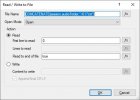
The .txt file needs to be saved in the Callflows folder for the app , i.e. "C:\ProgramData\3cx\Instance1\Data\Ivr\Prompts\Callflows\jltest2\617.txt"
I named it as the extension it was used for. This is in the "Disconnect Handler Flow" tab, in the "ReadWriteFile1" option.
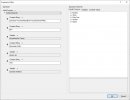
You'll need to have a ClickSend account, and then you can put your API info in the 'HTTP Request:" Option, click the expression builder icon for teh "Content", and modify the first Constant string with your user name and API key.
I've updated my Voice message to text message CFD App. With this app, a caller can record a message that will be transcribed and sent as a text message to numbers you specify in a txt file. This CFD app uses the https://www.clicksend.com API to send the message. You can specify a customer audio message when the caller connects, and use a simple .txt file to store the numbers you want the message to send to.
The .txt file needs to be saved in the Callflows folder for the app , i.e. "C:\ProgramData\3cx\Instance1\Data\Ivr\Prompts\Callflows\jltest2\617.txt"
I named it as the extension it was used for. This is in the "Disconnect Handler Flow" tab, in the "ReadWriteFile1" option.
You'll need to have a ClickSend account, and then you can put your API info in the 'HTTP Request:" Option, click the expression builder icon for teh "Content", and modify the first Constant string with your user name and API key.


