Warning! Your license key is not activated ! Go to Admin > System > Refresh License Key

Sergey Yezhov

Premier Customer
Joined
May 21, 2024
Messages
13
Reaction score
1
Hello everyone,


I have a 3CX server with an existing license.
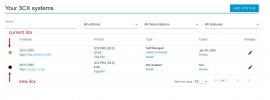
I log in to the 3cx.com dashboard and add another 3CX system — a server running on Linux.
When I upload the configuration file for the new server, the process starts but at the end it shows an error.


After that, I can no longer access the server via IP and port 5001. The server responds to ping, but the web page does not open. Because the process ended with an error, the 3CX server does not function properly.


How can I solve this problem?

 

Attachments

  • Скриншот 02-12-2025 144231.jpg
    Скриншот 02-12-2025 144231.jpg
    31.1 KB · Views: 12
  • Скриншот 02-12-2025 144728.jpg
    Скриншот 02-12-2025 144728.jpg
    42.5 KB · Views: 12
Hello, have you tried going to the server IP using the normal HTTPS port, 443? Unless you chose to use 5001 new installs default to 443.
 
Hello, have you tried going to the server IP using the normal HTTPS port, 443? Unless you chose to use 5001 new installs default to 443.

Thank you for the reply.
Yes, of course I tried both HTTP and HTTPS — neither of them opens. It looks like the installation process ended with an error, so the system didn’t finish installing properly. The server itself is alive — I can connect to it via SSH using its IP address.
But nothing opens in the browser. I don’t know why.
 
How was the installation done? Our ISO on a physical server, marketplace deployment? Some other cloud provider?

a) try the installation from scratch? This might be the quickest way to get operational.

b) Check log files for any relevant lines
/var/log/syslog
/var/lib/3cxpbx/Data/Logs (any file here)

c) open a support ticket.
 
How was the installation done? Our ISO on a physical server, marketplace deployment? Some other cloud provider?

a) try the installation from scratch? This might be the quickest way to get operational.

b) Check log files for any relevant lines
/var/log/syslog
/var/lib/3cxpbx/Data/Logs (any file here)

c) open a support ticket.

Thank you for your response.

I get the ISO image from the website shown in the screenshot, from my account on 3cx.com.

a) Yes, I am installing everything from scratch.

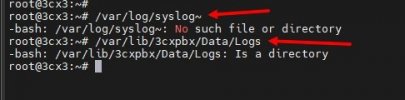
b) I have attached the screenshot.

c) Unfortunately, I cannot open a support ticket because it requires an additional payment.
 

Attachments

  • Скриншот 02-12-2025 171110.jpg
    Скриншот 02-12-2025 171110.jpg
    14.9 KB · Views: 10
Hi, at the end of syslog you have a ""~", remove that

/var/lib/3cxpbx/Data/Logs is a directory, you need to go to it and list to see what files are available.

Of course if the fresh install works you do not have to review any logs.
 
  • Like
Reactions: KyriacosS_3CX
Thank you everyone for the help.
I managed to install it.
The problem was with the DNS server. When the server is being installed, it tries to reach the internal DNS server. I had a small issue in FortiGate. After fixing that, everything worked.


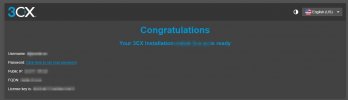
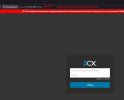
And most importantly — to access the 3CX management console locally (as shown in my screenshot, found it by accident), you don’t need to enter ports 5001 or 5000. The page opens without specifying a port.


The ticket is resolved, you can close it.

Best wishes to everyone!**:)
 

Attachments

  • Скриншот 03-12-2025 162022.jpg
    Скриншот 03-12-2025 162022.jpg
    24.9 KB · Views: 5
  • Скриншот 03-12-2025 161621.jpg
    Скриншот 03-12-2025 161621.jpg
    34.5 KB · Views: 6
  • Like
Reactions: KyriacosS_3CX
"Its always DNS!"... ;-)

The standard Port is 443 on new installs if you dont change it to something else.
 
  • Like
Reactions: KyriacosS_3CX
The standard Port is 443 on new installs if you dont change it to something else

Unfortunately, not exactly.
During the initial installation locally on the server, port 80 (HTTP) is used — as you can see in the screenshot. You can also access it via port 443 (HTTPS), and both options work.
 
V20 isnt used with ip anymore, it should always be over fqdn. Sure you can reach the pbx locally by http or https.
 
  • Like
Reactions: KyriacosS_3CX

Latest Posts

Forum statistics

Threads
111,953
Messages
589,916
Members
164,851
Latest member
DrunkeMeister