Webhook (or alternative) for missed/incoming calls?

Status
Not open for further replies.

marama

Free User
Joined
Feb 22, 2019
Messages
21
Reaction score
1
Hi!
Each time we have an incoming call (currently using call queues and ring groups, our slack channel or database should be aware of this call so it can perform futher actions.
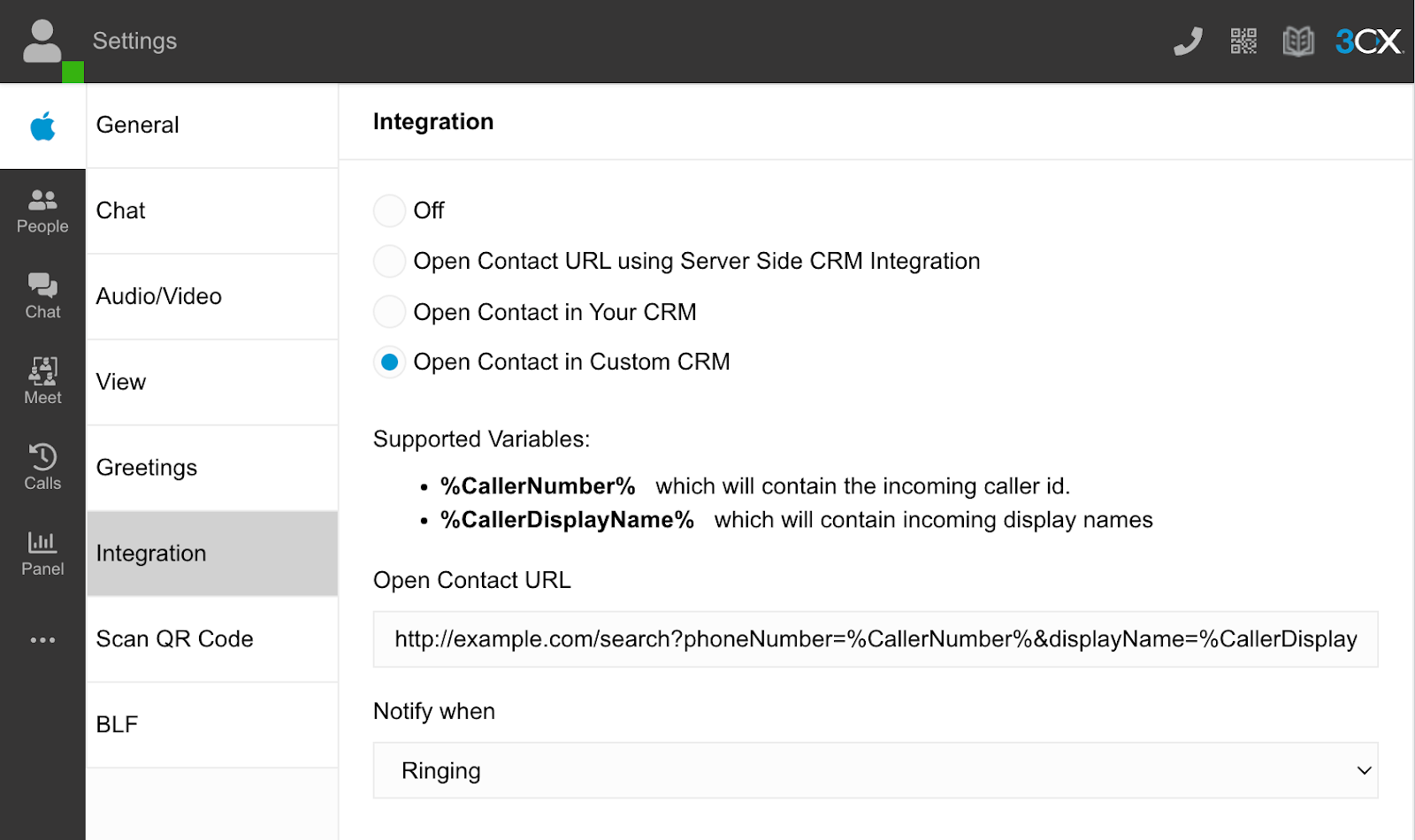
I thought the esaies way to solve this would be by using webclient iuntegration with "Auto launch a Custom Contact URL using variables" setting.
But for some reason, this doesn't seem to work for me. I'm testing one of those postbin services to test it, but when I call the number, nothing happens. Our 3cx is on-premise, firewall should be open for outgoing TCP http/s requests. Is there any way I can check the log on 3cx and see if/why it is failing? Can I somehow check if DNS request is failing?

What would be the alternative approach? We're still waiting on REST API, right?
Would Database CRM integration help? To have some Azure DB database log all the calls?

EDIT: actually, I'm not even sure the settings are getting saved. When I open the incognito windows and open the settings, I don't see the information I set. Only the default settings. On the non-incognito window, I see the info I set. Is there even a save button on this setting page, or it should auto save? Same behavior in Chrome and in Edge. Me confused, why would incognito show other data then non-incognito?
 
Last edited:
You can create your own CRM template and have it use the ReportCall and lookup features. The lookup can return a ContactUrl (just disable the sync to phonebook option) and that URL will be opened on answering the call.

The ReportCall can then be used at the end of the call to log more info with it.

https://www.3cx.com/docs/crm-integration/

The REST API isn't ready yet, and we're still unsure what features it will have.
 
Thank you!
But that does sound a bit of an overkill.
So I just want to call a URL when the extension is in ringing state. I was hoping the integrations setting in webclient would be sufficient, if it would let me save the setting.
I did try to follow your instructions, but didn't get far (probably due to my low knowledge).
Should I use template wizard as described in the link? Wizard started asking some questions I couldn't give an answer to.
 
@marama - yes this is possible in the webclient. You can specify an HTTP URL with parameters. In update 5 this function will be greatly improved and you can trigger the HTTP call upon an incoming call.

qq6mNy3uNcaBCcxahzuMcWg10v_wpox8gcID3Ue5UyRhRX4SsKRDxqlYB-OPN6slL7qjR7f4z6UsCTjSjzDGbXbkruB7qcX3tMwjdQYkVyC1VzTAsuA0UWiWVhvtCRj2IZvQqt02QGKkk1uupgJjPQ
 
  • Like
Reactions: Evolute IT
@marama - yes this is possible in the webclient. You can specify an HTTP URL with parameters. In update 5 this function will be greatly improved and you can trigger the HTTP call upon an incoming call.

qq6mNy3uNcaBCcxahzuMcWg10v_wpox8gcID3Ue5UyRhRX4SsKRDxqlYB-OPN6slL7qjR7f4z6UsCTjSjzDGbXbkruB7qcX3tMwjdQYkVyC1VzTAsuA0UWiWVhvtCRj2IZvQqt02QGKkk1uupgJjPQ
I'm on version 18.0 (Build 314)/(Update 2), and I know about this setting, but I can't seem to be able to save it, and I guess that's the reason it's not working. Do you have a save button, or should it save automatically?
Maybe I'd need to upgrade to newer version, but I was hoping there would be no need for that as the rest is working fine, and I've never done it so far.
 
Oh, I'm afraid I got the whole webclient thing wrong. Seems like the data is really stored in browser cache only, and the URL is triggered only if the webclient is running. That's totaly not what I want, I need a server side solution, as we don't use webclients. So is the solution with templates the way I need to follow?
 
  • Like
Reactions: Evolute IT
Oh, I'm afraid I got the whole webclient thing wrong. Seems like the data is really stored in browser cache only, and the URL is triggered only if the webclient is running. That's totaly not what I want, I need a server side solution, as we don't use webclients. So is the solution with templates the way I need to follow?
Yes and it works with the DesktopApp too but has to be configured locally. It's stored in the localStorage (not exactly the cache.)
 
Yes and it works with the DesktopApp too but has to be configured locally. It's stored in the localStorage (not exactly the cache.)
We're not using desktopapp either, it's grandstream hardware and forwarding to cellphones.
Would Flow Designer be able to call a URL?
 
We're not using desktopapp either, it's grandstream hardware and forwarding to cellphones.
Would Flow Designer be able to call a URL?
The flow designer can but it's not the same (you'll also need a Pro license.)

The CFD can flow a call, not monitor one. So the call HAS to go through it for the CFD to know and interact with it.

The DesktopApp can control the Grandstreams phones by the way. It's not just a softphone.
 
we have made our own webhook generator, but it's necessary root access to 3CX server https://creomate.com/3cx-webhook/
Hi!
Each time we have an incoming call (currently using call queues and ring groups, our slack channel or database should be aware of this call so it can perform futher actions.
I thought the esaies way to solve this would be by using webclient iuntegration with "Auto launch a Custom Contact URL using variables" setting.
But for some reason, this doesn't seem to work for me. I'm testing one of those postbin services to test it, but when I call the number, nothing happens. Our 3cx is on-premise, firewall should be open for outgoing TCP http/s requests. Is there any way I can check the log on 3cx and see if/why it is failing? Can I somehow check if DNS request is failing?

What would be the alternative approach? We're still waiting on REST API, right?
Would Database CRM integration help? To have some Azure DB database log all the calls?

EDIT: actually, I'm not even sure the settings are getting saved. When I open the incognito windows and open the settings, I don't see the information I set. Only the default settings. On the non-incognito window, I see the info I set. Is there even a save button on this setting page, or it should auto save? Same behavior in Chrome and in Edge. Me confused, why would incognito show other data then non-incognito?
 
  • Like
Reactions: Ubiratan Martins
I'd build a CRM integration that runs after the missed call section and triggers the external event.

I sent an SMS via Twillio to the customer informing them an agent would call them back and then update a DB with missed calls.
 
  • Like
Reactions: Evolute IT
I'd build a CRM integration that runs after the missed call section and triggers the external event.

I sent an SMS via Twillio to the customer informing them an agent would call them back and then update a DB with missed calls.
Can you please explain a little more about this? Before we moved to 3cx we did the same. The previous provider supported webhooks, we were able to trigger a message via twilio when the calls are missed, disconnected or hung up that 'Someone will reach out to them asap' - something like that. 3cx not having support for rest api / webhooks really frusrates me. All I need is a post request with caller ID & call status sent back for processing.
 
I understood webhook event notifications were on the roadmap for a future release. Does anyone have any info or updates they might share? Our customers need an HTTP notification upon an incoming call passing CID. Is this now supported? Or is it still recommended to use the CRM template?
 
I understood webhook event notifications were on the roadmap for a future release. Does anyone have any info or updates they might share? Our customers need an HTTP notification upon an incoming call passing CID. Is this now supported? Or is it still recommended to use the CRM template?
Depends on if you need the agent extension or only the CID.

You can use the CRM integration, or the Open Custom URL in the app, under ... > Settings > Integration.
 
Depends on if you need the agent extension or only the CID.

You can use the CRM integration, or the Open Custom URL in the app, under ... > Settings > Integration.
Just CID. Is it a web app or an installed application on the desktop?
 
Status
Not open for further replies.