WebMeeting audio echo and noise impossible unless all participants have heads sets

Status
Not open for further replies.

sst_ekell

Bronze Partner
Intermediate Cert.
Joined
Jun 29, 2018
Messages
33
Reaction score
11
The most common complaint I get from our users is that there is an impossible amount of echo, feedback, and noise on the audio of the WebMeetings.

The only way to get good audio is to unmute one participant at a time or have ALL participants have a headset on.

Neither situation is ideal.

When we tell moderators to mute all participants as they come in and explain to participants in the chat that they have to unmute to be heard, we get complaints that "so and so couldn't be heard when they spoke."

When we explain that for WebMeetings, it is best to make sure all participants are using a headset and not their laptop speaker and mic. We have WebMeetings with a variety of different types of users and folks joining from outside organizations - we can't mandate headsets for everyone - it is impractical.

And the biggest challenge I get from clients is "Zoom can do it". They say "I don't need a headset for Zoom meetings".

And you know what, they are right. Using Zoom is close to flawless. I can join with whatever setup I have, including using my laptop speaker and mic, and the experience and audio is pretty flawless.

Is there any path for 3CX WebMeeting to get to that level of functionality? Meaning, any user can join with any setup (even using their laptop mic / speakers) and it won't cause feedback loops, echo, or noisy audio?
 
Hi,

No clean solution, unless you use a headset this cannot be entirely avoided.
Normally echo cancellation is handled by the browser and this is where webmeeting runs.
Zoom requires that you run their application so this is a different approach which requires extra software in order to do that, whereas 3CX will run in a browser without any additional requirements.

The only easy path is to ask them to wear headphones, or pair their wireless earpods which are quite popular these days.

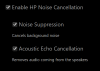
The browser cannot echo-cancel everything of course, and is reliant on your own hardware to some degree. Most modern laptops do have echo cancellation and noise suppression built in to their driver and the browser has automatic gain control that reduces your mic if you set it too high.

ie. an typical mid-range office HP laptop from 2015 has this as a minimum:
1594726043369.png

Your best bet is to have users wear headphones at the very least, and use the built in mic of their laptop rather than ask them to tick the boxes.

Hope this clears things up a bit, even if not a perfect solution.
 
I'm not unclear. I'm crystal clear on the issue and you are reiterating the problem in your post.

Users either have to have headphones on or be able to fix/configure their system in a way that suppresses feedback.

That makes the 3CX Web Meeting fundamentally less functional than Zoom.

My users are refusing to use the Web Meeting portion of 3CX and going out and purchasing Zoom subscriptions. Which diminishes the value prop for the 3CX system.

If having an application produces better functionality and better audio, then that's the way to go. Is there anything in the road map to address this?
 
  • Like
Reactions: KB8DOA
No, there's nothing on the roadmap at the moment and I don't think there will be because we don't plan on running software on your PC like Zoom does (and that was the goal originally, to keep it entirely in the browser and not dependent on software installation)
 
You can't mandate headsets for meeting attendees from other organizations. And they are all so used to using Zoom where the audio "just works".

I think having the best customer experience should be the goal. And the audio issues are a major problem that makes the 3CX Web Meeting unusable for most companies.

If the audio issues can't be solved in the browser then I would like to see a Web Meeting app on the roadmap.
 
There are mobile apps if that's what you mean.

https://apps.apple.com/us/app/3cx-webmeeting/id1039756959

https://play.google.com/store/apps/details?id=org.tcx.webmeeting&hl=en_US

If you mean a Windows app, they do have one, but it doesn't have the web meeting functionality. Maybe that's something 3cx could consider.

I think the audio issues are a real issue with the current system. At a minimum, making the dial-in experience better would be a huge boost. Just prompting participants when they join with a "Computer Audio" or "Dial-in/me" option would be a big step forward.
 
I think the audio issues are a real issue with the current system. At a minimum, making the dial-in experience better would be a huge boost. Just prompting participants when they join with a "Computer Audio" or "Dial-in/me" option would be a big step forward.

Yes, having a join by phone option would be a big step forward!

Maybe this is a setting I've overlooked, but ideally - if no headphone-less audio improvements are coming - I should be able to set the audio options on a meeting so I can disable web based audio all together and force a dial-in.
 
  • Love
Reactions: coreybrett81
Status
Not open for further replies.

Forum statistics

Threads
111,973
Messages
590,078
Members
164,896
Latest member
sameage