


- Joined
- Nov 30, 2022
- Messages
- 73
- Reaction score
- 38
Hi, Each time when I am in a call my microphone level is automatically lowered and it is very annoying.
I've done some research and I've found out that in in the code of the Desktop App the "autoGainControl" option for WebRTC calls has been enabled. This means that the microphone level will be automatically adjust.
In this jsfiddle link you can test it out by changing in the javascript tab the value "autoGainControl: false" to "autoGainControl: true".
https://jsfiddle.net/d2ka93e1/1/
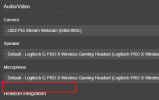
I would like to see an option in under the Audio/Video to enable or disable "Automatically Microphone gain".
I've tested it for the Windows Desktop App and the 3CX Webclient.
I've done some research and I've found out that in in the code of the Desktop App the "autoGainControl" option for WebRTC calls has been enabled. This means that the microphone level will be automatically adjust.
In this jsfiddle link you can test it out by changing in the javascript tab the value "autoGainControl: false" to "autoGainControl: true".
https://jsfiddle.net/d2ka93e1/1/
I would like to see an option in under the Audio/Video to enable or disable "Automatically Microphone gain".
I've tested it for the Windows Desktop App and the 3CX Webclient.


