webservice

@RafalR
that fixed it just added menu component fir second and the flow works great after that Thanks!!
 
@RafalR
that fixed it just added menu component fir second and the flow works great after that Thanks!!
This is not a proper solution in my opinion. That will add an extra timeout after the prompt is played. And this solves the issue because the Menu waits for DTMF, so it plays the prompt. However, just setting the property AllowDtmfInput to false will do the same without the overhead of the Menu.
 
Since I have the attention of the top experts on this forum :D I’d like to take this opportunity to clarify how component execution works in CFD v20.
The easiest way to explain this is with an example. I am attaching a very simple CFD project.

The script contains a loop that is supposed to execute 10 times. Inside the loop, we play an audio file (about 11 seconds long) and add an entry to a .txt file. Then repeat.

The problem is that as soon as the call connects, the .txt file immediately contains all 10 entries. The CFD script doesn't wait for the audio playback to finish before moving to the next component. It just rushes through the subsequent steps. This creates a situation where the .txt file shows 10 completed iterations, even though, in reality, it executed it only one.

Is this the intended behavior of CFD, and was it the same prior to v20? And how can I fix this without using the Menu component as a workaround?

CFD project

Virus total URL scan of that CFD project
 
Is this the intended behavior of CFD, and was it the same prior to v20? And how can I fix this without using the Menu component as a workaround?
look - after the initial post the first answer:
Was the option 'Accept DTMF Input' disabled in the CFD module?
in your project: no, it's enabled
disable it

because:
https://www.3cx.com/community/threads/webservice.136000/post-651245

... and: this option is there in the CFD since many years and work always the same way.

Maybe other problem, maybe other solution, but pls. look at the latter answers above.
I'm sure you did not.
 
Last edited:
Indeed, that sorts it all out. Thanks
 
@RafalR, you should pay attention to what we answer, otherwise these threads never end. You make a question, we give you the solution, you ignore it and then ask again?
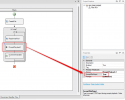
1766065825972.png

This is what @fxbastler and myself told you to do. You must set that to False in order to play the prompt immediately, otherwise the prompt is queued, and played when there is a Menu / User Input, or when the call ends. This is by design, it has always been like this.
 
@edossantos_sipcaller I am not thread owner. I just offered my workaround (which is pointless now) and then asked just once about the specific situation with a loop. I didn't expect that PlayBack component directly affects things like loop. Sorry for taking your time.
 
@edossantos_sipcaller I am not thread owner. I just offered my workaround (which is pointless now) and then asked just once about the specific situation with a loop. I didn't expect that PlayBack component directly affects things like loop. Sorry for taking your time.
No problem mate, just wanted to mention that the solution was already in the thread.

All the best.
 

Forum statistics

Threads
111,849
Messages
589,354
Members
164,683
Latest member
sjacquart