Well this is odd....

Status
Not open for further replies.

ElementalWindX

Bronze Partner
Advanced Certified
Joined
Oct 24, 2018
Messages
367
Reaction score
40
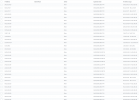
While doing our security audits on all our pbx's I came across one that had a bunch of IP's added to it's allowed list under the ip block list. This particular PBX does have an additional admin besides us and I'm thinking the account got compromised. I've changed her password as a precaution. Some of my PBX's are open to the world (for the moment) and I'm guessing this was at the beginning phase of about to be used for something bad. I don't see any added extensions though and the call logs/rules aren't changed allowing anyone to call outside the US.

Anybody have any input on this?

Thanks.
 

Attachments

  • wtffffffff.png
    wtffffffff.png
    67.2 KB · Views: 17
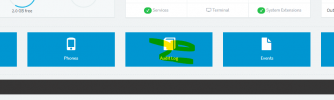
The audit log should show you who and what IP the change was made from. Then ask the other admin why if it matches up.
 
where specifically do I go to find that?
 
1635284670822.png

V18 though

:5001/#/app/audit/all is the URL
 
And only if they were added after the audit log feature was added.

Anything in the description field?
 
While doing our security audits on all our pbx's I came across one that had a bunch of IP's added to it's allowed list under the ip block list.
I believe the default date is 20 years from "today" so that implies they were added in 2018?
Mental note: update all those dates in 15 years...
 
Ah yea this particular PBX is stuck on v16, been trying to figure out how to get it onto v18 for the past hour. One of my last ones left on v16.
 
Ah yea this particular PBX is stuck on v16, been trying to figure out how to get it onto v18 for the past hour.
If it's a Debian 9 machine running 3CX v16.0.8.9, you should have an option to update to v18 from within the Management Console >> Updates section. Bear in mind that this will also upgrade the OS from Debian 9 to Debian 10.

If this is a Windows machine however, you can only upgrade by uninstalling and then re-installing meaning you will need to take a backup and move it away from the machine prior to uninstalling.
 
Thanks Chris. I've gotten it updated. I'll keep an eye on it.
 
  • Like
Reactions: ChrisC_3CX
Status
Not open for further replies.

Forum statistics

Threads
111,975
Messages
590,085
Members
164,904
Latest member
gdstratton