What's the best way to install V18 on Self hosted Debian which does not allow ISO upload?

Status
Not open for further replies.

fgc92210

Customer
Advanced Certified
Joined
Oct 28, 2020
Messages
185
Reaction score
29
My customers do not want to have their own cloud account.
Therefore, we run their clouds. We have been trying to push 3cx here and there, but it's always challenging because different reasons.
Lately, we were asked if we could run 3CX for a customer in our Digital Ocean cloud. So I've looked online, only to find out that the package installation is no more supported.
My customer does not want to create a DO account. DO Won't accept the 3CX iso. So am I supposed to install the way I remember, by downloading from downloads-global.3cx.com/downloads and try to remember how to install a non supported way of installing? This has been really challenging. No clue who's the project manager in charge - probably in Europe - , but PLEASE release Debian install officially through packages.
 
Saw that.
The issue is "
  1. If you do not have a 3CX customer account, create one here. If you already have an account, login to the customer portal and select “Install” or “Reinstall” if previously already deployed.
Does it mean I need to go and create a new customer account every time?
In which case, it won't let me use the same email for our tech support.
Is this the only way?
 
Every license has a customer account, you don't need to create one. Additionally, if you are the linked partner, you already have access to do this.
 
The URL you mentioned says that a customer account needs to be created. Name, email.
Oh well, I'll figure it out. THanks
 
The URL you mentioned says that a customer account needs to be created. Name, email.
Oh well, I'll figure it out. THanks
It's as @cobaltit said, if the License Key you'll be using is already registered to an email address, then that email address already has a corresponding 3CX Customer portal account. If you know what the email address is just try logging in here. Use "Forgot your Password?" if you do not have the password and it should send an email to the email address of the account(The same one the License Key is registered to).
 
  • Like
Reactions: fgc92210
My customers do not want to have their own cloud account.
Therefore, we run their clouds. We have been trying to push 3cx here and there, but it's always challenging because different reasons.
Lately, we were asked if we could run 3CX for a customer in our Digital Ocean cloud. So I've looked online, only to find out that the package installation is no more supported.
My customer does not want to create a DO account. DO Won't accept the 3CX iso. So am I supposed to install the way I remember, by downloading from downloads-global.3cx.com/downloads and try to remember how to install a non supported way of installing? This has been really challenging. No clue who's the project manager in charge - probably in Europe - , but PLEASE release Debian install officially through packages.
If you do a search on the forum you'll see this has been posted previously, including several times from me too.

Although not supported, this works.

Code:
wget -O- http://downloads-global.3cx.com/downloads/3cxpbx/public.key | sudo apt-key add -
echo "deb http://downloads-global.3cx.com/downloads/debian buster main" | sudo tee /etc/apt/sources.list.d/3cxpbx.list
echo "deb http://downloads-global.3cx.com/downloads/debian buster-testing main" | sudo tee /etc/apt/sources.list.d/3cxpbx-testing.list
sudo apt update
sudo apt install net-tools dphys-swapfile
sudo apt install 3cxpbx
 
Just to be clear and hopefully avoid any future misunderstandings, even though manual installation as per above may work, it's not just the particular installation method that's not supported, but it will also render the whole 3CX instance deployed using this method an unsupported configuration as well.
 
Just to be clear and hopefully avoid any future misunderstandings, even though manual installation as per above may work, it's not just the particular installation method that's not supported, but it will also render the whole 3CX instance deployed using this method an unsupported configuration as well.
ok. I'm going to try one more time through the DO way, see if I can figure it out.
 
  • Like
Reactions: ChrisC_3CX
ok. I'm going to try one more time through the DO way, see if I can figure it out.
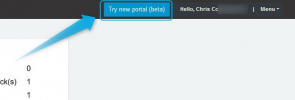
Great, just bear in mind that for DO you'll need to use the new customer/partner portal so make sure to click on "Try new portal":
1638353930736.png

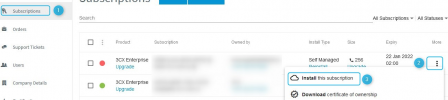
and then "Subscriptions" >> "More" >> "Install this subscription":

1638354093338.png
 
@ChrisC_3CX - Thank you. This is what is missing in the doc (new portal).
 
@ChrisC_3CX

Just tried it tonight, and got an error message saying "No regions were found. This commonly indicates that you have not enabled "Compute Engine" in this project or you have insufficient permissions to administrate those."

I chose "Reinstall" on this particular instance.
Then I used one of the NFR licenses which are currently unused, and used the "Install".
Same error for both. The API Token as Read and Write rights.
 
@fgc92210 during installation did you upload a backup on the Deployment Wizard ? If so, do me a favor and dont, deploy the PBX and do a post installation restore of the backup.
Do you still have the same issue ?
 
@fgc92210 during installation did you upload a backup on the Deployment Wizard ? If so, do me a favor and dont, deploy the PBX and do a post installation restore of the backup.
Do you still have the same issue ?
Yes I did use the backup on the deployment.
I will try again as a fresh install (no backup), then restore the backup, and will let you know how it went.
 
  • Like
Reactions: ChrisC_3CX
Yes I did use the backup on the deployment.
I will try again as a fresh install (no backup), then restore the backup, and will let you know how it went.
Same issue with a NFR license: I chose Install, no backup, setup demo domain name, API Keys for Digital Ocean, then I got the same error message.
 
Same issue with a NFR license: I chose Install, no backup, setup demo domain name, API Keys for Digital Ocean, then I got the same error message.
Any work around for this?
I get the same error message from my Partner Panel, regardless if I try to install new or reinstall, with or without backup, on Digital Ocean..
 
@fgc92210 can you please check that your API Key does not have any spaces in the middle ?
If you have it in a browser stored, copy it and paste it in Notepadd++.
Also can you PM me to check this together ?
 
NO space. Will PM You.
 
  • Like
Reactions: NikosT_3CX
Before I was going to send you a message, I created a new API Key.
The new one had a different number of chars, comparing to the first one I used.
I used POSTMAN and ran a "droplets" API Call on my Digital Ocean to make sure it was working:
- The new one worked
- The previous one I used for 3CX sent me back "Unauthorized / Unable to authenticate you".

Therefore, I most likely made an error when I was saving the key. Issue was on my end.
Thank you
 
@fgc92210 No problem at all, we are glad all is working as expected !!
Hope you will enjoy your new installations :)

One tip : If you plan to install a lot of machines, go to DO Account, Control Panel, Settings , Droplet Limit and request Increase Droplet Limit from more than 10.
If you dont then Deployment Wizard on our side will give you this waring when you hit this limit so better do it from now :)
 
Status
Not open for further replies.

Forum statistics

Threads
111,974
Messages
590,083
Members
164,901
Latest member
Silent_Guru