WhatsApp Inbound Calls

Kevin Attard Compagno

Staff member
3CX Support
Joined
Nov 23, 2006
Messages
549
Reaction score
532

Guided installation of your WhatsApp SIP Trunk.​

3CX V20 Update 8 now brings WhatsApp Inbound calls to your PBX, expanding on the messaging integration. Reach out to the millions of WhatsApp users worldwide by adding WhatsApp SIP Calling to your PBX - effectively giving callers the equivalent of FreePhone calling from anywhere o...
Continue reading the Original Blog Post.
 
Last edited by a moderator:
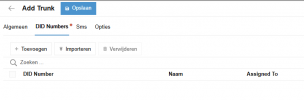
Been trying to configure it, all goes well, until I need to import the template and try to save it.
I'm using the provided template from the manual.
Then it keeps on pointing me to the DID numbers page:

1770819546368.png
No matter what I fill in there, it doesn't allow me to save the configuration
Any pointers in right direction? :)

UPDATE: Nevermind I used the same main trunk number as for my Messaging. Which resulted in a conflict as this was already in use.

Will we be able to have the messaging and the calling on the same Meta Phone number?
 
Last edited:
Yes, you can, and in fact setting up the messaging for the number is a prerequisite for setting up WhatsApp SIP.
 
Yes, you can, and in fact setting up the messaging for the number is a prerequisite for setting up WhatsApp SIP.
Whatsapp messaging is working like a charm, but if I tried to add the template with the same nummers main trunk number then. The DID numbers tab is highlighted and I'm stuck. It simply does not allow me to save the trunk. :confused:
 
  • Like
Reactions: JorisC
I have it working just fine, and I've set it up multiple times.

First I set up the messaging part, with the main trunk number (for example) +35799887766.
Next I set up the calling part, with the main trunk number IDENTICAL - +35799887766.

Are you using the same number format?
 
I have it working just fine, and I've set it up multiple times.

First I set up the messaging part, with the main trunk number (for example) +35799887766.
Next I set up the calling part, with the main trunk number IDENTICAL - +35799887766.

Are you using the same number format?

@Kevin Attard Compagno thanks for the patience showed. :)
I've retaken all my steps, and instead of making a copy paste. Retyped it manually.
Looks like a trailing space was added in my copy. this caused the error.

:cool:Working like a charm as I initially expected from you guys!!
 
I tried adding calling to my WhatsApp account, which has been active and working in 3CX for a few years.


I followed the provided guide, but I still get the following error in step 2:


{
"error": {
"message": "(#100) One feature setting must be specified",
"code": 100,
"type": "OAuthException",
"fbtrace_id": "A1Lzl1nrA7o6QQCKvrxh_W4"
}
}


What could be causing this issue?
 
Hello everybody,

We have just configured our 3CX to receive SIP calls from WhatsApp. Great functionality.
Our question is about security, we have the port 5061 blocked in our firewall and only allowed to our providers.
To receive calls from WA we have had to disable the block 5061 rule.
Anyone know the public IP addresses of wa.meta.vc to create and allow rule in the firewall?

Thanks in advance,
Joel M.
Vertical Ibérica
 
  • Like
Reactions: NatalyS_3CX
Ciao a tutti,

Abbiamo appena configurato il nostro 3CX per ricevere chiamate SIP da WhatsApp. Ottima funzionalità.
La nostra domanda riguarda la sicurezza: abbiamo la porta 5061 bloccata nel nostro firewall e consentita solo ai nostri provider.
Per ricevere chiamate da WA abbiamo dovuto disattivare la regolazione del blocco 5061.
Qualcuno conosce gli indirizzi IP pubblici di wa.meta.vc per creare e consentire regole nel firewall?

Grazie in anticipo,
Joel M.
Verticale Iberica

https://developers.facebook.com/doc...aging/whatsapp/webhooks/overview#ip-addresses


Too bad I can't find the solution to my problem...
 
I managed to finish the setup, calls come in correctly in 3CX but there is no audio
 
I managed to finish the setup, calls come in correctly in 3CX but there is no audio
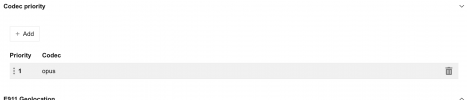
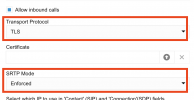
Is SRTP enabled and is OPUS in the list of codecs of your trunk?
 
As a follow up to @YiannisH_3CX 's comment, if you follow the guide accurately you should have this on your trunk:
1771230521781.png

...and this:

1771228079631.png
 
Last edited:
I confirm that everything was up and running.
I deleted the trunk and reloaded the configuration, and it started working again.

Thanks for the support!
 
I tried adding calling to my WhatsApp account, which has been active and working in 3CX for a few years.


I followed the provided guide, but I still get the following error in step 2:


{
"error": {
"message": "(#100) One feature setting must be specified",
"code": 100,
"type": "OAuthException",
"fbtrace_id": "A1Lzl1nrA7o6QQCKvrxh_W4"
}
}


What could be causing this issue?
Hey Luca,

I'm facing similar error. What was your way around it?
Thank you
 
I got the trunk working quite easily.
I am however having another issue. I have two branches each with their own WhatsApp number connected to the same 3cx. I originally setup a trunk for each site with its own routing but realised that the trunk is IP based and will be routed based on the first trunk.
I then tried to setup DID numbers to route the different calls but that didn't work. Has anyone found a solution?
 
I got the trunk working quite easily.
I am however having another issue. I have two branches each with their own WhatsApp number connected to the same 3cx. I originally setup a trunk for each site with its own routing but realised that the trunk is IP based and will be routed based on the first trunk.
I then tried to setup DID numbers to route the different calls but that didn't work. Has anyone found a solution?
Are the calls going to the trunks default destination? Were the DIDs added and assigned in the way they are received from the trunk?
 
Calls come in with +27 and not just 27. I added the + and it is now working
 
  • Like
Reactions: YiannisH_3CX
I have found the fix.

There is an issue on older API setups, I think. The format of the Curl Message that worked for me includes the line

"messaging_product": "whatsapp" and I also had to cleanup the format of the server and port.


Code:
curl -X POST "https://graph.facebook.com/v24.0/<YOURPHONEIDHERE>/settings" \
  -H "Authorization: Bearer <YOURTOKENHERE>" \
  -H "Content-Type: application/json" \
  -d '{
    "messaging_product": "whatsapp",
    "calling": {
      "status": "ENABLED",
      "callback_permission_status": "ENABLED",
      "call_icon_visibility": "DEFAULT",
      "srtp_key_exchange_protocol": "SDES",
      "sip": {
        "status": "ENABLED",
        "servers": [
          { "hostname": "<YOURSERVERHERE>", "port": 5061 }
        ]
      }
    }
  }'
 
  • Like
Reactions: KyriacosS_3CX
Also same, interested in if you have a fix?
Check the format that the calls come in. My calls came in with a + in front of the country code. Change setup the main trunk number and the DIDs based on that and it will work
 

Latest Posts

Forum statistics

Threads
111,990
Messages
590,163
Members
164,926
Latest member
tohoken1