Why my 3cx has a recording. Even if I'm on standard license. how to disable

Status
Not open for further replies.

phvoip

Free User
Joined
Nov 20, 2019
Messages
9
Reaction score
0
1595830657049.png
Hi everyone.
After updating to new 3cx. The recording part on the dashboard is getting bigger everyday
 
If recording is enabled it is normal to see space used increasing. You need to go on each extension settings , in options, and disable
 
Hi @phvoip

What PBX version are you on and what licence type do you have? Did you enable recording during the 40 days PRO trial period and the PBX keeps recording calls?
Also are you on Windows or Linux?
 
I can't determine, would help me how? as per i know i have the latest.
Yes I did enable id.
my pbx is on google cloud
 
If recording is enabled it is normal to see space used increasing. You need to go on each extension settings , in options, and disable
i'm on standard annual so supposed to be it is disabled.
 
Sorry, in that case only 3CX staff can advice on what is really possible to do .
 
You will need to access your Google Cloud instance via SSH and navigate to your recordings folder
/var/lib/3cxpbx/Instance1/Data/Recordings

In this folder you should see folders with your extension names where the recordings are saved. Try to make a new call and see if a new recording is created in the appropriate folder.
 
1596075666039.png
there is no recording. yet the file is getting bigger.
and one issue is that.
When I call someone outside. External call.
the one im talking to is disconnect and our conversation is being played back
 
You mean the conversation is played back while you are on the phone?
Please let us know what PBX version you are running. You can see the version number on the dashboard of the PBX.
Also what Debian version are running the PBX on? You can check that via SSH.

Are you using IP phones? If so how are they provisioned?
 
Installed Version : 16.0.6.584
Debian 4.9.189-3+deb9u2
Yes IP Phone. they are provisioned.
 
there is no recording. yet the file is getting bigger.

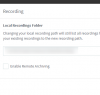
If it's getting bigger, then you need to see what Recordings Location you actually set on the system because it cannot grow without anything appearing in the folder

Recordings > Click Location > Check here:
1596542783820.png


When I call someone outside. External call.
the one im talking to is disconnect and our conversation is being played back

This is not related to recordings in any way, this sounds like a trunk or voice gateway issue and should be checked separately.
 
Status
Not open for further replies.

Forum statistics

Threads
111,955
Messages
589,926
Members
164,857
Latest member
Luca Christiansen