Window Store app stuck at small size

alanjmcfL

Bronze Partner
Basic Certified
Joined
Nov 27, 2022
Messages
35
Reaction score
13
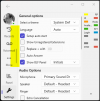
Various miscellaneous windows got resized small, apparently due to laptop moving between docks and dock-less, . That's fixable for most apps, but there seems no way to resize the 3CX Windows Store app.

It was small width and height. Closing and re-starting the app has apparently made it the correct width, but its still short.

Is there a way to resize it? (The normal window resizing actions are apparently disabled.)

Screenshot (note small height, affecting list of panels etc etc
1714732027904.png
1714731886676.png
 
Last edited:
  • Like
Reactions: MayurPatel
Will there be an update to resize the application?
 
@alanjmcfL Are you closing the app entirely from the system tray?
 
@alanjmcfL Sent you a private message, Please take a look
 
@alanjmcfL We have just released a Beta V20.0.476 where we made some improvements in height and width handling of the softphone. Can you confirm whether this has resolved your issue?

Thanks
 
  • Like
Reactions: Evolute IT
I’ll check when I’m next at my PC.

Now…how to provoke Windows into squashing the App into the wee size. What sequence of moving between docks at home and office each with dual monitors, and the laptop screen undocked caused it.
 
@alanjmcfL We have just released a Beta V20.0.476 where we made some improvements in height and width handling of the softphone. Can you confirm whether this has resolved your issue?

Thanks
I've filled in the form to request beta access via the Store.
Alan
 
@alanjmcfL added the latest listing to the MS Package flight.
Please allow some time for it to be processed
 
  • Like
Reactions: alanjmcfL
Hello, Indeed, don't hesitate to share and vote for the idea of resizing.
It can no longer be said that way.
Thank you all for your help, for the sake of our users.
Kind regards,
 

Latest Posts

Forum statistics

Threads
111,973
Messages
590,075
Members
164,895
Latest member
jasonkkrause