


- Joined
- Nov 27, 2022
- Messages
- 35
- Reaction score
- 13
Various miscellaneous windows got resized small, apparently due to laptop moving between docks and dock-less, . That's fixable for most apps, but there seems no way to resize the 3CX Windows Store app.
It was small width and height. Closing and re-starting the app has apparently made it the correct width, but its still short.
Is there a way to resize it? (The normal window resizing actions are apparently disabled.)
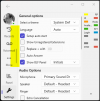
Screenshot (note small height, affecting list of panels etc etc
It was small width and height. Closing and re-starting the app has apparently made it the correct width, but its still short.
Is there a way to resize it? (The normal window resizing actions are apparently disabled.)
Screenshot (note small height, affecting list of panels etc etc
Last edited:


