Windows desktop app?

perfect-touch

Customer
Joined
Mar 26, 2020
Messages
167
Reaction score
37
Is the windows desktop deprecated? It doesn't appear in the apps tab on a v20 installation?

The new Microsoft store app only supports URL CRM launch and not executable launch like the desktop app did...? Additionally, the MS store app can be closed accidentally by users, can't it? The desktop app would minimise to the system tray instead? Have I missed an announcement regarding EOL of the desktop app??

The ability for users to inadvertently close the store app is a nightmare for us!
 
Yes it’s gone unfortunately. The Store app is prerelease like v20.
 
@perfect-touch Thanks for your feedback.

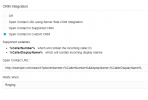
Could you clarify this statement please? 'only supports URL CRM launch and not executable launch'

Are you not able to find the 3CX program launcher when clicking on Start and searching for 3CX?


Note that the Windows framework does not support system tray functionality.
 
@perfect-touch Thanks for your feedback.

Could you clarify this statement please? 'only supports URL CRM launch and not executable launch'

Are you not able to find the 3CX program launcher when clicking on Start and searching for 3CX?
I think this is searched

1702911278665.png
@perfect-touch Have you tried to use the file protocol? file:///<Path>/<executeable>
 
  • Like
Reactions: perfect-touch
No, I created a custom handler by editing HKCR on the user's PC - but this doesn't detract from the fact that sweeping changes are being made to supported clients with (from my perspective, little notice). As I said, the user clicking the X on the store app and it closing with no more incoming calls is the biggest issue...

So right now on the test system I've found...

1) I need to migrate the user base onto the store app
2) Users with physical deskphones can no longer differentiate between internal and external calls as they now have the same ringtone
3) Although I haven't had enough reports from test users to confirm - there is a suggestion that group/queue names are no longer being prefixed/suffixed to the caller ID/name
 
@perfect-touch Thanks for your feedback.

Could you clarify this statement please? 'only supports URL CRM launch and not executable launch'

Are you not able to find the 3CX program launcher when clicking on Start and searching for 3CX?


Note that the Windows framework does not support system tray functionality.

I get that the windows framework does not support system tray functionality - but (seemingly unannounced) 3CX have removed a working solution that customers were still using...?
 
@perfect-touch Thanks for your feedback.

Could you clarify this statement please? 'only supports URL CRM launch and not executable launch'

Are you not able to find the 3CX program launcher when clicking on Start and searching for 3CX?

Sorry, as another user has indicated, I meant that the desktop app has "launch an executable" as an operation.

I'm not sure if v18u9 or v20 was responsible, but I'm certain that the INVITE used to have an alert-info which allowed external and internal calls to have different ringtones on hardware devices... I can't test this as I don't have a v18 pre-u9 anymore - but all the test users are complaining about the changed ringtones
 
ok @perfect-touch thanks for your feedback.

We have taken note of this and will discuss it internally
 
group/queue names are no longer being prefixed/suffixed to the caller ID/name
Per https://www.3cx.com/blog/releases/v20-release-candidate-2/

"The following features - for which we don't have a formal release date yet - will be available in Update 2:
  • Assign a name to a DID to tag a call.
  • Editing of the Teams Configuration."
edit: meant to add, the Desktop App deprecation has been mentioned and discussed on the forums here over the last 6 months or so. It may have been in a blog post at some point. Normally there isn't an email notification for things like that, just a blog post and/or forum post.
 
Per https://www.3cx.com/blog/releases/v20-release-candidate-2/

"The following features - for which we don't have a formal release date yet - will be available in Update 2:
  • Assign a name to a DID to tag a call.

I'm confused - are you saying that this is the reason queue/group names aren't being prefixed or suffixed to caller names - an existing feature has been removed and it's replacement won't be available until update 2?
 
existing feature has been removed
There's a list of those in the blog post under "What to Expect in V20 Updates 1 & 2." We haven't upgraded any to v20 yet ourselves, and I don't intend to for the first few updates. I don't specifically recall about queue names but I know Inbound Rules have come up several times on the forum and I think it's all the same option. In general if something's missing in v20 it will probably be in a later update.
 
So if i read this correctly, the Desktop app is not usable with version V20?

We have now lots of customers using this app in there windows 2016 RDS enveriment.
The use the protocol click to call/callto: option and that is not availible in the Webapp.
Also its not possible for the clients to use the store in Windows server 2016 RDS.

So how to solve this? or is it just we dont do that?
 
Sorry, as another user has indicated, I meant that the desktop app has "launch an executable" as an operation.

I'm not sure if v18u9 or v20 was responsible, but I'm certain that the INVITE used to have an alert-info which allowed external and internal calls to have different ringtones on hardware devices... I can't test this as I don't have a v18 pre-u9 anymore - but all the test users are complaining about the changed ringtones

I restored to v18u9. Distinctive ringing for external calls now working again. INVITE to handset via ring group now contains "alert-info=external" for external calls and is absent for internal extensions calling ring group. Definitely seems to be a v20 "issue"
 
I've just rolled out the new Windows Store app to a few staff members but I've had to rollback to the old classic Windows V16 version already, because they are so used to clicking the X button to close/hide the app (Which on the old version continues running in the tray), and the new version the X button closes the client completely. I was immediately getting issues raised as to why their phone wasnt ringing.

Can we please somehow have a way that the new Windows Store app continues running if they click X, or at a minimum, hide the X or just minimise it?
 
Hi thanks for your feedback.
Unfortunatley this is a limitation in the .NET framework.
We are looking in solutions for this. One of them could be push services to wake the app.

Next beta release of the app (coming soon) will ask for confirmation if you really want to close the app whilst on a call. Any ongoing calls after closing the app will be terminated gracefully
 
Hi thanks for your feedback.
Unfortunatley this is a limitation in the .NET framework.
We are looking in solutions for this. One of them could be push services to wake the app.

Next beta release of the app (coming soon) will ask for confirmation if you really want to close the app whilst on a call. Any ongoing calls after closing the app will be terminated gracefully
I personally think you should ask for confirmation of closing the app *all* the time, not just when on a call.

That might make the user think twice, as currently, they assume it is still running, but a warning like "This will stop your phone working" would stop them from doing that.

You could technically disable the X button on the client with this code:

private const int CP_NOCLOSE_BUTTON = 0x200;
protected override CreateParams CreateParams
{
get
{
CreateParams myCp = base.CreateParams;
myCp.ClassStyle = myCp.ClassStyle | CP_NOCLOSE_BUTTON ;
return myCp;
}
}
 
Thanks, we will take your feedback into consideration
 
Hi @alanplum We have just released a Beta 5 of the Softphone which fixes the following issues:
1. A dialog will be shown when pressing on (x) if you are on a call and requests confirmation to close the app.
2. If the user indeed confirms closing the app whilst on a call, the calls will be terminated in the background

Regarding running in the background and asking for confimation even when not on a call, we will discuss internally.
 
Regarding running in the background and asking for confirmation even when not on a call, we will discuss internally.

This is a problem for us as well. Could you set the app to open when you answer using the browser call prompt? It works if the softphone is running, but once you close it goes back to using the desk phone in my case.
 
  • Like
Reactions: Evolute IT

Forum statistics

Threads
111,974
Messages
590,081
Members
164,899
Latest member
mazet