Windows SBC Best Practice

Status
Not open for further replies.

Discovery87

Silver Partner
Basic Certified
Joined
Jan 7, 2020
Messages
81
Reaction score
12
Good morning chaps

I recently encountered a problem with one of my sites setup using STUN. I have been advised to deploy an SBC in order to get a more reliable experience and apparently some extra controls?

I have searched and searched yet all the 3CX articles talk about (regarding SBC) is the reliability side of things. They don't explain what other advantages the SBC offers? I have read some users on here talking about being able to remotely provision/control the phones via the SBC, is that correct?

My main question here is, what is best practice when running an SBC on the raspberry pi? I am not as clued up with Linux as I am with Windows and I am wary that I might be leaving some big obvious doors wide open (if you get drift). What steps should i take to secure the SBC connection and the pi itself.

Also, what steps should I take to move my phones from direct STUN to operating via the SBC?

Thanks in advance!
 
If SBC in Linux is not your cup of tea, then stay in windows world as SBC is also on windows.
yes with SBC remote provisioning is available, control the phones ? not sure to understand what you expect.
but if you expect the same as local phones from 3CX MC, no this is not the case. you don't have access to phone GUI for example.

SBC is using only 5090 port so it limit internet exposure with many ports and flow is encrypted.
Also, what steps should I take to move my phones from direct STUN to operating via the SBC?
You need to factory reset phones and let them appear in console alone, on 3CX side you need to change in extensions STUN mode to SBC
Then just assign extensions to phones and provisioning is going through SBC.

Of course you need to use 3CX supported phones
 
Linux is in my opinion the most stable option between SBC's and Windows more user friendly (if you are not familiar with Linux.

The issue I find with Windows is that there are a lot of environmental setting which can really ruin your deployment, some of which I have included on the attached guide I wrote, more specifically:

  • Setting your NIC adaptor correctly.
  • Windows firewall.
  • Windows Updates (not included but ensure they are not going to run updates automatically).
 

Attachments

Ed good check list for windows.
 
  • Like
Reactions: eddv123
So there's no real best practice for the SBC per se as far as security. It's more of a best practice in general as far as any OS install goes. Basically follow this guide to get the Pi installed:

https://www.raspberrypi.org/downloads/raspbian/

Then follow this guide to install the SBC:

https://www.3cx.com/docs/3cx-tunnel-session-border-controller/

The Raspbian guide should guide you through the only best practice of consequence really which is setting a good password for the root user and changing the default password (or disabling the account entirely) for the pi user. Not specific to 3CX or SBC but just general OS hardening. I guess the only other thing is you'll want to have your SBC on a static IP or a DHCP reservation from your router.
 
Very useful guide @eddv123 , thanks for sharing!
Hope you don't mind, I think I'll pin this post for a little while because I think a lot of users could benefit from this information.

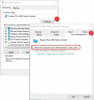
Just to add to the list of things, I usually recommend also disabling the option below for Windows when either PBX or SBC is installed:
13998

It is found in the Network Adapter Settings. I have noticed that not all Adapters have this option, but it is worth checking to see if it exists, and if so, disable it.
 
Last edited:
@NickD_3CX power save is very important as I have known SBC's to fall asleep and cause negative effects also. The Public/Private adaptor point is really interesting also.

I had a site that we setup the SBC prior to deployment (on another network) on deploying on the customer network the adaptor then flicked itself to public mode and from thereon disconnected the SBC until the NIC was changed to private. Very easy one to miss with negative results!
 
  • Like
Reactions: NickD_3CX
I very recently added a new Router to 2 locations that were able to initiate a P2P VPN. What a difference.
 
@NickD_3CX power save is very important as I have known SBC's to fall asleep and cause negative effects also. The Public/Private adaptor point is really interesting also.

I had a site that we setup the SBC prior to deployment (on another network) on deploying on the customer network the adaptor then flicked itself to public mode and from thereon disconnected the SBC until the NIC was changed to private. Very easy one to miss with negative results!

I've also seen this behaviour on servers and workstations in general where it changed it's network location to Public or Private instead of it's Domain. That can sometimes be caused by the NLA (network location awareness) service starting before the domain is available.
If you change the NLA service to delayed start this will ensure that the domain is recognised when the service starts and ensure the correct network type is selected.
 
I highly rate a Raspberry Pi as your 3CX SBC. Using Linux is a little different to windows, sure, but its so easy that I even got my sales guy to do it and got it working.

Additionally to the 3CX SBC Raspberry Pi setup, I would highly recommend to do the following as well (all steps can be easily searched online for how to do them):
  1. Static IP assignment (or reservation if you prefer DHCP)
  2. Set a cron job (which is a scheduled job) to reboot the SBC once a week. This is from my experience as a good measure, as I've had a few issues where they just need a reboot every now and then
  3. Enable SSH on the Pi so you can later remotely access it
As for your existing phones and their config, all you need to do is to update their provisioning method to 3CX SBC (remote), enter your new Pi IP, then hit reconfigure in the 3CX console for that phone - no reset of phones needed.
 
Cheers All!

I ended up going with Raspberry Pi.
 
Hi All.

I used to think to have an SBC on your LAN would allow so kind of survivable remote site telephony as you have with Cisco. So I wanted to ask what happens to the local extensions behind the SBC when the link to the 3CX server goes down?

Thank you.
 
So I wanted to ask what happens to the local extensions behind the SBC when the link to the 3CX server goes down?
They become unreachable until the link is re-established.
 
Thank you @ivank

I must have heard wrong.
 
Cheers All!

I ended up going with Raspberry Pi.

Congrats, i encounter so many people who are terrified of linux, or are so stubbornly married to windows that they will not even hear the idea of putting a linux 3CX or SBC on their network, they treat it like Ebola virus or something. And some of those same people i have no doubt if they would actually take a look honestly, would take to it rather quickly. But some people would rather bury their heads in the sand than open their minds to something new and outside their comfort zone, even if it would actually make their job easier and their system more reliable.

Had another IT guy actually get confrontational when i advised we really shouldn't put his 3CX Server on his domain joined SQL Server due to many reasons, Load, potential conflicts, and the policy of keeping 3CX on a box by itself of 3CX's support which i agree with.
 
Congrats, i encounter so many people who are terrified of linux, or are so stubbornly married to windows that they will not even hear the idea of putting a linux 3CX or SBC on their network, they treat it like Ebola virus or something. And some of those same people i have no doubt if they would actually take a look honestly, would take to it rather quickly. But some people would rather bury their heads in the sand than open their minds to something new and outside their comfort zone, even if it would actually make their job easier and their system more reliable.

Had another IT guy actually get confrontational when i advised we really shouldn't put his 3CX Server on his domain joined SQL Server due to many reasons, Load, potential conflicts, and the policy of keeping 3CX on a box by itself of 3CX's support which i agree with.
Aw man, I can relate to all of that haha I love Linux for those kinds of applications simply because Windows is too heavy when you just need a basic OS. FreeBSD could work well. No need for Linux knowledge, there are so many tutorials online and honestly, only 4-5 commands need to be known to work with an SBC on Linux.
 
When our company started, the old IT manager was afraid of linux in the same way, and the engineering team had very little linux experience except for myself, well, that manager is gone now through his own doing, we have added another engineer to the team, and using 3cx projects i have brought the rest of our team up to snuff on handling linux by building linux 3CX servers over and over with them, and day to day management of them such that our team can now work with linux day in day out without issue. The whole team has now come to prefer the linux builds thanks to the simplicity, and lack of all the windows nuances in dealing with a 3cx on windows build-out such as windows updates, windows firewall, OS Licensing and Activation issues, having to constantly reboot them, and how windows loves to consume disk space like a leaking faucet requiring us to constantly disk cleanup, or allocate them more space just to go to waste. the list goes on and on....
 
  • Like
Reactions: Zol and AWS2P
one of my co-workers just installed, setup, and started running tshark(wireshark) for some troubleshooting all from the linux CLI, by himself(he started as a windows only guy), i am so proud! :p
 
This thread has inspired me to get testing 3CX server and also SBC with a nice Raspberry Pi.

I know it's a bit off-topic but with the Linux thread in mind, what's the general consensus on adding the installs to the Instance Manager in the partner portal for monitoring and central management purposes? I assume it's not developed yet into a 'single pane of glass' type of management console and that it's still necessary to log into the individual FQDN for management of extensions, group, etc etc?
 
I assume it's not developed yet into a 'single pane of glass' type of management console and that it's still necessary to log into the individual FQDN for management of extensions, group, etc etc?

No need to assume. Just add an instance and you can see how it works for yourself.
 
  • Like
Reactions: Evolute IT
Status
Not open for further replies.