- Joined
- Dec 21, 2023
- Messages
- 5
- Reaction score
- 1
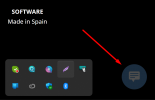
Buen dia. Recién acabo de instalar el sistma y configurar un lifechat con las versiones indicadas en el título, pero el icno no aparece activo y al pasar el mause muestra prohibido.
la web https://www.360nity.com/site (directorio de instalación de WP) y asi es la URL que he configurado en lifechat, he probado sin poner /site pero sin resultado. También he leido sobre el tema del certificado SSL y parece correcto, aunque esta firmado por lets encrypt.
Gracias por adelantado.
---
Good day. I just installed the system and configured a lifechat with the versions indicated in the title, but the icon does not appear active and when I move the mouse it shows prohibited.
the website https://www.360nity.com/site (WP installation directory) and this is the URL that I have configured in lifechat, I have tried without putting /site but without result. I have also read about the SSL certificate issue and it seems correct, although it is signed by lets encrypt.
Thanks in advance.
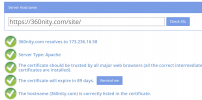
la web https://www.360nity.com/site (directorio de instalación de WP) y asi es la URL que he configurado en lifechat, he probado sin poner /site pero sin resultado. También he leido sobre el tema del certificado SSL y parece correcto, aunque esta firmado por lets encrypt.
Gracias por adelantado.
---
Good day. I just installed the system and configured a lifechat with the versions indicated in the title, but the icon does not appear active and when I move the mouse it shows prohibited.
the website https://www.360nity.com/site (WP installation directory) and this is the URL that I have configured in lifechat, I have tried without putting /site but without result. I have also read about the SSL certificate issue and it seems correct, although it is signed by lets encrypt.
Thanks in advance.