Solved Wrong voicemail during out of office hours

Status
Not open for further replies.

smartek

Customer
Joined
Jan 12, 2016
Messages
54
Reaction score
22
Hi,

I have been bashing my head against this problem but I need your help.

I have an inbound rule (every day has the same schedule) :
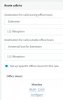
Screen Shot 830.JPG

So to my understanding, at 12h01, it's out of office hours, so it should play the voicemail of the DND status right ?

Screen Shot 831.JPG

So the voicemail "vacances_ete_2020.wav" ... but this is not working, it plays the voicemail of my available status :
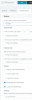
1595516378934.png

It must be obvious, yet I cannot find out why it doesn't work. I tried to play around with the autoswitch, it didn't work either, but I believe I don't need this here.. as the out of office hours are managed by the inbound rule.

Thank you very much for your help !
 
Hi,

If you call *4111 ( to hear the extension's voicemail ) during a time that you have confirmed 100% that the status is set to DND, will you hear the correct message?

Trying to understand if the Voicemail is misbehaving OR the Inbound rule is misbehaving
 
Hi JohnS_3CX,

Thank you for coming back to me so quickly.

If I do the number followed by *4111, I hear the wrong voice message.

If I set the status manual to DND, then I will hear the right message. So the status is not switching ...
 
Try this, remove the Office Hours on the sip trunk. and setup on Extension 100 using the autoswitch function.

To test you can manually change the status of the extension in management console , highlight extension and change the status by click on the status icon along the top
 
There are no office hours on the sip trunk. There are global hours, and also inbound rules hours.

So I created an extension 100, but then what should I do with the autoswitch function ? And how should I test this ? Ok I can change the status of this extension to DND, but then what ? It should revert back automatically to "available" ?
 
https://www.3cx.com/community/threads/manual-switching-of-office-hours-not-working.72779/

Changing between out ‘ in hours does not change the status of the phones -,i.e dnd (unless you have configured autoswitch) it just changes the routing of the sip / trunk line defined by in hours and out of hours settings

So that makes sense : out of office hours doesn't change the status of the hours ... it's a bit in contradiction with what i have been reading here and there, but at least it's an explanation. So why is the autoswitch not working :

1595570703511.png

From my understanding, out of those hours, the status of the extension should be DND right ?
 
Last edited:
Just a small clarification:

- The auto-switch will work if you enable it from BEFORE the office hours end
1595572523133.png
https://www.3cx.com/3cxacademy/videos/intermediate/time-day-routing/


- If you enabled it AFTER the office hours ended, the status will not change, you will have to wait until tomorrow to see the status changing when the PBX goes into "closed"

- Also Important: ensure the PBX is using the Default Office Hours. If it was forced IN/OUT at some point, then trunk will not follow the global schedule https://www.3cx.com/docs/pbx-dial-codes/#h.665f9ex1w4m3
 
Im having some sort of setup like you have

Im having 1 3CX with 2 different companys on it.

2 different inbound rules which are forwarded to 2 different extensions (dummy's)
These dummy's are handeling the times based on the auto switch function.

**Keep in mind that these are just dummys which are offline extensions doing nothing but putting calls through** Only option which handles this is "if im busy or my phone is unregistered forward calls to" (this is for during office hours)

Available status is normal call flow
Away = break times
DND = Outside office hours.

** You dont have to use break times if you dont want to **

help1.png

help2.png

So if the time kicks in that is outside this scope DND kicks in.. You can set DND status to either the Extensions VM or route it to for example an IVR with the correct message, or another extensions voicemail.
 
Hi PimvanD,

Thank you very much for your explanations, very appreciated.

Why are you using dummy extensions? Can't you use the same settings directly on your user's extensions?

- If you enabled it AFTER the office hours ended, the status will not change, you will have to wait until tomorrow to see the status changing when the PBX goes into "closed"
Well that probably explains a lot :)... wish there would be a littlee popup windows warning us in 3CX about this. Let's see how it will work today.

Thank you guys !
 
Why are you using dummy extensions? Can't you use the same settings directly on your user's extensions?

Yes im aware of this, its easier to break down and to check for problems. Got lots of colleagues who have less understanding of 3CX.

Plus we also use this dummy for forwarding if needed. If something goes wrong we know where the forwarding is made and its easy to find and solve the issue.

I guess best practise for us.
 
@PimvanD Good to know !

Thank you all for your input !
 
  • Like
Reactions: PimvanD
Status
Not open for further replies.

Forum statistics

Threads
111,954
Messages
589,924
Members
164,852
Latest member
priya