X4U-V2 as SBC - over time laggy LCD buttons and slow/crackly audio / FW 2.12.16.20

Status
Not open for further replies.

BTComp

Bronze Partner
Joined
Mar 3, 2021
Messages
18
Reaction score
4
Hi All

We have 3CX hosted on a brand new customer using 6x Fanvil X4U-V2 phones.

All are set up as SBC router phones so they can be taken home and work the same if needed, don't rely on other phones etc

3CX version 18.0 Update 8 (Build 939)Version

Phone Firmware version 2.12.16.20 (latest according to https://www.3cx.com/docs/phone-firmwares)

The issue:
All seemed fine at first, but over a couple of weeks the phone handset that the receptionist uses (95% of all calls are done just on this phone) became incredibly laggy to use, to the point calls took 3+ seconds to begin after picking up (caller cannot hear the worker say initial hello), calls were crackling for the receptionist and device was basically unusable. Calls were fine from POV of external callers (after that large initial delay).

Pushing buttons on phone itself (to dial a number or navigate menus) showed a delay of around a second to respond/update the LCD.

The receptionist uses a headset with the phone - Jabra Mono Pro 920 with the required adapter.

When this happened the first time I attended site and power cycled the phone, it said SIP Register failed at that point, so I factory reset it which solved that, then re-enabled the EHS function so the headset would work again and left site with it working as it did at initial install.

Less than two weeks later it's happened again - crackly audio, laggy LCD interface on phone. I tried factory reset but the crackly audio has remained (better but still unsatisfactory levels for customer)

For now I have installed SBC on the user's PC and changed this phone to run via that, instead of using the SBC of the phone itself, and calls are now perfect as you'd expect.

I saw comments about a memory leak that should have been patched out already - I am wondering if anyone else is still seeing bad behaviour from this new phone model, especially if using the EHS (headset) function.

The other phones work fine but as mentioned only take maybe 5% of calls.

I like the dual LCD feature of the X4U-V2 but no way am I ordering more of these until I can be sure firmware bugs are gone!

Thanks for your attention everyone :)
 
Last edited:
Please be aware that headsets directly connected to the device is not tested or supported.
However have you removed the headset to monitor the behavior?
Also since this was a router phone, how many ip phones were also provisioned behind the Fanvil?
 
No phones behind it. Each phone is an X4U-V2 doing its own independent "personal" SBC routing.

Thanks for the heads up about headsets being unsupported on 3CX - do you mean only old style ones via a phone, or USB headsets on PC etc as well?

Either way I'm also opening a ticket with Fanvil to see if they have any input!

Oh and the user requires the headset as they must walk away from their desk during calls, so cannot test without.
 
This is also mentioned on 3CX Support procedures, however headsets directly connected to the device were never supported or tested. I believe that this needs to be clarified from Fanvil. Let us know the results.
 
Will do, waiting to hear back from Fanvil.

Should clarify also the other phones which work fine do not have a headset attached (but also aren't used nearly as much as reception).

When the problem first happened I logged in to phone web page and looked at RAM usage, but it was only 4.5MB of 54MB used, less than 10%.

If anyone else is still having memory leak style behaviour issues like this with the X4U do point me to your thread here as well!
 
  • Like
Reactions: TheodorosG_3CX
Is seems to be related with the headsets although Fanvil should clarify this.
 
Hello,

I am having the exact same behavior with a Fanvil V64 phone configured as a router phone, no headset, with
3CX version 18.0 Update 8 (Build 939) and phone firmware version 2.12.16.20.

Tried same troubleshooting steps as @BTComp and still getting the same issue.

Have not tried with an installed SBC on the LAN. I hope they solve this issue soon.
 
  • Like
Reactions: BTComp
Thanks for adding the info! We also have V64s deployed at different customer sites as well, no reports of performance issues yet though thankfully. This X4U-V2 is the only phone we have with a headset connected.

What's your sample size - how many do you have set up as router phones? We've got 6x X4U-V2 and 6x V64 out in the wild now running as SBC router phones, all deployed within the last 3 months. Some have cordless DECT phones behind them as well. Our older client systems use different phones.

Maybe we are seeing faulty individual units - might be worth swapping with another to see if the problem follows the phone...annoying for the customer but I might see if they have patience to let me try that.
 
For the moment, I only have it on one Fanvil V6 phone, I have three other V64 phones that I will be testing with this week to see if I can reproduce the same behavior, some configured with and without routing. I will also be testing with an SBC and the same phones without router function to see if they reproduce the same problem. I do not believe at this point that the units are faulty, I really think it's the firmware.

I am setting them up to be at two different sites for the same company.

Will post updates here.
 
  • Like
Reactions: TheodorosG_3CX
Returned to site today and the phone in question, now running under SBC of the user's PC, said SIP register failed. I had issues with SIP register failed errors during original set up (done at my office not at customer site) but it seemed OK after things were set up.

Powered the phone off & on at customer site - all good. User made 15 minute call while I was there and then got cut off with SIP register failed again!

I have now swapped the phone with another X4U-V2 from another user and set it up as a router phone like I originally did, so we'll see what happens next.

Still no reply from Fanvil unfortunately.
 
Just to update this with latest findings a week later, the phones seem fine after swapping. The busy reception phone with headset is still fine, and the phone that was in that position is also still fine (but gets almost no use). Good for the customer but not very conclusive.

The original issue was raised around 2 weeks after I installed the units at customer site, so interested to see how it goes over longer term.
 
  • Like
Reactions: TheodorosG_3CX
Well, the client called today and same thing is happening almost a month later, but so bad they can't even answer calls - had to go to mobile app as a backup. Oddly they reported the LCD was NOT laggy to show dialled numbers this time, though this may just be because they had tried power cycling the desk phone already.

The phone internal web page loaded fine and I could see the SIP account showed "timeout". Phone showed as offline to 3CX system.

We've unplugged the headset and again removed the SBC instance, IP phone from user in admin page, factory reset and set up again as SBC router phone without enabling the headset function (EHS). This now makes it the same as the other X4U-V2 desk phones at customer site.

Wait and see.
 
Last edited:
Customer has just let me know that the phone has been fine since removing the headset. Looks like a Fanvil bug and I will have to try to get in touch with them again (hopefully they reply this time...).

Fingers crossed that this thread at least helps someone else that is in the same situation. Not sure if it's just the Jabro Pro 920 and Fanvil EHS20 that cause the issue or other headsets as well.
 
I've ended up replacing the Fanvil phone and Jabra headset combo (with required EHS20 adapter) with Yealink T54W(and a Yealink WH62 USB headset - auto detected when plugged in to phone, much nicer).

Fanvil finally got in touch after I went through our wholesaler and they would like packet captures and syslog dumps from the deskphone.

I am trying the troublesome phone and headset combo myself at my office - not going to put the customer through yet more testing.
Will probably avoid Fanvil going forward I am sad to say. The others I deployed are working fine and they are cheap compared, but overall impression is they are too green and not stable/well tested enough, plus hard for me to get a reply from tech support (never replied to my web form enquiry). Not a good combo!
 
A week later now after setting it up for my own extension (with EHS20+Jabra connected and EHS enabled on phone). I'm not even using it for calls as the crackle and lag started after a couple of days, it's just sitting there doing nothing.

I came in today and the X4U-V2 is showing SIP Register failed on the LCD.

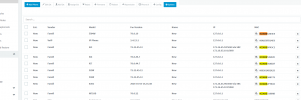
I then found this in the 3CX phones tab (see attached image)...8 Fanvil phones all of different models (but similar first 6 digits on MAC for 7 of them) claiming to be ready for adoption (plus one generic "IP phone").

This is the only Fanvil on our LAN, so I have to wonder where these random models are coming from.

Is the desk phone crashing and sending out different model requests (even though they don't share firmware versions), or are these REAL phones from other companies talking to our LAN SBC over th einternet??? Worrying.

To finish it off, The actual model and LAN IP of the X4U-V2 aren't even in this listxD

Sent the logs off to Fanvil via our wholesaler last week and no word yet (sent files from this latest development off as well).
 

Attachments

  • 3CX detecting multiple incorrect models.PNG
    3CX detecting multiple incorrect models.PNG
    46.5 KB · Views: 14
Hi ,We have received this feedback, and currently, we have set up a test environment for stress testing with the headset and X4U-V2. I will provide updates as soon as there is progress.
 
  • Like
Reactions: OlegR_3CX
We're having similar issues with the Fanvil V64 as an SBC phone. We have about 10 deployed and all are experiencing similar issues. We do have a couple of X4U-V2 phones deployed with the same issue.

Key symptoms are:
  • Audio is severely crackly/choppy for ~5-10 seconds at the beginning of the call, for about 3 out of 5 phone calls. Audio is sporadically choppy during the call after the initial choppiness.
  • The audio issue affects all phones that are connected to the SBC.
  • A reboot/factory reset sometimes resolves the issue for a short period.
  • Removing the SBC phone profile and setting it up as a standard phone with a Windows-based SBC phone works normally, with no issue.
  • The phones are up-to-date firmware wise.
  • No headset/headphone connected.
  • We have applied QoS rules to the 3CX tunnel TCP/UDP ports on the customer router.
 
Progress Update: We have currently managed to preliminarily replicate a similar issue. After the test phone has been idle for 286 hours, the phone's response becomes sluggish. It takes 1-2 seconds to access the dial pad, accompanied by significant background noise, and the call quality is very poor. Our development team is in the process of analyzing the root cause of this problem. Further updates will be provided as progress unfolds.
 
  • Like
Reactions: OlegR_3CX
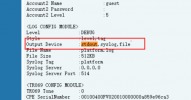
Hi Internally, we removed the "stdout" from the configuration file and retested by setting the syslog level to "error." We have conducted stress testing for 15 days, and the same issue has not recurred. We suspect that this problem may be related to the syslog level. I recommend you also try this configuration method.

1709887670893.png
 
Status
Not open for further replies.

Forum statistics

Threads
111,974
Messages
590,081
Members
164,899
Latest member
mazet