Yealink 52H Handset Factory Reset

Status
Not open for further replies.

Scott EIT

Bronze Partner
Basic Certified
Joined
Jan 29, 2019
Messages
209
Reaction score
18
Hi,

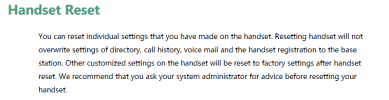
Is there any way to factory reset a 52H handset? I've tried going to Settings - System Settings - Handset reset. I'm then asked if I want to reset handset to default, which I choose yes to, but the handset still stores settings of previous base. How do you remove all these settings from the handset?
 
Hi @Scott EIT you can check this guide :)

Unfortunately I've tried the following and it doesn't work:
  1. Press the “OK” key
  2. Navigate to “Settings”“System Settings”“Handset Rest”“OK”. When the message “Reset handset to default” appears press “Yes.
Data remains on the handset. I can still see the previous base it was connected to.
 
Data remains on the handset. I can still see the previous base it was connected to.
So, I guess you dont have the previous base because you could reset the base or unpair the handset from there, however I think you will need to enter in contact with yealink for this matter.
 
No, unfortunately the base isn't available.
 
No, unfortunately the base isn't available.
Well my friend, I'm afraid you will need to contact Yealink so they can assist you.
 
  • Like
Reactions: Scott EIT
  • Like
Reactions: Alejandro_3CX
You are welcome!
 
Just something to note...

1700492514648.png
 
  • Like
Reactions: Scott EIT
Status
Not open for further replies.

Forum statistics

Threads
111,832
Messages
589,284
Members
164,662
Latest member
DejanMDS