Solved Yealink BLF Updates

Status
Not open for further replies.

Lando25

Customer
Joined
Apr 14, 2026
Messages
3
Reaction score
4
Trying to get the BLFs on a yealink t46S updated. I cannot get the phone to pick up the new configuration and have tried rebooting and reprovisioning. phones and server all both on premise.

Thanks
 
Trying to get the BLFs on a yealink t46S updated. I cannot get the phone to pick up the new configuration and have tried rebooting and reprovisioning. phones and server all both on premise.

Thanks
What firmware version is running on the phone?
Also, is this provisioned locally or via an SBC?
 
The phone is running 66.86.0.180 (current version) and are provisioned locally.
 
Is your FQDN using a custom SSL cert? Is the cert trusted by the phone? Try turning on accept untrusted SSL certs
 
  • Like
Reactions: KyriacosS_3CX
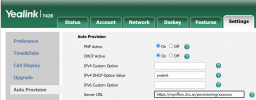
1. In your 3CX extensions' phone tab, check "Provisioning Link" and "Network Interface" for that specific phone and MAC entry: Does it show an IP or a FQDN?

2. In your actual phone's web UI does the server URL match perfectly with the above?
1776239857680.png
 
  • Like
Reactions: KyriacosS_3CX
Hello,

If the 3CX server is local, it should have Split DNS, does this work correctly?

Paulo
 
  • Like
Reactions: KyriacosS_3CX
Thanks for the replies. We do have a FQDN and split DNS. For some reason our provisioning links were still pointing towards the old IP. I updated them to the FQDN in the management and the phone console and phones are now provisioning.
 
Last edited:
Status
Not open for further replies.

Members Online Now

No members online now.

Forum statistics

Threads
111,831
Messages
589,277
Members
164,660
Latest member
RJenkinsROCK