Solved Yealink phones doing daylight savings

Status
Not open for further replies.

Dean0

Customer
Joined
Jul 4, 2019
Messages
11
Reaction score
3
We are in Western Australian our yealink phone have decided to apply DST and move ahead by an hour. Phones are up to date with the latest firmware i have set the DST parameter to 0 and re-provisioned the phones however they are still showing an hour ahead.
 
Hello @Dean0 !
Your install is windows or debian ? hosted ? Check if the system is on time first
 
Then, in 3CX "Phone Provisionning" tab of an extension, you've the possibility to set the timezone. Is it correct ?

12804
 
@INDY_Mathieu

Debian, hosted in Azure (PBX express setup) checked from the terminal in the dashboard and date and time are correct.
 
So you're using a Debian SBC ? Is it up to date/time too ?
 
SBC is windows based.

Phone provisioning is on the correct time zone.
 
And this windows on SBC is on the correct time too ?
 
Please note that phones can also pick up time from a local NTP server on your network.

check to see if there is one running on your network that may be interfering.
 
Are you also using default templates for the phones?
 
SBC time is correct.
There isn't any NTP server on the network.
Yes we are using the default template. Server was installed only 4 months ago so it hasn't been upgraded from old versions.
 
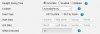
If I login to the web interface of one of the phones.
Time zone is set to +8
Location is set to Australia (Perth)
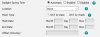
Daylight Saving Time is set to Automatic. I can set this to disabled and the phones return to the normal time but once they are reprovisioned it goes back.
 
if i set to location to none it removes the DST start date and times. Firmware or template issue?
12820


12822
 
Firmware issue I think, but not 100% sure. Yealink provides an autoDST.xml file intended to be used for provisioning DST settings. 3CX does not use this file, so I'm assuming some settings are baked into the firmware and then can be overriden by this file. Looking at the Yealink provisoning package for for v83 this is in the autoDST.xml file:

Code:
<DST szTime="+8"    szZone="Australia(Perth)" iType="1" szStart="10/1/7/2"         szEnd="3/5/7/3"     szOffset="60"/>

But then in the v84 autoDST.xml file it looks like this:

Code:
<DST szTime="+8"    szZone="Australia(Perth)" />

So likely with the latest firmware update via 3CX you lost DST. Nothing much you can do other than manually make the changes in the web interface or do a custom template and use your own autoDST.xml file until 3CX can confirm with Yealink and they make a new firmware. This is the guide for that:

http://support.yealink.com/faq/faqInfo?id=233

This is of course assuming the new DST information is wrong.
 
@Dean0 When you say it hasn't been upgraded, you mean from v15 or earlier or it's on an earlier v16 version (not the current v16U3)?
 
Hasn't been upgraded from 15v or earlier.
The system is currently up to date on 16.0.676
 
Hi @Dean0

Can you please share the exact phone model but also the exact firmware they are running?
 
T42s
Firmware Version 66.84.0.95
Hardware Version 67.0.0.0.0.0.0
 
also have a T46s same issue

Firmware Version 66.84.0.95
Hardware Version 66.0.0.128.0.0.0
 
H Dean0,

Ok so I provisioned one here, set my timezone on the PBX to Perth +8 (just like your PBX if I'm not mistaken).

The phone said the exact same time, as a quick google search for Perth time. If Google is correct then there should not be any problems.

I would first suggest to double check the 3CX server time, then management console settings timezone (which I believe you have already done yes?).

Then, factory reset and reprovision your phone and see if it now works as intended.
 
Hi @JohnS_3CX
Yes date and time are definitely correct and timezone.
12870

12871

I will get one of the phones reset and re-provisioned and let you know.
 
Last edited:
  • Like
Reactions: JohnS_3CX
Status
Not open for further replies.

Forum statistics

Threads
112,313
Messages
591,844
Members
165,458
Latest member
Kayla Norris