Yealink phones not provisioning, RPS delivered successfully

Status
Not open for further replies.

ITSupport94

Premier Customer
Joined
Dec 4, 2021
Messages
7
Reaction score
0
Hi,

We’re trying to migrate our 3cx server from Windows Server 2016 to Server 2022, were installing 3cx as a fresh install and restoring from backup.

The restore is all successful and the phones work, however we use hotdesking in our environment, meaning the some of the phones need to be reprovisioned daily, some more than once a day.

This is where we have hit a roadblock with provisioning, on the new server phones all work fine for calls etc, I can re-provision all the devices once but never a second time, or provision any new phones, also meaning we cannot use Hotdesking.

We're getting the messages RPS Request for Yealink (MAC:XX:XX:XX:XX:XX:XX) IP Phone of User (XXX) delivered successfully, but the phones do nothing.

I’ve factory reset some devices, removed them from their userr and attempted to provision to no success, also tried logging into the phones UI and adding the provision link & Auto-provision also to no success.

Reverting back to the old 3cx server hosted on Server 2016 and things work again. We just cannot get the new server to provision the phones.

The phones can access the internet on the VLAN, Access the PBX on HTTPS, we are using a trusted cert by Yealink from GoDaddy specific to the FQDN.

Environment Details:
3CX Version: 18.0 Update 9 Build 31
Server OS: Windows Server 2016/2022
3CX Server hosted on-prem with FQDN & Split-DNS is enabled
IP phones: Yealink T-19P E2, T-31P, T-31G, T-33G
Provisioning Locally
Trunk Prov: Gamma Business Communications
Firewall Checker Passed
No Custom Templates


How do i proceed as i cannot move servers still, or even think about upgrading to v20 untill we know this all works.
 
Is the 2022 server using the same IP address as the 2016 server? If it is using a different IP address you would need to reconfigure your internal DNS A Record to the new IP address, and wait for the DNS TTL to allow the endpoints to see the new IP Address.
 
Is the 2022 server using the same IP address as the 2016 server? If it is using a different IP address you would need to reconfigure your internal DNS A Record to the new IP address, and wait for the DNS TTL to allow the endpoints to see the new IP Address.
Hi,

Yes, were using the same IPs so everything is configured the same after the server. The server runs on a VM so were able to switch off the NIC from the old VM and switch on the NIC on the new VM that has the same static IP assigned.

Thanks
 
Hi there,

I'm assuming they are all on premise along with the PBX for this, and that your addressing is RFC1918 compliant across the board.

Firstly, I'm gonna cast some doubt on this part to begin with:
The phones can access the internet on the VLAN, Access the PBX on HTTPS, we are using a trusted cert by Yealink from GoDaddy specific to the FQDN.

Here is a good way to disprove it, assign a new phone to an extension, but instead of using the FQDN, select the IP in the provisioning interface in 3CX. This should in theory bypass any problems related to HTTPS, Certs, DNS, FQDN.

If this works fine, then you need to work through eliminating HTTPS, Certs, DNS, FQDN issues step by step until you find which one is the showstopper.
 
From the subscription I can see 2 IPs in use. One is on the 10.x.x.x network and the other is on the 172.16 network, so I dont think they are on the same IP.
 
Hi @JohnS_3CX,

Yes, all on prem the same as the server and everything works fine on server 2016. I currently have my laptop plugged in on the same VLAN port as a phone was and can access the server and the WWW without issue & getting the right DHCP from the firewall.

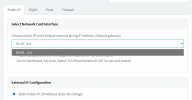
Selecting the interface is where things differ, on the new 3cx console we only have our FQDN as a choice, on the old we have the internal IP and the FQDN as a choice.

The phone I am testing with this morning is provisioned on the old console with the FQDN and provisions every time. I have noticed the old console log shows Provisioning file for MAC xxxxxxxxxx of user xxx requested by IP was successfully generated, where the new shows RPS provisioning.

Thanks
 
From the subscription I can see 2 IPs in use. One is on the 10.x.x.x network and the other is on the 172.16 network, so I dont think they are on the same IP.
The 10.x.x.x is the VLAN for the phones, the 172.16.x.x is our native LAN.
 
Selecting the interface is where things differ, on the new 3cx console we only have our FQDN as a choice, on the old we have the internal IP and the FQDN as a choice.
You have V18, use the Management Console rather than the Webclient Admin to test the interface change.

In fact I would suggest to upgrade to V20 since you are migrating unless there is a very serious reason not to yet. V18 is reaching EOL and you will have to upgrade as soon as possible.
 
You have V18, use the Management Console rather than the Webclient Admin to test the interface change.

In fact I would suggest to upgrade to V20 since you are migrating unless there is a very serious reason not to yet. V18 is reaching EOL and you will have to upgrade as soon as possible.
Hi, I am on the management console rather than the web-client, above is a screenshot from the management console.

One reason for migrating from v18 to v18 is to rule out any potential issues prior upgrade. Another is that we dont have email addresses for all of our users, alot of the team that use the hotdesking share the same email, and in V20 you cannot have 2 users with the same email from what i have seen, unless this has changed recently.
 
Hotdesking phones do not require an email address to provision, and if a user is solely using a hotdesking phone then they also do not need an email address on their account.

The email address is only required when they access a web client.
 
Hotdesking phones do not require an email address to provision, and if a user is solely using a hotdesking phone then they also do not need an email address on their account.

The email address is only required when they access a web client.
Our team do use the windows client to route calls and see the phonebooks :/
 
Does your email allow for aliases? You could use an alias for each user. The unique email address for us is important due to the 2FA authentication, and the fact that the email is now used as a main identifier and not just the extension number.
 
I'd like to confirm i have this same issue.

Got a set of new phones (reseller, looks like they re-used, RPS registered, kept auto-provisioning on an old PBX). Factory reset > RPS kicked in and reset password every time. Completely useless to me.

THIS WAS A GODSEND: https://ticket.yealink.com/portal/mac-removal Took 18 hours to remove the MAC's for all handsets from the RPS service. DONE.

Then another factory reset of all handsets, ow genuinely i could login to the web interface!
3CX User > add iphone > make/model/mac > provision direct. GO.

Logged into the handset webpage, pasted the provision URL from the above mentioned 3CX user>iphone page, and clicked save. Then clicked "provision now". Handset rebooted a few times, and installed a firmware update in the middle somewhere.
I saw this:
RPS request for Yealink (MAC:<MAC GOES HERE>) IP Phone of Desk 1, Reception delivered successfully
OK

Provisioning file for MAC <MAC GOES HERE> of user 32513 requested by 91.119.204.44 was successfully generated
OK

1x minute later...
SIP request (REGISTER) from 91.119.204.44 was rejected. Reason: Block WAN requests is ON.

This is the 3CX FREE instance i'm using. there is no admin area to get to the toggle button "block wan requests", so i can simply switch this off... WHY?!?
Infact i could only read this by rebooting my router, and getting a new public IP!
Good job i didn't provision this handset directly on the customer site!

So the question remains.. WHY does 3CX not auto-provision the handset correctly first-time?

Second question... why would 3CX FREE hide the "block wan requests button" yet stupidly force "block wan requests = ON" as the default option.... The only possible way to turn it off, is to log a suppor ticket.. £75. It's a scam.
 
I'd like to confirm i have this same issue.

Got a set of new phones (reseller, looks like they re-used, RPS registered, kept auto-provisioning on an old PBX). Factory reset > RPS kicked in and reset password every time. Completely useless to me.

THIS WAS A GODSEND: https://ticket.yealink.com/portal/mac-removal Took 18 hours to remove the MAC's for all handsets from the RPS service. DONE.

Then another factory reset of all handsets, ow genuinely i could login to the web interface!
3CX User > add iphone > make/model/mac > provision direct. GO.

Logged into the handset webpage, pasted the provision URL from the above mentioned 3CX user>iphone page, and clicked save. Then clicked "provision now". Handset rebooted a few times, and installed a firmware update in the middle somewhere.
I saw this:
RPS request for Yealink (MAC:<MAC GOES HERE>) IP Phone of Desk 1, Reception delivered successfully
OK

Provisioning file for MAC <MAC GOES HERE> of user 32513 requested by 91.119.204.44 was successfully generated
OK

1x minute later...
SIP request (REGISTER) from 91.119.204.44 was rejected. Reason: Block WAN requests is ON.

This is the 3CX FREE instance i'm using. there is no admin area to get to the toggle button "block wan requests", so i can simply switch this off... WHY?!?
Infact i could only read this by rebooting my router, and getting a new public IP!
Good job i didn't provision this handset directly on the customer site!

So the question remains.. WHY does 3CX not auto-provision the handset correctly first-time?

Second question... why would 3CX FREE hide the "block wan requests button" yet stupidly force "block wan requests = ON" as the default option.... The only possible way to turn it off, is to log a suppor ticket.. £75. It's a scam.
OK.....

There is quite a few unfair accusations being made here....

Lets take it from the top.

First of all if a phone has been provisioned through another RPS account, we will not be able to override this. So having to go through Yealink was the correct way to remove said phones from that account.

Based on our provisioning guides https://www.3cx.com/sip-phones/ the first step is identifying your phone and its proper firmware.

To connect an IP Phone onto our Cloud offering you would need to either have a Session border controller device, or a phone capable of being provisioned as a Router Phone.

This will connect via a secure Tunnel back to the PBX.

If it is a capable router phone IT MUST BE ON THE PROPER FIRMWARE FIRST. Nothing, and I mean NOTHING, even the descending of GOD himself would not allow this phone to connect if it doesnt have the proper firmware.

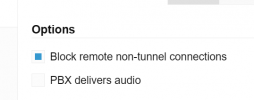
The reason why you got blocked is because the phone is trying to connect through the SIP Port directly, with the option to block remote connections being ON.

1725965502629.png

This is configurable by you. Had the phone been on the proper firmware and connecting through the tunnel this would not have happened. So your allegation that there is no admin option to configure this is INVALID.

The once the phones make and model are selected in the users account, all you would have to do is just RESET the phone, and it would go to the RPS, and pick up its provisioning URL, and contact the PBX to get its configuration file, and then REGISTER as a SIP endpoint.

So the question remains.. WHY does 3CX not auto-provision the handset correctly first-time?

INVALID FIRMWARE

Second question... why would 3CX FREE hide the "block wan requests button" yet stupidly force "block wan requests = ON" as the default option

We do NOT block this. The reason why it is forced ON is to PREVENT INSECURE CONNECTIONS to the system.

The only possible way to turn it off, is to log a suppor ticket
INCORRECT partially. You do not need this of for a secure connection, but in the off chance someone does need an INSECURE connection, they could do it themselves.

The only possible way to turn it off, is to log a suppor ticket
If you have managed to lock yourself out, then you have the option of waiting 24 hours for the expiry of the block, or contact our Support team.

It's a scam.

I find this HIGHLY insulting, and I refuse to respond to this portion of your rant.
 
  • Like
Reactions: bitn2
Highly insulting... why, it's not a personal attack... my reasons: Charging customers support an unblock of a public ip... yet it's clearly a default configurations and missing whitelist options available to 3CX FREE/SMB administators.
Ive got a PRO instance on anther subscription, those buttons are easily found there.

UNSUPPORTED FIRMWARE:
Looking at the handset in the admin page; should clearly show the unsupported/old firmware versions registered from, and offer the administator the option to release an update to the handset to download...
https://www.3cx.com/docs/manual/ip-phones/#h.gwqg1qvtfjy7:~:text=To upgrade your,the Users page.
Perhaps this is the old way of doing things?

To confirm what i said earlier: the handsets have AUTOMATICALLY UPGRADED THEIR FIRMWARE, during provisioning from the 3CX system. As of 10 mins ago they were on 108.85.0.15 - firmware installed by the 3CX platform!

Publically only 108.85.0.70 and 108.85.0.90 are available https://support.yealink.com/en/portal/docList?archiveType=software&productCode=9f9590f420350430
The release notes for .90 advise to install .70 prior.

3CX portal doesn't describe the supported verion numbers, just that it's handled automatically.
https://www.3cx.com/sip-phones/firmware-update-yealink/

Installing .70 - DONE
Installing .90 - DONE

MANUAL FIRMWARE UPDATE TO THE LATEST VERSION = DONE

UNBLOCKING MY PUBLIC IP
Call my ISP, obtain a new static ip, re-configure my router (disconnect/reconnect fttp circuit) > visit ifconfig.me >>> new public IP confirmed.

Login to handset admin page again > Click to register (previously i disabled this)...
public ip blocked in 3cx again !!!??!!??!?!?!?!?!?!

WAITING 24 HOURS
"If you have managed to lock yourself out, then you have the option of waiting 24 hours for the expiry of the block, or contact our Support team."
What if i don't have 24 hours? What if i have a fixed ip? What if i tried to provision a handset on a site with a few dozen clients all logged in from the same WAN circuit - ALL of them would suddenly be offline. This logic is madness (this is my opinion, don't be offended). Justified with:
- 3CX made a decision to "auto-block sip registrations from unsupported firmware versions by default" => totally agree.
- The second decision to "auto-block the WAN IP from blocked sip registrations, to any/all HTTPS or SIP clients, preventing anyone logging in from the same site/circuit" => totally disagree.

'Block non-tunnel connections' - thanks for that screenshot, found it >> toggling >> re-registering >> nope this doesn't let these auto-provisioned handsets register.

Maybe, introduce a little logic into the auto-blocking feature, and simply deny the registration for the username presented (not originating WAN IP), on the condition the firmware version isn't supported (registration requests would need to append the firmware version during the sip-register request of course)... so maybe a future development down the line. This is what Polycom Provisioning servers do. They also handle blacklist/whitelist options entirely separate to registrations.

INSECURE CONNECTIONS
When you refer to insecure connections - what are we talking, TLS? VPN?
I assume you mean TLS.. As i don't believe the 3CX platform supports S2S or P2S VPNs (could be wrong).
UDP:5050, TCP:5060 and TCP:5061 (TLS) are all open to the world from a layer 5 TCP/ACK perspective....

My mobile (running zopier, with a sip-client registration and tls-enforcement configured); was also barred. despite the 'Block non-tunnel connections' checkbox.

My SIP handsets were all provisioned (configured) by the 3CX platform - i didnt even set the admin password, just a provisioning URL, as previously described.
The fact the SIP registrations are happening over insecure non-tls port 5060 is not my doing, it's the 3CX PBX that configured the handset to register against that insecure endpoint.
 
  • Like
Reactions: JohnS_3CX
T46U-108.86.0.70.rom
and
T46U-108.86.0.90.rom

sorry for not using copy/paste
 
not exactly major versions behind...
 
I would still do the manual upgrade on the phone. From memory, the T5 series 96.86.0.70 (??) would fail to provision (and trigger blacklist) as a router phone, and 96.86.0.74 (?) would succeed. We don't have a lot of T4s so I'm not sure about those versions offhand.
 
Status
Not open for further replies.

Members Online Now

No members online now.

Forum statistics

Threads
111,831
Messages
589,277
Members
164,660
Latest member
RJenkinsROCK