- Joined
- Mar 20, 2018
- Messages
- 62
- Reaction score
- 10
Hello,
Been looking around on the internet for a closing answer but can't find it, so here i am
We've got some customers asking for different ringtones depending on were the caller is positioned.
We are serving a lot of GP's who are using Ring Groups for emergency calls.
For example:
CALLER1: is in the Queue (normal)
CALLER2: is in a Ring Group (emergency)
For a long time we are using DECT's for the emergency calls, but would like to stop with this.
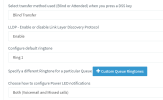
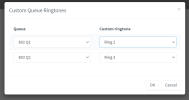
Is it possible to have 2 different ringtones so that the assistant can recognize the priority when not directly looking at the display?.
so CALLER1 has ringtone A and CALLER2 has ringtone B.
BTW: It is a HOSTED environment, but for some stange reason i can't post anything there..
Kind Regards,
Maurice
Been looking around on the internet for a closing answer but can't find it, so here i am
We've got some customers asking for different ringtones depending on were the caller is positioned.
We are serving a lot of GP's who are using Ring Groups for emergency calls.
For example:
CALLER1: is in the Queue (normal)
CALLER2: is in a Ring Group (emergency)
For a long time we are using DECT's for the emergency calls, but would like to stop with this.
Is it possible to have 2 different ringtones so that the assistant can recognize the priority when not directly looking at the display?.
so CALLER1 has ringtone A and CALLER2 has ringtone B.
BTW: It is a HOSTED environment, but for some stange reason i can't post anything there..
Kind Regards,
Maurice