Yealink T33G issue after upgrading to the latest firmware.

dtsout

Premier Customer
Joined
Sep 18, 2026
Messages
5
Reaction score
0
Hi.

After 3 days of continue work arounds, I decided to post my issue in case someone else has an insight.
I noticed in my work environment consisting of a self hosted 3cx v20 (latest stable update) system and Yealink T33G phones, that when the system informed me about new firmware for the phones which I did, an issue I am not able to resolve until this day.

Previous firmware of the phones was 124.87.0.15 on which external calls after the user makes the dial, shows both the name and the number, probably taken from the contact list.
Same thing happens between internal calls. When a college dials another one, his name and internal number (for instance 330 d.john) appears on the screen of the one who did the call.

After upgrade for some reason, even though external calls works as expected and explained above. Internal calls between extensions on Yealink T33G (firmware 124.87.0.20) fail to display caller name showing only the number.

Isolation performed:
  • Confirmed not present on firmware 124.87.0.15 (same phone model/template, different unit)
  • Confirmed provisioning templates are byte-for-byte identical between the working (.15) and broken (.20) phone, aside from device-specific credentials.
  • Confirmed directory.incoming_call_match_enable = 1 (already correctly enabled)
  • Explicitly set directory.update_time_interval = 3600 (previously blank/default) — confirmed applied via re-pulled config — no change in behavior
  • Performed factory reset + fresh re-provisioning from a clean custom template — no change in behavior
  • Downgrade to 124.87.0.15 is blocked by Yealink's anti-rollback lock
  • 124.87.0.20 is currently the latest available firmware for T33G (no newer build to try).

Any thoughts?

Thank you in advance.
 
Hi,

I think you don't have to worry about the firmware version, I've added the same model with the same firmware on Update 9 and it works here.

These phones take the name from their phonebook when you make an outgoing call towards a colleague for example.

So it sounds like the phonebook on your T33G does not contain your colleague's extensions currently.

Have you checked the actual phonebook of the device? You can press the update button when you enter the phonebooks menu to refresh it immediately. The refresh interval can be changed from Phones > Options.
 
  • Like
Reactions: Alejandro_3CX
Hi,

I think you don't have to worry about the firmware version, I've added the same model with the same firmware on Update 9 and it works here.

These phones take the name from their phonebook when you make an outgoing call towards a colleague for example.

So it sounds like the phonebook on your T33G does not contain your colleague's extensions currently.

Have you checked the actual phonebook of the device? You can press the update button when you enter the phonebooks menu to refresh it immediately. The refresh interval can be changed from Phones > Options.
Hi and thank you for your quick response.

Point is that I have 3 out of 31 phones with the latest firmware that works after update and their phonebook (local) is empty.
On top of that, I have 15 phones with the 0.15 firmware which work as they should, again with empty phonebook.

The only phonebook that is with data, is the remote one (shared), which is the one 3cx gives to the phones it provisions.

PS All the phones are T33G and thank you for the option to change the time interval from the gui.
 
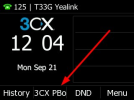
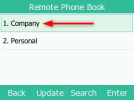
Look at the remote phonebook labeled "Company" please and confirm whether it contains your fellow users extensions or not. Check this specifically on your problematic phone.

1789988780888.png


1789988802318.png


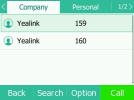
1789988814581.png


As you see from my example, my fellow users 159 and 160 are listed.

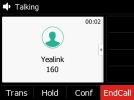
When I call them, or if they call me, their name "Yealink" and their extension appears on the screen

1789988881108.png
 
Look at the remote phonebook labeled "Company" please and confirm whether it contains your fellow users extensions or not. Check this specifically on your problematic phone.

View attachment 52477


View attachment 52478


View attachment 52479


As you see from my example, my fellow users 159 and 160 are listed.

When I call them, or if they call me, their name "Yealink" and their extension appears on the screen

View attachment 52480
Hello again.

I know that the company should contain data in order for 3cx to provide them to the phones. Yet in the company field, there are a couple of thousands phones of our external customers (who they appear incoming / outgoing) but no internal extensions (so as it always been the situation and everything working correctly). Now with the same configuration from the 3cx perspective (what appears on company is what we imported in contacts field on it's GUI) our customers appear but our colleagues don't.
 
Let's check if 3CX generates the entries in the phonebook first:

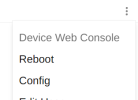
1. Phones page > 3 dots menu next to your T33G, and select Config
1790001272318.png
2. In the config box search for remote_phonebook.data.1.url and this will show you the URL of the phonebook.

3. Do you at least see the extensions of your colleagues in the generated phonebook? Open the link in your browser and search through it to find out.

- If the answer is yes, then the phonebook has probably grown larger than the Yealinks can handle (they have a maximum limit set by the manufacturer and stop loading the rest). In this case you still have some options.

- If the answer is no, let me know and I can tell you where to check next.
 
Let's check if 3CX generates the entries in the phonebook first:

1. Phones page > 3 dots menu next to your T33G, and select Config
View attachment 52481
2. In the config box search for remote_phonebook.data.1.url and this will show you the URL of the phonebook.

3. Do you at least see the extensions of your colleagues in the generated phonebook? Open the link in your browser and search through it to find out.

- If the answer is yes, then the phonebook has probably grown larger than the Yealinks can handle (they have a maximum limit set by the manufacturer and stop loading the rest). In this case you still have some options.

- If the answer is no, let me know and I can tell you where to check nex
 
Do you want to access the phone's options itself or it's web interface? 0.20 changed the gui since the last firmware version.
 

Forum statistics

Threads
112,095
Messages
590,728
Members
165,072
Latest member
Tonde09