Yealink T4 Series | Configuration Guide

KaterinaK_3CX

Joined
Feb 24, 2016
Messages
246
Reaction score
36
Supported models:
  • Yealink T40G / T40P
  • Yealink T41S / T41U
  • Yealink T42S / T42U
  • Yealink T43U
  • Yealink T46S / T46U
  • Yealink T48S / T48U
Read the guide.
 
Yealink T4 series goes auto DND mode at 4.00 pm
 
Yealink T4 series goes auto DND mode at 4.00 pm
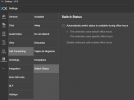
Hi, as first step check that the extension is not using the Switch Status option, you can check this from the web client or desktop app

1690642117381.png

Then se the extension profile to Available.
 
  • Like
Reactions: CentrexJ
I have two extension on the same DID. which always goes office hour after 7.30 pm. But before DND gets enable automatic at 4.00 pm everyday.
 
Please assist further to resolve this as early possible.
 
I wonder if you already checked the parameter I mentioned, the switch status?
 
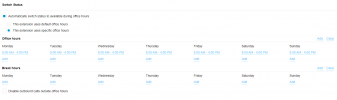
This is my Office hour timing. Do I have to switch default? Attached for your better review.
1690645870300.png
 
So the extension is using the switch status feature, it means that the status profile will change according the specifics hours that you have set.

From Monday to Sunday the extension profile will be:

Available (Office Hours) from 8:00AM to 4:00PM.

Do Not Disturb (Out of Office Hours) from: 00:00 to 8:00AM and then from 4:00PM till 23:59

So this is why your extension changes automatically to DND at 4:00PM

If you don't want to use that feature, then disabled the parameter Automatically switch status...
 
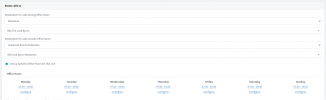
Please have a look here. Here is exact picture.
1690647360393.pngLast screen shot was from Ext profile.After unchecked for auto swtich will it effect my office hours timing.
 
1690647360393.png
These are the office hours for routing calls, these wont be used in the extension since this configuration is only for routing your incoming calls.

From Monday to Sunday Office Hours 7:30 - 19:30 calls will be routed to the office hour destination, then the rest of the hours that are not declared will be the out of office hours, it means from 00:00 to 7:30 and from 19:30 to 23:59 calls will go to the out of office destination.

So just uncheck the parameter Automatically switch status and the extension will not change its status automatically.
 
Great news these are now supported for SBC Router phones as well, However, can you remove the misleading product pricing from the article "T46U costs in the region of $130" trade price on that unit is usually above $130 USD (Currently around $140 TRADE) even Amazon.com are advertising at $154USD....

Many Thanks in advance
 
I have added T46S ip phone to the system using SBC. The phones are visible under the phones section but its not configured with the extension. It indicate as offline
1701278423660.png
 
Can someone tell me how to add a Router Phone to an existing user and extension to act as an SBS. I have a computer that acts as my SBS and I am trying to now use a router phone to act as the SBS. However the user extension already had 3 phones on it. So this new router phone will replace 1 of the 3 phones. There is no button to configure or add a new phone. I even looked in the management console and there is no place to add a router phone.
 
As I recall the router phone has to be the first phone on an extension so delete the other two, re-add this one, and add the other two back again. Also there can be only one router phone per extension.
 
@Heath You need to remove all phones from the extension and add the router phone first. Then you will be able to add another phone to this user.
 
Hi,

Quick question, can a T48S be a router phone. It would appear from the 3CX compatible phone list that the T48U can be a router phone. We have a T48S that refuses to be a router phone......
 
can a T48S be a router phone
No. The phrasing is a bit confusing IMO because https://www.3cx.com/sip-phones/ says "Yealink T4 Series: T42S, T46S/U, T48S/U and others (can be Router phone)" but if you click the link the T4 page says "Router Phones: T42U, T43U, T46U, T48U" so they are not actually trying to say the S models can do it.
 
  • Like
Reactions: Berttielp
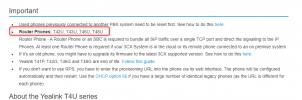
Note that T42S cannot be used as router phone as this is clarified in the guideline:
1712202595108.png
 
  • Like
Reactions: Berttielp
S cannot be used as router phone
Since it has come up a few times, can 3CX change the wording:

"Yealink T4 Series: T42S, T46S/U, T48S/U and others (can be Router phone)"

to
"Yealink T4 Series: T42S, T46S/U, T48S/U and others (some of which can be a Router phone)"
 

Forum statistics

Threads
112,147
Messages
590,959
Members
165,167
Latest member
Finatra.us