Unsupported Yealink T46U - Visual Alert for BLF Pickup

Status
Not open for further replies.

Parslej

Forum User
Joined
Jun 16, 2021
Messages
62
Reaction score
18
We just rolled out 3cx with Yealink phones. People love BLFs buttons - see who is busy / who is talking (with Visual Alert for BLF Pickup enabled)
But quickly realized that they now receiving tons of alerts to pickup phones do not really belonging to their calling groups.

So it looks that by enabling every new BLF key on your phone automatically you will be notified about every calls to those extenstions!
(I think obvious expectation is to see only assigned pickup groups notifications)

Thus question is - does anyone know how configure this to have BLFs working and be informed about only own groups connections ?
(It would be really pity if I had to resign from BLFs - this was one of selling point when we decided to move to 3cx / voip solution...)

Thanks in advance for any tips !
 
By saying that I meant displaying on Yealink (T46U) phone visual / audio alerts similar to:
1111 <- 1112
1112 <- 1113
While extension 1110 is not part of any group / queues 1112 nor 1113 belongs to

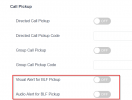
Visual / Audio pickups alerts can be enabled on Yealink phone by enabling options shown below.

What I want to achieve is to see info on phone's screen someone who is calling who with option to pick this up but *only* within group(s) I belong to


1628585165607.png
 
Hi @Parslej

By default we do not provision those features on the phone, if you go and manually enable them then you will see the alerts exactly like you have described. There is no option in 3CX to control this.

So either keep the options in the Yealink disabled or do not add the BLFs for extensions you don't want others seeing. You can add them as speed dials instead so that users can contact those extensions without also monitoring their line.

Alternatively, you can ditch the phones entirely and use the 3CX webclient or desktop app. In the apps, the presence is managed differently and you can indeed prevent others from seeing information they should not be able to see. Your options and rights management are documented here:
https://www.3cx.com/3cxacademy/videos/intermediate/extension-groups/
 
Thanks for your reply. Unfortunately for this scenario I have to use physical phones, cant use apps.

BTW in 3cx' apps it is also not presented in they way I'd like to see... :(
I'd love to see notification on main app screen when someone is calling my collogue, so I can quickly check it is woth to pick this up or not (without need to open additional switchboard / panels etc)
- ideally this should be presented on standard window / dialpad / notification popup
 
The Team screen in the web client (and now the new desktop app) shows who is calling an extension, and the person can pick up, divert, etc, by clicking on the call.
 
Status
Not open for further replies.

Members Online Now

Forum statistics

Threads
111,832
Messages
589,278
Members
164,662
Latest member
DejanMDS