Yealink T48 G

Status
Not open for further replies.

heshousehold

Free User
Intermediate Cert.
Joined
Mar 9, 2021
Messages
34
Reaction score
8
Hello I am trying to register a yealink T48 G and for some odd reason does not want to register. Under phones I see the yealink which is in a default state besides the fixed IP Address and assign an extension . It picks up the phone as a T48 with the correct mac address and I have checked under options that the disallow use of extension outside the LAN is unticked. I have the 3CX on a Raspberry Pi on an IP starting as 196.15 etc.
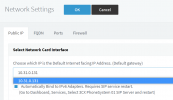
The Yalink is also on the IP starting with 196.15 etc of cause the last digits are just different. The provisioning method is local LAN office and the selected interface is the Raspberry Pi IP address . Ones I select ok at the top I am actually not sure what is suppose to happen but i think it should send a provisioning file to the T48 . If I go in to the phones UI after this there is nothing under the account blank. I then tried to copy the provisioning link from 3CX to the phones UI and provision like that it also does not seem to work. As with most IP Phones we can also register by putting the register ID and password in the phones UI under accounts unfortunately this also did not register the phone and I now seem to be out of options and I am not sure what I am missing any advice would be appreciated thank you so much
 
I'm not sure your IP range is RFC1918 compliant, and this can cause issues. Please use a compliant networking address in these ranges:

10.0.0.0/8,169.254.0.0/16,172.16.0.0/12,192.168.0.0/16
 
Thank You so much for your help and quick response I will have a look at this with our IT people in the Office appreciated thank you
 
Please also be aware that after the IP range change, you need to restart the server and also need to update the Network page in the management console to ensure the correct new LAN IP appears, and then press OK to save the new setting

1624358721209.png
 
Thank you again so much before I go to our IT People I am just trying to get my head around the whole IP range sorry new to this so at the moment the Raspberry is sitting on our office public IP address. Away from office lets just say my house I can access the 3CX using the public IP Address or the FQDN both work. At the house I have a polycom VVX300 on my local house network been in the 10.0.0. range and it is connected and working as an extension of the Raspberry. I was on the understanding that this model would not work as an outside extension ? All i did was copy and paste the ID and password from the 3CX and point it to the public IP on the Raspberry and up it come no problem .Now my question is this for some reason someone in the office plugged the Yalink into the same public IP address as the Rasberry and asked me to assign and register an extension which did not work of cause. I see this public IP address almost like a local LAN say like my house been 10. 0. 0. just the public is 196. 15. etc or am I not seen this in the correct way so surly it should be easy for the Yalink to register as they have the same IP Address range appreciated
 
Hi,

I think I understand you a bit better now. So correct me if I'm wrong please:

1. Your office internet provider gave you a public IP address on their modem: ie. 196.15.x.x

2. Your office has an internal (private network) range like 10.x.x.x

3. Your home also has an internal (private network) range like 10.x.x.x

4. You took a VVX300 home which took a 10.x.x.x IP, similar to how the Yealink at the office took a 10.x.x.x IP

Is the above correct so far?
 
Thank You so much. So we have to different places the office and my home.
Yes the office has public ip in the range of 196 . 15
and yes they also have an internal IP 10.0.0
The 3CX on the raspberry is sitting at the office on the 196.15 IP public
We are testing the 3CX so its not a full blown working system yet
The Yalink is also plugged in to the public network same as the raspberry but is not registering like this suspect you cant do it like this not sure. We have 3CX apps and desktop extensions working no problem just the Yalink is not registering

Coming to the house it only has the 10. 0. 0 IP inside the house everything in the house gets a 10.0.0 IP
The VVX300 is at home on the home network with an IP 10.0.0 We created an extension on the Raspberry in the office. This Extension registered and the VVX300 at the house is working on this extension .They way we got the VVX300 to register is to copy the ID and Password from the 3CX and paste into the phones UI .The Domain in the phone UI is the 196.15 IP Address of the Raspberry this extension is working

The extension i cannot get to work is the Yalink sitting in the office on the public IP

Appreciate the help thank you
 
VVX300
That specific model is only supported for local installations (PBX and phone in the same LAN - not remote). It is not supported for remote connections and you should expect it to run into some problems if you try and connect it remotely to your 3CX machine (eg. registration issues, one-way audio, no incoming calls). This is just an FYI notice so you are aware that this phone is not supported this way. Now that we got this out of the way let's look at the Yealink issue :)


Yealink
You said the Yealink and the Raspberry are "sitting at the public IP". But in fact this does not make any sense in your case if I understood you correctly. Both the Pi and the Yealink have a LAN IP in the 10.x.x.x range and they are at the same office, so they should be able to talk to each other in the local network. The public IP should absolutely not be involved here at all. Perhaps this is what was causing confusion..

So here is what I would suggest to you:

1. Reset the Yealink so it will stop trying to connect

2. See the Blacklisted IPs on the 3CX management console, and remove the LAN IP of the Yealink IF it ended up there.

3. Delete the extension where the Yealink was assigned, and create a brand new one for our test. Do not change any of the extension settings AT ALL - we want it to be perfectly default.

4. Follow our Yealink provisioning guide, but do not skip any steps. Make sure you do everything as described here (follow specifically Local LAN or SBC: Provision via Plug’n’Play, not STUN) and the Yealink should provision as expected https://www.3cx.com/sip-phones/yealink-t4-series/

Let me know what firmware the phone ends up using in the end, and let me know if the PnP provisioning was successful.
 
Thank You for the heads up on the VVX300 noted and yes lets leave that alone now.
Yealink yes I think i am trying something here that is not going to work but our offices are admit it must work and I need something concrete to say to them its not going to work

Just to recap and then ask for your comment please as correctly said does not make sense
Both the Pi and the Yealink are on the public IP Address and I am trying to register the Yealink like this?
So the Pi has a publlic address and the Yealink has a public address not going to work I am sure
Sorry for the confusion and thank you
 
Sorry the firmware is 35.83.0.130
 
So the Pi has a publlic address and the Yealink has a public address


Apologies, this is not very clear to me yet. Can you please explain in more detail what this means?
 
So sorry so i have both the Pi and the Yealink on the public network not the local network ? So both the Pi and the Yealink have public IP Address and we are trying to get the Yaylink to register across the public IP thank you
 
Are we talking about the same public IP for both or does each one have its own unique public IP ?
 
The Pi has its own unique public IP
The Yalink has its own unique public IP
Better understand to get to the 3CX i can use a public IP Address unique to the 3CX
To get to the Yalink UI i can use a public IP Address unique to the Yalink UI
Different public IP
Thank you again
 
Very clear. Ok in this case you only have a single option to make the Yealink work in this direct manner: Provision it as STUN as per the guide above.

BTW, how did you assign public IPs to both the Yealink and the Pi? Just curious if done via port forwards, or you literally bridged them to the WAN interface
 
Last edited by a moderator:
Thank You When we set up the 3CX on the Raspberry Pi we set it up as a static IP Address and allocated a unique public IP address to the 3CX
When we set up the Yealink we also allocate a static IP Address and allocated a unique public IP address
The actual line coming in to our office has a range of public IP Address with a start of 196.15. etc to an end range ending in 196.15. etc properly 20 or 30 public IP Address so no port forwarding nothing just Public IP Address from the pool of 20 to 30 IP Address that is why I am pulling my hair out surely the Yealink should register as far as I know there is nothing between the Yealink and the Pi it should register?

May I please ask and I will try to do the whole stun setup but would it be a better option to move the Pi to the local network 10. 0. 0 etc and to move the Yealink to the local network 10.0.0. and then try register would really appreciate the advice on this and lastly if we then have the Pi and the Yealink set up on the local network and now I want to connect a supported IP Phone at my house remote connection lets say a Fanvil X1 would I then use the FQDN as the domain or the provisioning method to connect the phone direct SIP or do we go the route of STUN or SBC ? I really do not have a problem with connecting the supported 3CX apps and the apps on the pc 123 and we connect its the actual IP Phones I am struggling with really struggling and any advice would be appreciated thank you so much for all your time today trying to help I am trying to learn as well
 
Sorry in all trying to get the Yealink to work I did try the STUN option and I know that you have to put in the user name and password extension number and voice mail pin . Straight after doing that and even before looking at the phone I tried to log in to the phoned UI and instead of getting the normal green login of all yealink it come up just with a block plain with a user name and password not the normal Yealink green login thinking there was something wrong i I reset the phone and my normal login was back. Relished now the plain log in could have been the user name extension and voice mail pin not sure please advice and I will try stun again thank you again
 
The ideal way I would suggest is the following:

1. Local phone: just provision them in LAN mode, no point in trying STUN or public IP

2. Remote phone: if you have 1-2 remote phones at one office, simply use STUN. If you have more, then use 3CX SBC for better reliability and ease


So don't assign the public IP to your Pi. Allow the Pi to have a local IP behind your firewall, and just forward the necessary ports

Our guides have been written to be simple and easy to understand

- For Phones you will find step-by-step instructions here for https://www.3cx.com/sip-phones/

- If you are still learning, then save yourself a lot of time and use our free 3CX Academy. It will teach you all the basics, and will answer a lot of questions before you even need to ask them. We highly recommend it!
https://www.3cx.com/3cxacademy/
 
Thank you so much John I will let the offices know about the local LAN.Just got through the basic and see the intermediate has remote connection which is my next step :) Appreciate all the help
 
  • Like
Reactions: JohnS_3CX
Glad to hear! In case you are interested, our 3CX trainer who made the academy material also does free webinars.

Just look at the right column of this forum page under "Upcoming Webinars" if wish to sign up.
 
Status
Not open for further replies.

Members Online Now

No members online now.

Forum statistics

Threads
111,831
Messages
589,277
Members
164,660
Latest member
RJenkinsROCK