Solved Yealink W60B Extensions Not Registering

Status
Not open for further replies.

technomojo

Bronze Partner
Joined
Jul 10, 2015
Messages
22
Reaction score
2
I have 2 W59Rs (FW 115.85.0.20) paired with a W60B base station (FW 77.85.0.20), connected to a self-hosted cloud install (3CX 16.0.1078 on Amazon Lightsail) via an SBC running on a Raspberry Pi.

Edit: I've managed to get the W60B (not the W59Rs) to auto provision but the extensions won't register.

I've never used these handsets before. I note that 3CX explicitly supports the W59R connected to the W80/W90 base stations:

https://www.3cx.com/sip-phones/yealink-dect-w80p/

and the W60B, which I've used before, is explicitly supported with W52H, W53H and W56H:

https://www.3cx.com/sip-phones/yealink-dect-w52p/

but I haven't found anything saying the W60B + W59R combination is supported.

Can anyone clarify? Any other suggestions welcome!

Thanks in advance.
 
Last edited:
Handsets have nothing to do with provisioning or registration. The base station provisions/registers to 3CX. The handsets pair to the base station via DECT. If the extensions aren't registering, it's a problem with the base station, not the handsets. If you follow the guides, the base station/extensions should be registered before you even pair a handset.
 
Good point! Thank you. I've updated the thread title accordingly. Reassuring that the issue is nothing to do with the handsets.

Any idea why auto provisioned extensions won't register? I've been through the guides again, triple checked my settings, reprovisioned and everything looks as it should, just no registration.

The extensions work fine on the 3CX softphone. I take it that if the SBC is up, there can't be any port blocking or network issues?
 
Well let's separate provisioning and registration. So if you web into the W60B base you see it provisioned properly, pointing to 3CX and the SBC? And use, with the SBC you need no inbound port forwarding.
 
That's right, for each extension/account, the W60B's SIP Server 1 is set to the 3CX server's FQDN and the Outbound Proxy Server 1 is set to the SBC's local IP and the extension authentication is correct (Account > Register).
 
Hi @technomojo

If it took some trial and error to get the W60B to provision, then I would recommend you factory reset it, and then paste the link again to give it a chance to register.
 
No, provisioning was pretty straightforward. I'd reset and reprovisioned before but tried again and still no registration.

I've also tried enabling the 'Local Log' of the W60B but the 185KB zip file it downloads is invalid...

Edit: I tried opening the zip with 7zip and it opened :rolleyes:

Not really sure where to look, but I found these errors in the boot.log:

<131>Jan 26 10:44:13 ATP [1416.1425]: ATP <3+error > get trans attr error.
<131>Jan 26 10:44:14 ATP [1416.1425]: ATP <3+error > m7 key error,it have uppercase letter

- many of these, maybe 20. Then this:

<131>Jan 26 10:44:16 GUI [1405:1405]: APP <3+error > 056.377.860:from[app_vpPhone] sync[0] msg[395144][0][0] size[0] target[0xd498ccac] not found
<131>Jan 26 10:44:25 WEB [1764:1773]: WEB <3+error > 065.010.468:GetPlainText[kkruHYGAsJo/UME39l14DCR8fsF2PJYOIdaNt8L860PKJx8FHLqocX9Pi99A1Cm3C6DDRghx2BvJH/YTrLeDDw==][08d065a509c1381496759488025c72dba8d43362a98a4ea2e33d6470f435bb053bf9c4ab7511ca569d33fe0ed74105c8ad6fa7673e1878b6f95ed6ef3ab35ccbab439f15ed911c6261fa2375640e257e2ce9928571dd8414d98643298a17811b0f65785d6b4f83abdb3a14
<131>Jan 26 10:44:25 WEB [1764:1764]: CUIT<3+error > 065.172.323:check passwd err
<131>Jan 26 10:44:27 WEB [1764:1773]: CUIT<3+error > 067.852.200:check passwd err
<131>Jan 26 10:44:29 WEB [1764:1764]: CUIT<3+error > 069.416.664:check passwd err

Anyone able to decipher this, or know where I should be looking?
 
Last edited:
What version is your SBC, and where you able to confirm other phones on that SBC worked successfully?

It would be good to know if the W60 is the only one having the issue or whether it is something to do with the SBC
 
SBC Version is 16.2.24.

These are the only handsets on this site (the rest use soft clients), I could take a tester out if need be.

This is the first time I've used a Pi for an SBC, I've been through the guides a few times to hopefully ensure I hadn't missed any details. I guess I thought that if the SBC was connecting to 3CX, then all must be well. Are there any troubleshooting steps I could take with the SBC before going onsite?
 
You need to ensure the SBC registers on the PBX (trunks section) and then you are pretty much set.

Beyond this, I would test another phone and if that doesn't work either then I would begin to suspect the local network having some type of SIP ALG or perhaps blocking traffic. The SBC is supposed to be on the same network as the phones, so if the traffic is not reaching it then its neither the SBCs' nor the phones' fault.

If you don't find anything along those lines, then I would suggest to open a case with support for further analysis.

Do note that Yealink has an updated firmware for that model, if you follow our guide that you posted above originally.
 
SBC is registering, no problem there. It's also on the same LAN as the W60B.

SIP ALG is disabled on the client's Netcomm NF18ACV router. I don't believe there are any other NAT or firewall-related issues that could be getting in the way.

Funny regarding the firmware, 77.85.0.20 was the latest 3CX supported version as at Jan 19. Life moves fast!

I tested with W60B firmware 77.83.0.85 before trying 77.85.0.25 as well, to no avail.

I'll take a test handset out and report back. If anyone has any other suggestions in the meantime, they would be most welcome!
 
I also set a static DNS on the W60B pointing to the local router as per @cobaltit 's suggestion on this thread but no luck there either.
 
OK, I've tested connecting a Yealink T46S at that site and initially it didn't show up in the 3CX Phones list.

After a closer look at the router settings, I found that IGMP blocking was enabled (to some degree) either by the router manufacturer or their ISP.

The router's description:

IGMP Snooping: Enable IGMP Snooping and select the IGMP Snooping mode to use. Standard: allow all multicast traffic to LAN clients. Blocking: only allow multicast subscribed clients to receive multicast packets.

After switching the setting to 'Standard', the T46S and W60B both showed up in the 3CX Phones list. I can autoprovision the T46S and the line registers. So I presume we can now rule out an issue with the network or SBC.

Frustratingly, after factory resetting and reprovisioning the W60B, registration of those extensions still fails.

I've retested with different firmwares:

77.83.0.85
77.85.0.20
77.85.0.25

So I think we can probably rule out a firmware issue.

I don't see any failed authentication attempts in the 3CX Activity Log.

Anyone have any other ideas?
 
Hi @technomojo

That was a good find, glad you were able to take care of it.

Since the obvious issues have been resolved (with a T46S provisioning successfully), I think you might need to get some further help from a 3CX Partner because this looks like something that will need more in-depth troubleshooting.
 
Solved.

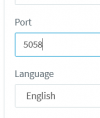
I imagine the IGMP issue was the problem initially but at some stage the config of the W60B in 3CX was modified:

1611894410031.png

Apparently the number changes if you scroll while hovering over the field. I must have done this at some point.

Thanks for the assistance.

A little bit of feedback: that field scrolling functionality seems unnecessary :p
 
Glad you got it resolved. I'm pretty sure the field scrolling is a browser or accessibility function, or maybe a mouse enhancement. Highlighting the field and using the scroll wheel under W10 doesn't change the value for me.
 
  • Like
Reactions: JohnS_3CX
Maybe a combination of the field type and Firefox? I don't even need to highlight the field.
 
Yeah, doesn't happen in Chrome :rolleyes:
 
Glad to hear this was resolved. Yes, it does not happen in Chrome, it's a Firefox thing and only if you click inside of a field first (highlights as blue to inform you it's active).
 
Status
Not open for further replies.

Members Online Now

No members online now.

Forum statistics

Threads
111,831
Messages
589,277
Members
164,660
Latest member
RJenkinsROCK