Solved Yealink W60B

Status
Not open for further replies.

Anton00

Free User
Joined
Jun 30, 2022
Messages
16
Reaction score
1
Hello,

I can't make calls using Yealink W60B. The base was provisioned but the extension is still red in the management console. However, the handset shows the correct extension number.
I performed factory reset and provisioned the base again but it didn't help.
 
  • 3CX Version, Standard Annual 18.0 (Build 965)
  • Server OS, Windows Server 2019
  • Is the 3CX Server Hosted and where? On-premises
  • IP Phone Make/Model/Firmware version, Yealink W60B firmware 77.85.0.25
  • Provisioning Method: STUN
  • Has the Firewall Checker passed: Other phones are working with the same settings
  • Are custom Phone Templates being used: no
 
Last edited by a moderator:
Done
All checks were passed.
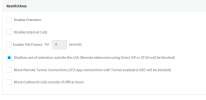
  • Edit your extension, under Options > Restrictions and disable "Disallow use of extension outside the LAN (Remote extensions using Direct SIP or STUN will be blocked)"
Done.
  • Edit your extension, under Options > Troubleshooting and enable "PBX Delivers Audio"
Done.
  • For each IP Phone installed at the same Remote Location, set a:
  • Unique SIP port not shared with any other phone
Done.
- Unique range of RTP ports, not overlapping with any other phones
Done.
- Use our phone guides to see how to setup your specific model in Remote/RPS mode: https://www.3cx.com/sip-phones/
Done.

Remote Location Configuration:
  • Assign a static IP to each phone (or use DHCP reservation)
Done.
  • Port forward each phone's unique SIP port and RTP port range on the Remote Location Firewall
Done.
  • Disable any SIP ALG or SIP Helpers running on the Remote Location Firewall
SIP ALG and Firewall were disabled.


The base is still not working. The extension is red. By the way, I can't login to base web interface using login/password from Extension -> Phone Provisioning tab.
 
Last edited by a moderator:
Question, have you assigned extensions to the setup in 3cx ?

Step 9 - https://www.3cx.com/sip-phones/yealink-dect-w52p/ (note you do not have to setup any phones, just enter the extension number)

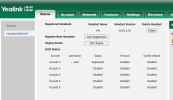
If you log into the base unit, can you see the extension number assigned,

1658331110678.png

For the extension have you untick 'disallow use of extension outside the lan' ?

1658330984019.png

Click the blacklist, and remove any entries
 
Question, have you assigned extensions to the setup in 3cx ?
Yes, I have done. I said before that the handset shows correct extension number.

If you log into the base unit, can you see the extension number assigned,
I can't login to the base unit because login and password are incorrect.
For the extension have you untick 'disallow use of extension outside the lan' ?
Yes, of course.
 
The password for the base unit, is the Device Web Page Password under the FXS/DECT details
 
If you log into the base unit, can you see the extension number assigned,
Yes, I see the correct extension number in the 'Handset Name' column.
 
I deleted the extension and DECT phone in the management console and provisioned the base from scratch. The provisioning was successful but the extension is still red.
 
At the phones site, do you have a ISP modem, and after that your firewall with the forwarded ports?

Perhaps you did everything correctly on your personal firewall, but the ISP modem after the firewall may be blocking SIP or have ALG enabled?

1. Find out about the modem and see if there is something you can do

2. Alternatively you will have to get a capture of the W60B and see what happens when it tries to contact your 3CX server. This is the closest you can get to learning what exactly happened here. This video will help:
https://www.3cx.com/3cxacademy/videos/advanced/basic-troubleshooting/

3. Finally if there is nothing you can do, try installing the 3CX SBC on a local PC at the phones site, and and see if you can connect your W60B successfully - as a test to confirm the base is healthy.
 
The problem was resolved. I used SBC method instead of STUN. I believe that ISP filtered 3CX packets.
 
  • Like
Reactions: JohnS_3CX
Status
Not open for further replies.

Members Online Now

No members online now.

Forum statistics

Threads
111,831
Messages
589,277
Members
164,660
Latest member
RJenkinsROCK