


- Joined
- Aug 15, 2023
- Messages
- 7
- Reaction score
- 1
I am trying to set up Yealink W90B and I can't seem to find the same menu options from step 5 and 6 of the DECT Phones instructions.
https://www.3cx.com/sip-phones/yealink-dect-phones/
from step 5, I don't have “Settings” > “Auto Provision” > “Server URL” to be bale to put the provision URL.
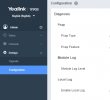
I also don't see this section on my side after I put the DECT Manager's IP, is this the same IP for the web interface of the yealink W90B?
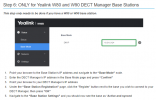
https://www.3cx.com/sip-phones/yealink-dect-phones/
from step 5, I don't have “Settings” > “Auto Provision” > “Server URL” to be bale to put the provision URL.
I also don't see this section on my side after I put the DECT Manager's IP, is this the same IP for the web interface of the yealink W90B?


