Yealink won't provision - Fanvil will???

philiprlittle

Silver Partner
Joined
Dec 15, 2021
Messages
24
Reaction score
4
Does anybody know why I'm having so much trouble with Yealink phones at the moment? I add the mac address and model, use onsite SBC and the phone - regardless of the model always asks for old password new password.

Fanvil on the other hand work immediately and it doesnt matter if you're using an SBC or itself as a router phone.

It has to be me surely??? If it's not, it's Fanvil for me from now on, I've wasted too many days on this now.
 
Just skip the password or wait for some time. It should provision without problems. Are this phones supported and with the actual 3cx firmware?
 
  • Like
Reactions: KyriacosS_3CX
Hi - You can't skip the password, it stays there without redirecting.

The phone should provision and then either manually update the firmware or, if selected, 3CX shoul update all new phones automatically.

These are meant to be zero touch provisioning.
 
Correct you can't skip the password, it could take up to 1 minute before the Yealink will start the update is what I have experienced lately. As extra info: I had some phones that were used in an other PBX and the factory reset did not clear all fields. Try loging in to the phone with default credentials and check the provisioning server.
 
Should be noted that Update 8 includes the option to do automatic firmware updates for new phones on their initial provisioning - provided the phone is on a firmware that can jump directly to the offered one of course.
 
Hello,

philiprlittle, is this with the 'Netherlands' firmware of Yealink ( x.x.188.x ) ?

Ronaldvdv, yes, I have seen this as well, it used to be a lot easy'er :)

Paulo
 
  • Like
Reactions: Ronaldvdv
Hello all. This is a brand new out of the box Yealink T44U - this should be a zero touch provision - Yealink say it is.

That's my sort of point. I don't really want to unbox 20 handsets and manually update the firmware and past a privisioning link in from 3CX.

There must be something that I am doing wrong? I can send out 20 Fanvil phones and they'll all light up and work without anyone neading to go to site. It has to be somehting that I'm missing somewhere. If not, Yealink is no good for our business moving forward.
 
Can you confirm the version number of the firmware? Did you try more than one phone? How long did you wait for it to see if it moves on from the password screen?
 
Start with the basics:

1. Ensure the RPS entry is delivered (Event Log), and that the MAC is indeed the one written on the phone for its LAN interface (not WiFi)
1776347097673.png
Important: Or you may see an error in its place, telling you why the MAC was rejected.

2. Factory reset and connect to LAN (not WiFi). The phone will need a couple of minutes to contact Yealink and get its provisioning URL.

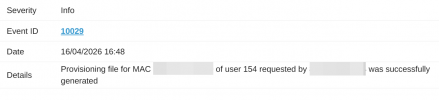
3. If the phone actually pulls the config file, you will see it (Event Log)
1776347344942.png

Just filter by MAC, and see what happened before you do anything else. Seeing the password screen, just means the phone is most likely factory reset and showing the initial screen that you would expect to see in this case.
 
Okay - I've spent most of the day with Yealink and I think we have made ground and gotten to the bottom of it.
Once you put a mac address in and 3CX fires out a RPS request from Yealink, the request is supposed to be live for 14 days - it turns out that the request expires and is cancelled after 20 minutes.

If you're provisioning a phone there and then, it is fine. If you're doing 20 the day before, they won't provision.
 
  • Like
Reactions: Colby D.
Hi Philip,

That 20 minute remark drew my attention as it sounded very peculiar.
We've found the glitch and sorted it out so you should be all set now.
I can no longer replicate here, let me know if all is well on your end too now when you add your next phones.
 
That's great news - thanks John.

I can't believe there hasn't been more a song and dance about it. Fingers crossed the glitch fix has sorted it.
 
Hi Philip,

That 20 minute remark drew my attention as it sounded very peculiar.
We've found the glitch and sorted it out so you should be all set now.
I can no longer replicate here, let me know if all is well on your end too now when you add your next phones.
Hello John,

Can you let me know if the RPS 20 timeout glitch is now fully resolved?

Thanks,
Philip
 
Hi Philip,

Yes I can confirm as of last we spoke, anything added from that point onward should still be up for the full 2 weeks (including some of my own test PBX entries for verification).

Have you had any issues to report since?
 
Hi Philip,

Yes I can confirm as of last we spoke, anything added from that point onward should still be up for the full 2 weeks (including some of my own test PBX entries for verification).

Have you had any issues to report since?
Great thank you. Nothing to report, but I'm provisioning soem this morning.

Thanks,
Philip
 

Members Online Now

No members online now.

Forum statistics

Threads
111,831
Messages
589,277
Members
164,660
Latest member
RJenkinsROCK