- Joined
- Jul 12, 2018
- Messages
- 7
- Reaction score
- 1
I followed all instructions from
, but as soon as i click on the "Authorise" button on the Windows softphone i receive an "unable to connect" error.
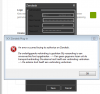
In Zendesk i created the OAth token with the correct name and identifier and agents are able to login using username and password (also with the API).
With my previous 3CX test setup everything worked without problems, with the same settings.
The installed Zendesk CRM integration is "Zendesk.zip" verion 916, we are using 3CX Pro 15.5.
Am i doeing something wrong?
Code:
https://www.3cx.com/user-manual/zendesk-crm-integration/ - document no longer existsIn Zendesk i created the OAth token with the correct name and identifier and agents are able to login using username and password (also with the API).
With my previous 3CX test setup everything worked without problems, with the same settings.
The installed Zendesk CRM integration is "Zendesk.zip" verion 916, we are using 3CX Pro 15.5.
Am i doeing something wrong?
Last edited by a moderator: